
Chapter 03
This guide is written primarily for use by those persons who need an in depth understanding of the programs generated by MAGEC. Copies of this guide should be distributed to:
This guide is to be used as a reference book. You will usually use this chapter in conjunction with one of the other chapters, such as:
This book contains a complete example of an online Cobol program generated using MAGEC's MMPCREAT process. The sample MMP (MMP stands for MAGEC Message Processor) was produced without any Customization. To produce this MMP the Developer did the following things:
1. Defined the VAC and SIF files to the repository (DCL, KYF, ELT, and DIT definitions)
2. Generated copybooks named VAC01-C and SIF01-C using DITGEN
3. Added a Screen Header (via SHDADD) record for MSK# 600
4. Added an MMP Header (via MMPADD) record for MMP# 600
5. Painted the Screen using the Auto-Paint and the MSKDEF Function
6. Executed MSKCRE (PF10 from MSKDEF screen)
7. Executed MMPCREAT (batch)In most cases when you are developing new applications like this the first two steps above will already have been done, possibly by the Database Administrator.
You can review the specifications for Mask 600 and for the two Data Classes to see all of the input used to create this MMP. The keys to both files are the Employee number (9 digits). This MMP is the one generated as the first tutorial project in the "Application Developer" tutorial.
Feel free to experiment with the VAC . . . Functions since they are there for you to "play" with.
If you would like to see all the specifications used to create this sample application you may see them online. Enter:
SHDSEE 600 To see the Screen Header.
MMPSEE 600 To see the MMP Header.
MSKDEF 600 To see the "Screen Painting".To see the database definitions and Element copybook enter:
DCLSEE VAC To see the Data Class profile.
KYFSEE VACK1 To see the Key profile.
ELTSEE VAC01 To see the Element profile.
LBRSEE VAC01-C To see the Copybook.
RULSEE VAC01 To see the Business Rule for Element VAC01.You could do similar commands to the above ones for the SIF Data Class, if you wished.
The example MMP will process nine Functions to provide file update, inquiry, browse, and search as well as data entry to the VAC file. It will access the SIF file read-only, since it merely wishes to join it in order to get the employee's name for display on the screen. Through Customization the Developer might add any number of additional Functions, modify any of the "standard set of nine" Functions, or even delete some of them. This book will concentrate on how the standard, un-customized MMP's work. In the analysis of the generated Cobol code we will see, however, the pre-determined Customization "insertion points" and we will give a brief explanation of each of them as we go.
The standard nine Functions are named using six-character Function Codes. The standard prefix (first three characters) of the Function Codes is the primary Data Class Name, in this example: VAC. The Function Codes for this example depict the standard suffixes, they are:
VACADD — add a record
VACCHG — change a record
VACDEL — delete a record
VACSEE — see a record
VACNXT — see the next (or previous) record
VACDUP — duplicate a record
VACLOC — locate a record (generic browse)
VACSCN — scan for records using a Character Mask
VACFND — find records containing a Search ArgumentMost of these Functions are two-phase Functions, that means that the Operator must do at least two transmissions in order to complete a given operation. For instance; in order to change a record the Operator must:
1. Enter VACCHG followed by the key value of the record to be changed, then press ENTER. The specified record will be displayed.
2. Overkey the fields to be altered on the display and press ENTER. The record will be updated.The two phases described above for the "CHG Function" are called:
1. New Transaction mode
2. Continuation modeThe generated MMP contains a one-byte indicator named MMP-NEW-TRANSACTION which is set near the beginning of processing for all of the standard Functions to indicate whether it is in New Transaction Mode or in Continuation Mode. The status of this indicator, along with the Function Code, controls all the logic of the MMP thereafter.
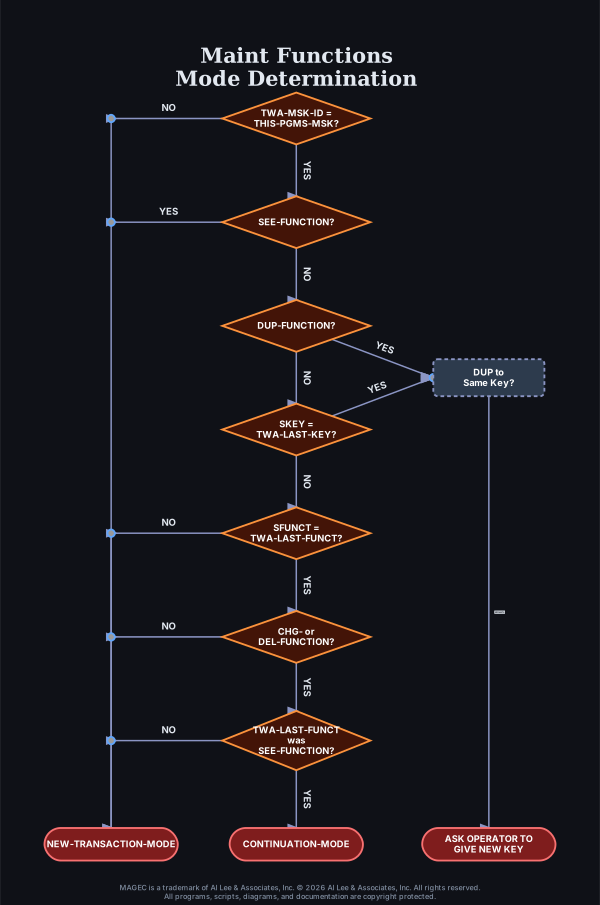
The determination of whether the MMP is in New Transaction Mode or Continuation Mode is made based upon comparisons between the Function Code and Key Value which is sent from the Operator to the MMP versus the Function Code and Key Value which was last sent from the MMP to the Operator, to see whether they have been changed by him/her.
These comparisons are made between:
Note: Refer to 📋 Appendix A and 📋 Appendix B of this section (Analysis of the Generated MMP) for logic diagrams of the determination of New Transaction or Continuation mode.
The MMP includes a standard routine for Normalizing the Operator's Key entry. That means that the Operator may enter the Key Value into the SKEY field on the top line of the screen in an abbreviated format and the MMP will transform it into the "Normalized" format necessary for accessing the file(s). File keys can be made up of up to five component fields which may be alphanumeric, numeric, packed, binary, and any combinations.
For instance, the Operator might enter a command of:
xxxxxx JOHN/23 to access a record having a key value of:
JOHNbbbbbbbbbbb023 where the key to this particular file consists of a 15-character (alphanumeric) Name followed by a 3-digit Number.The Normalize Key routine in the MMP accepts the Operator's input and produces the Normalized Key value from it. It also does editing to verify that numeric data is in fact numeric and that the Operator did not enter too few or too many characters or digits. The Normalize Key routine is controlled by parameters from the KYF file.
The nine standard Functions are divided into two categories:
The MMP contains two separate "Mainlines" for the two categories of Functions. It determines, at the very top of its logic, which type is being done and goes to the appropriate Mainline for it. Within the Mainline it determines which of the Functions is being done and whether it is in New Transaction Mode or Continuation Mode. Next we will describe briefly the general processing logic of each of the various combinations of Function and Mode.
1. Edit and Normalize the key value entered. If an error is found, exit with the INVALID KEY message.
2. Try to read the file using the Normalized key value. If match found display the record and exit with DUPLICATE message.
3. "Blank" the screen by filling the enterable fields with all Underscores and exit with the ENTER DATA TO BE ADDED message.
4. Exit.
1. Edit and Normalize the key value. If an error is found exit with the INVALID KEY message.
2. Try again to read file using Normalized key, if match found display the record and exit with the DUPLICATE message.
3. Edit data in all screen fields. If error found, set FATAL-ERR flag and ERROR-NUMBER(s) and exit
4. Initialize record Element area for add, move screen data to it.
5. Add new record.
6. If add was successful issue DATA ADDED message, else issue the DB ERROR message.
7. Exit.
1. Edit and Normalize the key value. If error found issue the INVALID KEY message and exit.
2. Read file using Normalized key. If NOT-FOUND issue NOT FOUND message and Blank screen with Underscores and exit.
3. Save the Audit Stamp (if there is one).
4. Fill the screen with data from the record.
5. Exit.
1. Edit and Normalize the key value. If error found, issue the INVALID KEY message and exit.
2. Read the record for update. If NOT-FOUND, issue the NOT FOUND message and exit.
3. Compare Audit Stamp to Saved Audit Stamp (if this Data Class has an Audit Stamp). If altered, issue the UPDATED BY ANOTHER TASK message and exit.
4. Edit the screen data. If error found, set FATAL-ERR and ERROR NUMBER(s) and exit.
5. Move screen data to record Element area.
6. Update the file record.
7. If update was successsful, issue the DATA UPDATED message, otherwise issue the DB ERROR message.
8. Exit.
1. Edit and Normalize the key value. If error found issue the INVALID KEY message and exit.
2. Read file using Normalized key. If NOT-FOUND, issue NOT FOUND message and Blank screen with Underscores and exit.
3. Save the Audit Stamp (if there is one).
4. Fill the screen with data from the record.
5. Issue PRESS ENTER TO DELETE message.
6. Exit.
1. Edit and Normalize the key value. If error found issue the INVALID KEY message and exit.
2. Read the record for update. If NOT-FOUND, issue NOT FOUND message and exit.
3. Compare Audit Stamp to Saved Audit Stamp (if this Data Class has an Audit Stamp). If altered, issue UPDATED BY ANOTHER TASK message and exit.
4. Edit for circumstances which would preclude deletion. If found, set FATAL-ERR and ERROR NUMBER and exit. This allows you to protect the Referential Integrity of your database when "parent" records are to be deleted by ensuring that no "children" will be left on file without a parent.
5. Delete the file record.
6. If delete was successsful, issue DATA DELETED message, otherwise issue the DB ERROR message.
7. Exit.
1. Edit and Normalize the key value. If error found issue the INVALID KEY message and exit.
2. Read file using Normalized key. If NOT-FOUND issue NOT FOUND message and Blank screen with Underscores and exit.
3. Save the Audit Stamp (if there is one).
4. Fill the screen with data from the record.
5. Exit.There is no Continuation Mode for a SEE Function; however, since the New Transaction Mode for a SEE Function is identical to the New Transaction Mode for CHG and DEL, the SEE Function can serve as the first phase for them. If the Operator changes the suffix of the Function Code from SEE to CHG or DEL then the MMP will go into Continuation Mode for the Change or Delete. This is true only if the Operator does not alter the Key Value. If the Key value is changed then the MMP will go into New Transaction Mode for the Change or Delete Function.
The DUP Function has no New Transaction Mode. The SEE Function serves as the New Transaction Mode for the DUP. If the Operator alters the Function Code suffix from SEE to DUP and also does alter the Key Value then the MMP will go into Continuation Mode for the DUP Function.
The NXT Function has no New Transaction Mode either. The SEE Function also serves as its New Transaction Mode. If the Operator alters the Function Code suffix from SEE to NXT and does not change the key value, the MMP will go into the Continuation Mode for the NXT Function. If the key value is altered, the PRIOR FUNCTION WAS NOT A SEE message will be issued.
There is no New Transaction Mode for a NXT Function. The SEE Function serves as its New Transaction Mode. The NXT Function must be preceeded by a successful SEE (not NOT-FOUND). The Operator must alter the Function Code suffix from SEE to NXT and not alter the key value. The MMP will then go into the Continuation Mode for the NXT Function. Pressing PF8 (page forward) or PF7 (page backward) automatically changes the Function Code suffix to NXT.
1. Restore the MAGECIO Request Area from the saved area so that it is the same as after the last READ was done.
2. Set the MAGECIO command to REDNX (read next) and issue the MAGECIO Request.
3. If NOT FOUND (end of data), move END OF DATA message and "Blank" the screen with Underscores and exit.
4. Fill in the screen with data from the record.
5. Save MAGECIO Request Area.
6. Exit.There is no New Transaction Mode for the DUP Function, the SEE Function serves as its New Transaction phase. The Operator first must do a SEE Function and must have successfully found an item (not NOT-FOUND). Then the Operator changes the Function Code to the DUP Function by altering the last three characters to "DUP" and also alters the key value to the desired new key to be added. He/She may also alter any displayed data on the screen at the same time. Then He/She presses ENTER, the resulting transaction will be a DUP Function in Continuation mode.
1. Internally alter the Function Code suffix to ADD.
2. Process the transaction as an ADD Function, Continuation Mode.
1. Set NUMBER-OF-RECORDS to 16.
2. Normalize the entered key value and set the key name in the MAGECIO Request Area.
3. Position generically (LOCKY) using the Normalized key value.
4. If NOT-FOUND (end of data), move END OF DATA message to SCOMPL and to screen body and exit.
5. Read first record (REDLE). If NOT-FOUND, set DB ERROR message and exit, otherwise go to Step 7 below.
6. Read next record (REDNX), if NOT-FOUND, move END OF DATA message to SCOMPL and exit.
7. Build a display line from record data and move into screen.
8. If screen is full (determined by NUMBER-OF-RECORDS), move PF KEY DIRECTIONS message into SCOMPL and exit.
9. Go back to Step 6 above.
1. Set NUMBER-OF-RECORDS to 16.
2. Continue processing starting at Step 6 for New Transaction Mode above.
1. Set NUMBER-OF-RECORDS to 16.
2. If Character Mask is "virgin", issue ENTER SELECTION MASK message and force the next transaction to also be a New Transaction Mode, exit.
3. Normalize the entered key value and set the key name in the MAGECIO Request Area.
4. Position generically (LOCKY) using the Normalized key value.
5. If NOT-FOUND (end of data), move END OF DATA message to SCOMPL and to screen body and exit.
6. Read first record (REDLE). If NOT-FOUND, set DB ERROR message and exit, otherwise go to Step 9 below.
7. If number of reads has reached the SCAN-LIMIT, simulate that the screen is full and go to Step 11 below.
8. Read next record (REDNX), if NOT-FOUND, move END OF DATA message to SCOMPL and exit.
9. Build display line from record data and compare to Selection Mask, if not a "hit", go to Step 7 above.
10. Move the display line into the screen.
11. If screen is full (determined by NUMBER-OF-RECORDS), move PF KEY DIRECTIONS message into SCOMPL and exit.
12. Go back to Step 7 above.
1. Set NUMBER-OF-RECORDS to 16.
2. Continue processing at Step 7 above in New Transaction Mode.
1. Set NUMBER-OF-RECORDS to 16.
2. If Search Argument is null, issue ENTER SEARCH ARGUMENT message and force the next transaction to also be a New Transaction Mode, exit.
3. Normalize the entered key value and set the key name in the MAGECIO Request Area.
4. Position into the file generically (LOCKY) using the Normalized key value.
5. If NOT-FOUND (end of data), move END OF DATA message to SCOMPL and to screen body and exit.
6. Read first record (REDLE). If NOT-FOUND, set DB ERROR message and exit, otherwise go to Step 9 below.
7. If number of reads has reached SCAN-LIMIT, simulate that the screen is full and go to Step 11 below.
8. Read next record (REDNX). If NOT-FOUND, move END OF DATA message to SCOMPL and exit.
9. Build display line from record data and compare to Search Argument(s), if not a "hit", go to Step 7 above.
10. Move the display line into the screen.
11. If screen is full (determined by NUMBER-OF-RECORDS), move PF KEY DIRECTIONS into SCOMPL and exit.
12. Go back to Step 7 above.
1. Set NUMBER-OF-RECORDS to 16.
2. Continue processing at Step 7 above in New Transaction Mode.The MMP operates as a subordinate program to the MAGEC Control Program. Whenever an Operator makes an entry and presses a transmit key to send the message to the CPU, the message is passed to the MAGEC Control Program (MAGECCP). MAGECCP accepts the incoming message and formats it into the TWA-MSK-AREA where the Mask Copybook defines it.
MAGECCP performs the Automatic Edits and Security Validation and then passes control to the Cobol MMP -- if the Operator is properly authorized. The MMP receives the message in the standard MAGEC Masking format and does not concern itself with the mechanics of reading and writing to the terminal or handling the variable incoming and outgoing formats. The MMP is actually portable, it can be executed in any MAGEC-supported environment. That includes MVS/CICS, VSE/CICS, Westi, VM/CMS (with or without VM-CICS), and PC and PS/2 environments using MS-DOS, PC-DOS, or OS/2, and LAN's.
SInce all interface with the environmnet is handled by the MAGECCP program, the individual MMP's need not be aware of the specifics of that environment. This enables the same MMP to operate in any supported enviroment with no program changes. On a network the same MMP can be executed in character mode and in GUI (Graphical User Interface) mode simultaneously. That is because the screen formatting and decoding is done externally to the MMP itself.
After receiving the formatted, edited, incoming message, the MMP does its processing. When it is ready to send the message back to the Operator it just exits, returning control back to MAGECCP.
MAGECCP checks whether the FATAL-ERR flag has been set indicating that errors were detected by either the Automatic Editing or by the Business Rule processing, or by the MMP's Custom editing. It sets the appropriate Error Messages (from the ERR file) into the screen area if so. It then performs a compression routine to optimize the message transmission and reformat it into the proper outgoing 3270, or other, format and then sends it to the Operator's terminal.
The work of the MMP is greatly simplified because it is relieved of the burdens of handling terminal message peculiarities and because all the needed resources are gathered together and passed to it in the TWA area. If the Operator is not authorized to do the Function he/she is attempting, then the MMP does not even receive control, a Security Violation message is sent to the Operator instead.
      ID DIVISION.
       PROGRAM-ID.  MMP600.
      ***                         VAC  FILE MAINTENANCE AND BROWSE.
       AUTHOR.  YOUR.NAME
       INSTALLATION.  MAGEC.GENERATED.MMP
       DATE-COMPILED.  06/01/25-13:00:08.
      *REMARKS.
      *************************************************
      *    THIS MMP GENERATED BY                      *
      *        MAGEC MMPCRE - A PROPRIETARY PRODUCT   *
      *        OF AL LEE & ASSOCIATES, INC.           *
      *        (214) 202-4965                         *
      *        THIS PROGRAM WAS CREATED, USING SHD    *
      *        NUMBER (MSK) 600,ON 06/01/25 AT        *
      *        13:00:08 TO USE THE CICS       MONITOR.*
      *        "COPY BOOKS" ARE TO BE EXPANDED        *
      *        FROM THE MAGEC   LIBRARY WHEN COMPILED.*
      *                                               *
      *                                               *
      *    - - - GENERATED USING 'MODELMMP' - - -     *
      *    IT PROVIDES UPDATE AND DISPLAY FUNCTIONS   *
      *    AND BROWSES THE DATA CLASS  VAC             *
      *                                               *
      *    IT WILL PRODUCE A HARDCOPY OF THE SCREEN   *
      *    OR BROWSE LIST IF THE OPERATOR PRESSES     *
      *    THE PF13 KEY.                               *
      *                                               *
      *                                               *
      *    BROWSES MAY BE DONE IN SEQUENCE BY:        *
      *        VACK1 - Employee# (9-digits)           *
   * * *   DEFAULT ALGORITHM %REMARKS          STARTS HERE
   * * *   DEFAULT ALGORITHM %REMARKS           ENDS HERE
      *************************************************
The Identification Division of the generated MMP is largely remarks. It gives an audit trail of what parameters were used into the MMPCREAT Job Stream and when the MMP was generated and Compiled. The insertion point %REMARKS is where you may insert your own comments to be generated into the MMP.
      ENVIRONMENT DIVISION.

      CONFIGURATION SECTION.
      SOURCE-COMPUTER.  IBM-370.
      OBJECT-COMPUTER.  IBM-370.
      ****************************************************************

      *                                                              *
      *     NO ADDITIONAL  CODING IS DONE IN THIS DIVISION FOR MMP'S  *
      *                                                              *
      ****************************************************************
The Environment Division contains no coding for online MMP's and you may not add any coding of your own since there is no insertion point provided.
      DATA DIVISION.
   * * *   DEFAULT ALGORITHM %SCHEMA          STARTS HERE
      * * *  NO STANDARD DEFAULT CODE FOR THIS INSERTION POINT  * * *
   * * *   DEFAULT ALGORITHM %SCHEMA            ENDS HERE
      WORKING-STORAGE SECTION.
           SKIP2
       01  CORE-MARK.
           SKIP2
      ****************************************************************

      *                                                              *
      *     THIS AREA IS GENERATED TO PROVIDE AN ID FOR EASIER       *
      *     LOCATION IN CORE DUMPS AND TO PROVIDE CONSTANTS FOR      *
      *     MMP, MSK, AND ELEMENT NAMES AND THE MASTER-KEY NAME.     *
      *                                                              *
      ****************************************************************

           SKIP2
           03 MMP-LIT              PIC XXX VALUE 'MMP'.
           03 THIS-MMP             PIC XXX VALUE  '600'.
           03 DATE-TIME-GENERATED   PIC X(18) VALUE  '06/01/25-13:00:08'.
           03 FILLER                REDEFINES DATE-TIME-GENERATED.
              05 DATE-GENERATED     PIC X(9).
              05 TIME-GENERATED     PIC X(9).
           03 MSK-CMD              PIC XXX VALUE 'MSK'.
           03 THIS-PGMS-MSK        PIC XXX VALUE  '600'.
           03 COMMON-LOC-MSK       PIC XXX VALUE '652'.
          03 COMMON-POP-MSK      PIC XXX VALUE '6PU'.
           03 FILLER               PIC X(32) VALUE
                'VAC MAINT/LOCAT'.
           03 MASTER-KEY-NAME          PIC X(5) VALUE  'VACK1'.
           03 FILLER  REDEFINES  MASTER-KEY-NAME.
               05  FILLER              PIC X(4).
               05  MASTER-KEY-NO       PIC X.
           03 THIS-PGMS-ELEMENTS.
               05 ELT-01          PIC X(6) VALUE 'VAC01 '.
               05 FILLER          PIC X(6) VALUE '      '.
      * * *  BELOW IS FOR SPOOLER
       01  SPOOL-ERR-MSG.
           03  FILLER              PIC X(06) VALUE 'ERROR '.
           03  SPOOL-ERR-COD       PIC X VALUE SPACE.
           03  FILLER              PIC X(20) VALUE
           ' FROM SPOOL-SUB ON '.
           03  SPOOL-ERR-CMD       PIC X(05) VALUE SPACE.
           03 FILLER               PIC X(12) VALUE ' FOR REPORT '.
           03  SPOOL-ERR-RPT       PIC X(4)  VALUE SPACE.
           SKIP1
       01  WS-TEST-REPORT-MSG.
           03 FILLER               PIC X(18) VALUE
           '&& REPORT NUMBER'.
           03 WTR-REPORT-NO        PIC X(4) VALUE SPACE.
           03  FILLER              PIC X(20) VALUE
           ' GENERATED &&'.
           SKIP2
       01  PF-KEY-INSTRUCTIONS.
           03  FILLER                  PIC X(40) VALUE SPACE.
           03  FILLER                  PIC X(40) VALUE
*         'Press PF13 for Hardcopy'.
           03  FILLER                  PIC X(40) VALUE
*         ' You may Position the CURSOR on an item '.
           03  FILLER                  PIC X(40) VALUE
*         'and Press ENTER to "SEE" it'.
           03  PFK-BROWSE-DIR          PIC X(40) VALUE SPACE.
           03  FILLER                  PIC X(40) VALUE
*         'or Press PF4 to "CHG" it'.
The Working Storage section is used to contain literal constants only. The MMP never alters the data in Working Storage. Any fields which are used as work areas or as the target fields for MOVE's or COMPUTE's must be in the TWA in the Linkage Section. The exception to this rule is those cases in which the program will MOVE to a field in Working Storage and will then access it without ever exiting (to do an I/O, for example) in between. In a fully reentrant environment (see explanation below). the program should assume that Working Storage will be re-initialized when the program receives control back after having exited. If you have trouble understanding this concept, play it safe. Don't MOVE to Working Storage fields.
Reentrancy There are three(3) classes of programs in CICS (or any interactive transaction environment). First, there are 'non-reusable' programs. This class must be loaded fresh from the loadlibrary for every transaction--not very efficient for high-volume tasks. Second there are 'serially-reusable' programs. They can be reused for multiple transactions, for multiple users, but only one at a time. Third, there are 'reentrant' programs. These programs can be used by multiple transactions, for multiple users, without being reloaded from the loadlibrary and with a single copy loaded in memory. This is obviously the most efficient class of programs.
MAGEC MMP`s are generated to the standard for full reentrancy. To be reentrant, the program must NEVER modify any portion of itself so that it is always identical. If may only modify memory that is NOT a part of its code, such as fields in the Linkage Section. Please keep in mind that this means not only that the program must be identical each time it is entered at the top of the PROCEDURE DIVISION , but also whenever it is returned to after a link to a subroutine or an I/O event.
     * * * * * * * * * * * * * * * * * * * * * * * * * *
      *   THE FOLLOWING IS THE HEADING TO BE DISPLAYED  *
      *   ON THE 'TOP' LINE OF THE SCREEN...            *
      * * * * * * * * * * * * * * * * * * * * * * * * * *
      01  HDG-LINE                PIC X(80) VALUE
*         'Emp#        First Name      Last Name                 Hire D
*    -        'ate Earned Vacation'.
           SKIP2
       01  KEY-NO-EDIT-PARMS.
           03 FILLER PIC X(26) VALUE '10902N0900A               '.
           03  END-OF-KEY-PARMS.
               05  FILLER          PIC X VALUE HIGH-VALUES.
               05  FILLER          PIC X(25) VALUE ALL '0000A'.
       01  FILLER REDEFINES KEY-NO-EDIT-PARMS.
           03  KEY-NO-EDIT-PARM     OCCURS 2 TIMES.
               05  KEY-NO              PIC X.
               05  KEY-PARMS           PIC X(25).
       01  FILLER REDEFINES KEY-NO-EDIT-PARMS.
           03 FILLER               PIC X.
           03 KEY-LITERAL          OCCURS 5 TIMES.
              05 KEY-MAX-LGTH      PIC S99.
              05 KEY-MIN-LGTH      PIC S99.
              05 KEY-TYPE          PIC X.
The Heading Line is to be used on the Browse screens (LOC, SCN, and FND). It contains the Locate Heading literal provided by the Developer using the SCDLST, SCDCHG Functions online. If the Developer did not give any Locate Headings then MMPCREAT would have generated its own from the Cobol data names of the fields being displayed (with the standard Element-Name prefix stripped off).
The Key Editing Parms were generated from the definition for the key (VACK1) on the KYF file. They control the logic and processing of the Normalize-Key routines which edit and reformat the entered key into proper format to read the file with.
      01 WS-SHORT-LIST-PAGE-MSG
*         03 FILLER                          PIC X(3)  VALUE '(# '.
           03 WS-SL-THIS-ITEM                 PIC 99  VALUE ZERO.
*         03 FILLER                          PIC X(4)  VALUE ' of '.
           03 WS-SL-LAST-ITEM                 PIC 99  VALUE ZERO.
*         03 FILLER                          PIC X(3)  VALUE ' of'.
           03 WS-SHORT-LIST-HDG.
               05 FILLER                      PIC X(17)  VALUE
*                  ' Short List from '.
               05 WS-SL-SOURCE                PIC X(6)  VALUE SPACE.
*         03   FILLER                         PIC X(3) VALUE ' - '.
      01 WS-SHORT-LIST-SCOMPL.
           03  FILLER                            PIC  X(40)  VALUE
*                  'PF:  3=Esc/7=PgBk/9=PgFwd  ENTER=Select  '.
      01 WS-SHORT-LIST-INSTR                 PIC X(40)  VALUE
*                  'Press PF24 for Pop-Up Short-List      '.
      01 WS-NO-SHORT-LIST-AVAIL              PIC X(40)  VALUE
*                  '+++ No   POP-UP  Short-List  Available +++'.
       01  WS-DETACH-MSG                   PIC X(40) VALUE
*              'Press PF3 to DETach to prior screen    '.
       01  DISP-POP-TBL-AREA.
           03  WS-DISP-POP-SUB             PIC S9(4)  COMP.
           03  WS-LIN-FIL                  PIC S9(4)  COMP.
           03  WS-LIN-POINTER              PIC S9(4)  COMP.
           03  WS-FLD-DISCARD              PIC S9(4)  COMP.
               88  WS-NOSAVE-ATTR          VALUE +1.
           03  WS-DISP-POP-TBL    OCCURS 16 TIMES.
               05  WS-DISP-POP-STRT        PIC S9(4)  COMP.
               05  WS-DISP-POP-END         PIC S9(4)  COMP.
      * * *  BELOW IS FOR ESCAPING TO LOW-LEVEL MENU VIA PF3  * * *
      01 WS-ESC-PF3-SKEY.
          03 WS-EPF3-LAP                      PIC  99.
          03 FILLER                           PIC  X  VALUE  '/'.
          03 WS-EPF3-PREFIX                   PIC  XXX.
      02 WS-ESC-PF3-SFUNCT                    PIC  X(6) VALUE  '$$MENU'.
The "Short List" facility of MAGEC is a feature which enhances the power of the browses and queries. Whenever your operator does a LOC, SCN, or FND function the program saves the list of up-to sixteen (16) record id's (keys). If the operator cursor-selects one of the items from the screen display he will be transferred to the SEE or CHG function for that item. S/he can then press PF24 to request a pop-up window listing the saved id's and cursor-select another one of them, and so forth. This saves the operator from having to re-do the query in order to update or see several items which were found to meet the selection criteria. The work areas shown above are used by the pop-up window function which displays the short list.
A copybook is included (via -MAGECINC) into the Working Storage of each program in order to define constants for a variety of special characters which might be used by the program. Examples of some of these special characters are: HYPHEN, COLON, and SLASH. These characters have different hexadecimal values in ASCII and EBCDIC, therefore there are two versions of this copybook -- one for ASCII and one for EBCDIC. When the program is generated MAGEC inserts the appropriate copybook for your environment. If you do any customization using these characters, it is best that you reference theses constants rather than literals which you might code yourself. That helps to keep your code portable so that you can upload or download your application among various platforms (MVS, VSE, VM/CMS, PC, AS400, etc.) without being concerned with incorrect character translations which might result from the transfer hardware or software in use at your installation.
      01  CONSTANT-STORAGE.
           SKIP2
      ****************************************************************

     *     THESE AREAS ARE NOT INITIALIZED ON ENTRY                 *
      *     AS THEY ARE CONSTANT DATA NOT TO BE USED                 *
      *     AS RECEIVING FIELDS.                                     *
     ****************************************************************
          03 NOT-FOUND-LIT        PIC XX  VALUE '14'.
           03 91A                  PIC XXX VALUE '91A'.
           03 START-LIT            PIC X(5) VALUE 'START'.
           03 SPOOL-LIT            PIC X(5) VALUE 'SPOOL'.
           03 ENDIT-LIT            PIC X(5) VALUE 'ENDIT'.
           03 PRINTS-FUNCT         PIC X(6) VALUE 'PRINTS'.
           03 CLEAR-FUNCT          PIC X(6) VALUE 'CLEARS'.
           03 ATT-FUNCT.
              05  DET-FUNCT        PIC X(8) VALUE 'FTH652'.
           03 FTH-FUNCT.
               05 FTH-CMD          PIC X(3) VALUE 'FTH'.
               05 FUNCT-LIT        PIC X(5) VALUE 'FUNCT'.
           03 MSG-LIT              PIC X(3) VALUE 'MSG'.
           03 ADD-LIT              PIC X(3) VALUE 'ADD'.
           03 LOC-LIT              PIC X(3) VALUE 'LOC'.
           03 CHG-LIT              PIC X(3) VALUE 'CHG'.
           03 SEE-LIT              PIC X(3) VALUE 'SEE'.
          03 NXT-LIT             PIC X(3) VALUE 'NXT'.
           03 SCANS-LIT            PIC X(5) VALUE 'SCANS'.
           03 OR-LIT               PIC X(3) VALUE 'OR '.
           03 GA-LIT               PIC X(2) VALUE 'GA'.
           03 STK1-LIT             PIC X(4) VALUE 'STK1'.
           03 SYS-LIT              PIC X(3) VALUE 'SYS'.
           03 DET-LIT              PIC X(3) VALUE 'DET'.
           03 KEY-NAME-PREFIX      PIC X(4) VALUE  'VACK'.
           03 LOVALU               PIC X VALUE LOW-VALUES.
           03 HIVALU               PIC X VALUE HIGH-VALUES.
**********  Special Characters copybook included here
      * * * * * * * * * * * * * * * * * * * * * * * * * * *
      *    THE FOLLOWING ARE THE DESCRIPTIONS FOR THE     *
      *    VARIOUS DB KEYS FOR THE FILE.  ONE OF THESE    *
      *    IS DISPLAYED ON THE BOTTOM OF THE SCREEN FOR   *
      *    THE OPERATOR DEPENDING UPON WHICH KEY HE IS    *
      *      USING.                                       *
      *****************************************************
           03 SEQ-MSGS.
               05 SEQ-1-MSG          PIC X(40) VALUE
                    'KEY 1 = Employee# (9-digits)            '.
           05 BAD-SEQ-MSG            PIC X(40) VALUE
                    'KEY ? -- INVALID KEY TYPE ENTERED'.
           SKIP2
           03  FILLER   REDEFINES SEQ-MSGS.
               05  SEQ-MSG  OCCURS 2 TIMES.
                   07  FILLER        PIC X(4).
                   07  SEQ-MSG-NO    PIC X.
                   07  FILLER        PIC X(35).
The Sequence Messages above were generated from the KYF description for the key(s). They are displayed at the bottom of the Browse screens to tell the Operator what sequence the data is being displayed in. You can define up to nine (9) keys for a Data Class and have MMPCREAT handle them automatically as above. The VAC Data Class has only one key defined.
     ****************************************************************

     *    MAGEC017    COPY MEMBER                                   *
      *    MAGEC     ERROR MESSAGE LIST WITH MNEMONIC NAMES          *
     *    AND COMPLETION MESSAGES                                   *
     ****************************************************************

       01  ERR-MSG-LIST.
           03  FALL-THRU-ERROR                PIC X(3) VALUE '911'.
           03  MULTI-TASKS-UPDATING           PIC X(3) VALUE '998'.
           03 COMPLETION-MSGS.
               05 ADDED-MSG        PIC X(26) VALUE
*                                         'Data ADDED to Database'.
               05 UPDATED-MSG      PIC X(26) VALUE
*                                         'Data UPDATED on Database'.
               05 ENTER-TO-DEL-MSG PIC X(26) VALUE
*                                         'Press ENTER TO Delete'.
               05 DELETED-MSG      PIC X(26) VALUE
*                                         'Data DELETED from Database'.
               05 EOL-MSG          PIC X(40) VALUE
*                     'END OF LIST  --  PF5 Key = Page 1    '.
              05  EOL-BOT-MSG   PIC X(40) VALUE
*                   'END OF LIST  PF5=Restart/PF7=Backward'.
              05  EOL-TOP-MSG   PIC X(40) VALUE
*                   'TOP OF LIST PFf5=Restart/PF8=Forward
               05 EOF-MSG          PIC X(26) VALUE
*                                         'END OF DATA Reached'.
               05 NOT-FOUND-MSG    PIC X(26) VALUE
*                                         'NO DATA FOUND for key'.
               05 DUPLICATE-MSG    PIC X(26) VALUE
*                                         'DUPLICATE key found'.
               05 NEXT-PAG-MSG     PIC X(40) VALUE
*                     'PF8=Forward / PF7=Backward / PF5=Restart'.
               05  CONTINUE-MSG  REDEFINES NEXT-PAG-MSG  PIC X(40).
               05 DB-ERR-MSG       PIC X(26)  VALUE
*                                         'io ERROR has occurred'.
               05 PGM-ERR-MSG      PIC X(26)  VALUE
*                                         'PROGRAM ERROR '.
               05 INVALID-KEY-MSG  PIC X(40) VALUE
*                           'Invalid KEY FORMAT - Press PF1 for Help'.
               05 BAD-CUR-POS      PIC X(26) VALUE
*                                         'Cursor Badly Positioned'.
               05 GOIN-NOWHERE-MSG PIC X(40) VALUE
*                      '** You are going NOWHERE **'.
               05 DELETE-PENDING-MSG PIC X(26) VALUE
*                                         'DUP RECORD Pending Delete'.
               05 MSK-ERR-MSG      PIC X(40) VALUE
*                       'Error Retrieving   MSK600 -or- MSK652'.
               05 SEE-FIRST-MSG    PIC X(30) VALUE
*                                     'Prior function was not a "SEE"'.
               05 ENTER-KEY-MSG    PIC X(40) VALUE
*                           'Enter "KEY" info.  -or-  PF1 for HELP'.
               05 INVALID-FUNCT-MSG PIC X(40) VALUE
*                             'MMP600 illegally entered'.
               05 VARSTG-MSG       PIC X(40) VALUE
*                           '++ TWA area clobbered by I/O ++'.
               05 ENTER-DOTMSK-MSG PIC X(40) VALUE
*                       'Enter Selection mask  -or-  PF1 for HELP'.
               05 SHORT-SCAN-AREA-MSG  PIC X(40) VALUE
*                       '++ Search area smaller than argument ++'.
               05 ENTER-SEARCH-MSG.
                   07  FILLER          PIC X(13) VALUE SPACE.
                   07 FILLER           PIC X(80) VALUE
*         'Enter the character sequence you wish to search for on'.
                   07 FILLER           PIC X(160) VALUE
*         'the 2nd line of the screen beside "SEARCH ARG:"    '.
                   07 FILLER           PIC X(80) VALUE
*         'Then, you may use PARENTHESES to bracket the portion of'.
                   07 FILLER           PIC X(80) VALUE
*         'the display line in which you wish the search to be done.'.
                   07 FILLER           PIC X(80) VALUE
*         'Enter the PARENTHESES on the 4th line, below the heading.'.
                   07 FILLER           PIC X(80) VALUE
*         'Use ONLY ONE LEFT and/or ONE RIGHT parenthesis, NO OTHER'.
                   07 FILLER           PIC X(80) VALUE
*         'CHARACTERS on that line.  Omitting them results in a'.
                   07 FILLER           PIC X(80) VALUE
*         'search of the entire line.'.
                   07 ESM-ERRMSG       PIC X(84) VALUE LOW-VALUES.
                   07 FILLER           PIC X(80) VALUE SPACE.
                   07 FILLER           PIC X(80) VALUE
*         'You may Press PF1 for complete instructions.        '.
               05 CURSOR-POINTING-MSG.
                   07  FILLER          PIC S9(4) COMP VALUE +29.
                   07  CPM-ATTRIBUTE-1 PIC X VALUE '8'.
                   07  FILLER          PIC X(70) VALUE
*                 'The CURSOR is pointing to an error'.
                   07  FILLER          PIC S9(4) COMP VALUE +29.
                   07  CPM-ATTRIBUTE-2 PIC X VALUE '_'.
               05 SCAN-LIMIT-MSG.
                   07  FILLER          PIC S9(4) COMP VALUE +29.
                   07  SLM-ATTRIBUTE   PIC X VALUE '8'.
                   07  FILLER          PIC X(10) VALUE '     ++++ '.
                   07  SLM-CTR         PIC ZZZ,Z99 VALUE ZERO.
                   07  SLM-CTR-X REDEFINES SLM-CTR PIC X(7).
                   07  FILLER          PIC X(18) VALUE
*                                             ' Records Scanned, '.
                   07  SLM-DSP-CTR         PIC ZZZ,Z99 VALUE ZERO.
                   07  SLM-DSP-CTR-X REDEFINES SLM-DSP-CTR PIC X(7).
                   07  FILLER          PIC X(22) VALUE
*                                      ' Displayed so far - '.
*                 07  FILLER          PIC X(5) VALUE 'Page '.
                   07  SLM-PAGE        PIC ---9 VALUE ZERO.
                   07  FILLER          PIC X(6) VALUE ' ++++ '.
               05 OLD-MSK-COPYBOOK-MSG  PIC X(40) VALUE
*                      '-MSK600 Altered  --  ReCompile   MMP600-'.
               05 CHG-KEY-TO-DUP        PIC X(40) VALUE
*                    '++Enter NEW key value to DUP to++'.
               05 DID-YOU-INTEND-MSG    PIC X(40) VALUE
*                    '<==Did you intend to do a CHG?'.
               05 BROWSING-BACKWARDS    PIC X(40) VALUE
*                    '(Browsing  Backwards)'.
               05 BROWSING-FORWARDS     PIC X(40) VALUE
*                    '(Browsing  Forward)'.
               05 ENTER-DATA-TO-ADD     PIC X(40) VALUE
*                    'Enter data to be ADDED'.
               05 NXT-OR-PREV-MSG       PIC X(40) VALUE
*                    'PF8  =  forward  -- PF7  =  backwards'.
               05 FILE-CLOSED-MSG.
                  07  FILLER            PIC X(08) VALUE
*                      '<  File '.
                  07  FILE-CLOSED-NAME  PIC X(05) VALUE
*                      '?????'.
                  07  FILLER            PIC X(20) VALUE
*                      ' is not now open  >'.
               05 UNABLE-TO-RESUME-BR   PIC X(40) VALUE
*                      '******* Unable to Resume BROWSE ******* '.
               05 RE-ENTER-KEY-MSG      PIC X(80) VALUE
*                     '* * *  Enter a New KEY VALUE - or - Press ENTER K
*     -    'ey to RESTART Browse  * * *'.
The above is an expansion of the Member MAGEC017 which was included into the MMP. It contains all the messages which the MMP might move to the SCOMPL area (on the top line of the screen) and also some literals for some of the Error Numbers which might be used.
          03  SCAN-LIMIT          PIC S9(9) COMP SYNC VALUE +1000.
           03  WS-SEE-FUNCT        PIC X(6) VALUE  'VACSEE'.
           03  WS-CHG-FUNCT        PIC X(6) VALUE  'VACCHG'.
The Scan Limit is the maximum number of records which the MMP will read while searching for a Selection Mask or Search Argument in the SCN and FND Functions. If the MMP reads this many records without finding enough "hits" to fill the screen (NUMBER-OF-RECORDS) then it will exit and display what it has found so far. If the Operator hits ENTER again it will resume from where it left off, etc. The purpose for the Scan Limit is to prevent a transaction from "hogging" the system's resources to process one user's request.
WS-SEE-FUNCT is the Function Code that this MMP will transfer to when the Operator is using a Browse Function and Cursor-Selects a line of display and presses ENTER.
WS-CHG-FUNCT is the Function it will transfer to if the Operator Cursor-Selects and presses PF4 from a Browse screen.
     ****************************************************************

      *                                                              *
      *  -MAGECINC MAGEC003                                          *
      *    THIS MODULE IS A TABLE OF ALL FIELD ATTRIBUTES            *
      *    LEGAL TO MAGEC 327X SCREEN MANAGEMENT MASKING.            *
      *    THE DATA NAMES INDICATE THE ATTRIBUTE:                    *
      *         POSN 1-2 = AT (ATTRIBUTE)                            *
      *         POSN   3 = PROTECT/UNPROTECT                         *
      *         POSN   4 = ALPHA/NUMERIC                             *
      *         POSN   5 = DISPLAY/NON-DISPLAY                       *
      *         POSN   6 = REGULAR/HIGH INTENSITY                    *
      *         POSN   7 = DETECTABLE  NON/ATT/MODIFY                *
      *         POSN   8 = MDT ON/OFF                                *
      *                                                              *
      ****************************************************************

       01  ATTRIBUTES.
           03 ATUANRNF             PIC X VALUE  '<'.
           03  FILLER              PIC X(6) VALUE 'UANRNF'.
           03 ATUADRNF             PIC X VALUE ' '.
           03  FILLER              PIC X(6) VALUE 'UADRNF'.
           03 ATUADHNF             PIC X VALUE 'H'.
           03  FILLER              PIC X(6) VALUE 'UADHNF'.
           03 ATUANRNM             PIC X VALUE '('.
           03  FILLER              PIC X(6) VALUE 'UANRNM'.
           03 ATUADRNM             PIC X VALUE 'A'.
           03  FILLER              PIC X(6) VALUE 'UADRNM'.
           03 ATUADHNM             PIC X VALUE 'I'.
           03  FILLER              PIC X(6) VALUE 'UADHNM'.
           03 ATUNDRNF             PIC X VALUE '&'.
           03  FILLER              PIC X(6) VALUE 'UNDRNF'.
           03 ATUNDHNF             PIC X VALUE 'Q'.
           03  FILLER              PIC X(6) VALUE 'UNDHNF'.
           03 ATUNDRNM             PIC X VALUE 'J'.
           03  FILLER              PIC X(6) VALUE 'UNDRNM'.
           03 ATUNDHNM             PIC X VALUE 'R'.
           03  FILLER              PIC X(6) VALUE 'UNDHNM'.
           03 ATPANRNF             PIC X VALUE '%'.
           03  FILLER              PIC X(6) VALUE 'PANRNF'.
           03 ATPADRNF             PIC X VALUE '-'.
           03  FILLER              PIC X(6) VALUE 'PADRNF'.
           03 ATPADHNF             PIC X VALUE 'Y'
           03  FILLER              PIC X(6) VALUE 'PADHNF'.
           03 ATPANRNM             PIC X VALUE '_'.
           03  FILLER              PIC X(6) VALUE 'PANRNM'.
           03 ATPADRNM             PIC X VALUE '/'.
           03  FILLER              PIC X(6) VALUE 'PADRNM'.
           03 ATPADHNM             PIC X VALUE 'Z'.
           03  FILLER              PIC X(6) VALUE 'PADHNM'.
           03 ATSANRNF             PIC X VALUE '@'.
           03  FILLER              PIC X(6) VALUE 'SANRNF'.
           03 ATSADRNF             PIC X VALUE '0'.
           03  FILLER              PIC X(6) VALUE 'SADRNF'.
           03 ATSADHNF             PIC X VALUE '8'.
           03  FILLER              PIC X(6) VALUE 'SADHNF'.
           03 ATSANRNM             PIC X VALUE QUOTE.
           03  FILLER              PIC X(6) VALUE 'SANRNM'.
           03 ATSADRNM             PIC X VALUE '1'.
           03  FILLER              PIC X(6) VALUE 'SADRNM'.
           03 ATSADHNM             PIC X VALUE '9'.
           03  FILLER              PIC X(6) VALUE 'SADHNM'.
           03  END-ATTRIBUTES      PIC X(7) VALUE HIGH-VALUES.
       01  ATTRIBUTE-TABLE REDEFINES ATTRIBUTES.
           03  ATT-TABLE OCCURS 2 TIMES.
              05  ATT-BYTE         PIC X.
              05  ATT-NAME         PIC X(6).
       01  COLOR-ATTRIBUTES.
           03  DEFAULT-COLOR       PIC X VALUE LOW-VALUE.
           03  BLUE                PIC X VALUE '1'.
           03  RED                 PIC X VALUE '2'.
           03  PINK                PIC X VALUE '3'.
           03  GREEN               PIC X VALUE '4'.
           03  TURQUOISE           PIC X VALUE '5'.
           03  CYAN                PIC X VALUE '5'.
           03  YELLOW              PIC X VALUE '6'.
           03  WHITE               PIC X VALUE '7'.
           03  BLACK               PIC X VALUE '7'.
       01  EXT-HILITE-ATTRIBUTES.
           03  NO-HILITE           PIC X VALUE LOW-VALUE.
           03  BLINK               PIC X VALUE '1'.
           03  REVERSE-VIDEO       PIC X VALUE '2'.
           03  UNDERLINE           PIC X VALUE '4'.
The Member MAGEC003 is -MAGECINC'd into the MMP to provide mnemonic names for all the 3270 Attribute codes in case you want to alter the attribute for a screen field in your Customization. The MMP uses these to initialize all the Attributes at the beginning of processing also.
The table includes the one-byte Attribute codes followed by their six-character "names". The names are used in various MAGEC Development Functions, such as MSKDEF. You will likely never have a need to access the six-character names in this table, you will probably use only the one-byte codes. They have data-names that identify them as to which six-character name they represent.
     ****************************************************************

      *  -MAGECINC MAGEC004
      *    THIS MODULE IS A TABLE OF ALL ALLOWABLE DATABASE REQUEST  *
      *    COMMANDS FOR THE I/O MODULE.                              *
      *                                                              *
      *                                                              *
      ****************************************************************

        01  DB-COMMANDS.
           03 LOCKY                PIC X(5) VALUE 'LOCKY'.
           03 LOCKX                PIC X(5) VALUE 'LOCKX'.
           03 FSTAT                PIC X(5) VALUE 'FSTAT'.
           03 LOCNE                PIC X(5) VALUE 'LOCNE'.
           03 LOCNX                PIC X(5) VALUE 'LOCNX'.
           03 LOCNK                PIC X(5) VALUE 'LOCNK'.
           03 REDLE                PIC X(5) VALUE 'REDLE'.
           03 REDID                PIC X(5) VALUE 'REDID'.
           03 REDKY                PIC X(5) VALUE 'REDKY'.
           03 REDNE                PIC X(5) VALUE 'REDNE'.
           03 REDNX                PIC X(5) VALUE 'REDNX'.
           03 REDPR                PIC X(5) VALUE 'REDPR'.
           03 RDULE                PIC X(5) VALUE 'RDULE'.
           03 RDUID                PIC X(5) VALUE 'RDUID'.
           03 RDUKY                PIC X(5) VALUE 'RDUKY'.
           03 RDUNE                PIC X(5) VALUE 'RDUNE'.
           03 RDUNX                PIC X(5) VALUE 'RDUNX'.
           03 RELES                PIC X(5) VALUE 'RELES'.
           03 NOOPS                PIC X(5) VALUE 'NOOPS'.
           03 UPDAT                PIC X(5) VALUE 'UPDAT'.
           03 DELET                PIC X(5) VALUE 'DELET'.
           03 ADDIT                PIC X(5) VALUE 'ADDIT'.
           03 GETIT                PIC X(5) VALUE 'GETIT'.
           03 GSETL                PIC X(5) VALUE 'GSETL'.
           03 POST                PIC X(5) VALUE 'POST '.
           03 CLSFL                PIC X(5) VALUE 'CLSFL'.
           03 SET-READ-ONLY       PIC X(5) VALUE '*READ'.
           03 SET-FOR-UPDATE      PIC X(5) VALUE '*LOAD'.
           03 CLOSE-ALL           PIC X(5) VALUE '*CLSE'.
The MAGEC004 Member defines all the MAGECIO Commands. Remember that some of these are only valid for certain Access Methods. For example, REDPR is not supported for ISAM. Refer to the chapter titled "Database Administration" for more details.
      01  LOWER-CASE.
           05  LC-ALPHABET             PIC X(26)  VALUE
*             'abcdefghijklmnopqrstuvwxyz'.
           05  FILLER  REDEFINES  LC-ALPHABET.
               07 LOWER-CASE-A             PIC X.
               07 LOWER-CASE-B             PIC X.
               07 LOWER-CASE-C             PIC X.
               07 LOWER-CASE-D             PIC X.
               07 LOWER-CASE-E             PIC X.
               07 LOWER-CASE-F             PIC X.
               07 LOWER-CASE-G             PIC X.
               07 LOWER-CASE-H             PIC X.
               07 LOWER-CASE-I             PIC X.
               07 LOWER-CASE-J             PIC X.
               07 LOWER-CASE-K             PIC X.
               07 LOWER-CASE-L             PIC X.
               07 LOWER-CASE-M             PIC X.
               07 LOWER-CASE-N             PIC X.
               07 LOWER-CASE-O             PIC X.
               07 LOWER-CASE-P             PIC X.
               07 LOWER-CASE-Q             PIC X.
               07 LOWER-CASE-R             PIC X.
               07 LOWER-CASE-S             PIC X.
               07 LOWER-CASE-T             PIC X.
               07 LOWER-CASE-U             PIC X.
               07 LOWER-CASE-V             PIC X.
               07 LOWER-CASE-W             PIC X.
               07 LOWER-CASE-X             PIC X.
               07 LOWER-CASE-Y             PIC X.
               07 LOWER-CASE-Z             PIC X.
       01  UPPER-CASE.
           03  FILLER                      PIC X(26) VALUE
               'ABCDEFGHIJKLMNOPQRSTUVWXYZ'.
       01  ALPHABET-LITERALS  REDEFINES UPPER-CASE.
           03  A                           PIC X.
           03  B                           PIC X.
           03  C                           PIC X.
           03  D                           PIC X.
           03  E                           PIC X.
           03  F                           PIC X.
           03  G                           PIC X.
           03  H                           PIC X.
           03  I                           PIC X.
           03  J                           PIC X.
           03  K                           PIC X.
           03  L                           PIC X.
           03  M                           PIC X.
           03  N                           PIC X.
           03  O                           PIC X.
           03  P                           PIC X.
           03  Q                           PIC X.
           03  R                           PIC X.
           03  S                           PIC X.
           03  T                           PIC X.
           03  U                           PIC X.
           03  V                           PIC X.
           03  W                           PIC X.
           03  X                           PIC X.
           03  Y                           PIC X.
           03  Z                           PIC X.
      01 NUMBER-LITERALS.
         03 MINUS-ONE            PIC S9(4) COMP SYNC VALUE -1.
         03 ZEERO                PIC S9(4) COMP SYNC VALUE +0.
         03 ONE                  PIC S9(4) COMP SYNC VALUE +1.
     * * * a list of number constants is included into the MMP
     * * * by including (-MAGECINC) the member NUMBERS
     * * * This enables the program (and you) to reference these
     * * *  constants rather than literals -- constants appear in a
     * * * cross-reference, literals do not.
      01 HARDCOPY-SEPARATOR-1.
           03  FILLER                      PIC X(40) VALUE
           '                        M A G E C   H A '.
           03  FILLER                      PIC X(11) VALUE
           'R D C O P Y'.
       01  HARDCOPY-SEPARATOR-2.
           03  FILLER                      PIC X(8) VALUE 'REPORT #'.
           03  HS2-REPORT                  PIC X(4) VALUE ZEROS.
           03  FILLER                      PIC X(17) VALUE
           '   FROM TERMINAL '.
           03  HS2-TERMINAL                PIC X(4) VALUE SPACES.
           03  FILLER                      PIC X(13) VALUE
           '        DATE '.
           03  HS2-DATE.
               05  HS2-DATE-MM             PIC XX.
               05  FILLER                  PIC X VALUE '/'.
               05  HS2-DATE-DD             PIC XX.
               05  FILLER                  PIC X VALUE '/'.
               05  HS2-DATE-YY             PIC XX.
           03  FILLER                      PIC X(8) VALUE
           '   TIME '.
           03  HS2-TIME.
               05  HS2-TIME-HH             PIC XX.
               05  FILLER                  PIC X VALUE '.'.
               05  HS2-TIME-MM             PIC XX.
               05  FILLER                  PIC X VALUE '.'.
               05  HS2-TIME-SS             PIC XX.
       01  HARDCOPY-SEPARATOR-3.
           03  FILLER                      PIC X(9)  VALUE 'COMMAND: '.
           03  HS3-SFUNCT                  PIC X(6) VALUE SPACE.
           03  FILLER                      PIC X VALUE SPACE.
           03  HS3-SKEY                    PIC X(31) VALUE SPACE.
           03  FILLER                      PIC X(9) VALUE ' BY EMP# '.
           03  HS3-EMP-NO                  PIC 9(9) VALUE ZERO.
           03  FILLER                      PIC XX VALUE ' ('.
           03  HS3-INITIALS                PIC XX VALUE SPACE.
           03  FILLER                      PIC X VALUE ')'.
       01  HARDCOPY-SEPARATOR-4.
            FILLER                PIC X(12) VALUE 'SEARCH ARG: '.
           03  HS4-SARG                    PIC X(66) VALUE SPACE.
       01  HARDCOPY-SCAN-MSG.
           03 HSM-SCAN-CTR                 PIC ZZ,ZZZ,ZZ9 VALUE ZERO.
           03 FILLER        PIC X(26) VALUE ' ITEMS SCANNED  '.
           03 HSM-DSPLY-CTR                PIC ZZ,ZZZ,ZZ9 VALUE ZERO.
           03 FILLER        PIC X(20) VALUE ' ITEMS LISTED'.
The above literals define the numbers and upper and lowercase alphabets for reference in various places throughout the program. Also above, the print lines used as report separators when the Operator presses the Hardcopy key (PF13 or Shift-F3).
      01  CUSTOM-ALGORITHM-LITERALS.
           03 FILLER                   PIC X VALUE SPACE.
   * * *   DEFAULT ALGORITHM %LOCLITS        STARTS HERE
     *  *  * NO STANDARD DEFAULT CODE FOR THIS INSERTION POINT   *  *  *
   * *  *  DEFAULT ALGORITHM %LOCLITS        ENDS HERE
   * * *  DEFAULT ALGORITHM %LITERAL         STARTS HERE
     *  *  * NO STANDARD DEFAULT CODE FOR THIS INSERTION POINT   *  *  *
   * *  *  DEFAULT ALGORITHM %LITERALS        ENDS HERE
      * * *  END OF WORKING STORAGE FOR  MMP600
The above area is provided so that you may insert some literals and constants of you own for your Customization. The %LOCLITS insertion point should be considered obsolete. It is still supported for compatibility with older releases of MAGEC in which you had to generate two MMP's to do all nine Functions, a Maintenence MMP and a Locate MMP. You should use %LITERAL.
      LINKAGE SECTION.
       01  BLL-CELLS.
           05 FILLER         PIC S9(8) COMP.
           05 TWAPTR         PIC S9(8) COMP.
           05 TWAPTR2        PIC S9(8) COMP.
           05 TWAPTR3        PIC S9(8) COMP.
           05 TWAPTR4        PIC S9(8) COMP.
           05 USER-BLL-1     PIC S9(8) COMP.
           05 USER-BLL-2     PIC S9(8) COMP.
           05 USER-BLL-3     PIC S9(8) COMP.
           05 USER-BLL-4     PIC S9(8) COMP.
           05 USER-BLL-5     PIC S9(8) COMP.
           05 USER-BLL-6     PIC S9(8) COMP.
           05 USER-BLL-7     PIC S9(8) COMP.
           05 USER-BLL-8     PIC S9(8) COMP.
           05 USER-BLL-9     PIC S9(8) COMP.
The example we are using was generated for CICS 1.7 (or later) using the '74 Cobol standard. If your environment uses the '85 Cobol compiler (VS COBOL II) this area would look somewhat different. Above is the required BLL-CELLS entry in the Linkage Section for Command Level Cobol. If you are using another TP Monitor (WESTI or Datacom DC) then your MMP will look slightly different at this point. That should not concern you though, these areas are referenced only in the "addressibility" code which is automatically generated into the MMP at the start of the Procedure Division and you should never have to modify it.
The source listing we are examining is what is produced out of the MMPCRE utility and then passed to the DFHECP1$ CICS Command Level Translator program. The output from that would go into the standard Cobol Compiler. The CICS Translator would insert a considerable amount of additional source code into this program, that additional code defines areas which you may reference if you wish but which you never need to reference when using MAGEC. You may ignore them also.
     * * * * * * * * * * * * * * * * * * * * * * * * * * * *
      *    TWADSC-C,COPY                                     *
      *   THIS IS THE COBOL DEFINITION OF THE TWA           *
      *   USED IN ALL MAGEC MMP'S TO DEFINE THE TOP         *
      *   PORTION OF THE TASK WORK AREA.                    *
      * * * * * * * * * * * * * * * * * * * * * * * * * * * *
       01  TWA.
           02 TWA-STRT.
             03  TWA-1ST-4K        PIC X(4096).
             03  TWA-2ND-4K        PIC X(4096).
             03  TWA-3RD-4K        PIC X(4096).
             03  TWA-4TH-4K        PIC X(4096).
             03  TWA-5TH-4K        PIC X(4096).
           02 FILLER REDEFINES TWA-STRT.
           03  FILLER              PIC X(20).
           03  FILLER              PIC X(72).
           03  TWA-PP-FILLER                 PIC X(56).
           03  TWA-FILE-KEY.
               05  TWA-TERMINAL-ID           PIC X(4).
               05  TWA-SPLIT-CODE            PIC X.
                   88 TWA-NORM-MODE          VALUE '0'.
               05  TWA-USER-VIEW             PIC X.
               05  TWA-FK-MODE               PIC X.
               05  TWA-REC-NO                PIC X.
            03  TWA-SIGN-IN.
               05  TWA-CRT-OPR.
                   07  TWA-INITIALS          PIC X(2).
                   07  TWA-EMP-NO            PIC S9(9) COMP.
               05  TWA-TIME-OUT              PIC 999.
              05  TWA-APPLICATIONX.
                   07  TWA-APPLICATIONS      OCCURS  100 TIMES
                                             PIC X.
The MAGEC TWA (Task Work Area) is 16K in size (16,384 Bytes) for all MMP's. It has a standard format for approximately the first 6K; the copybook TWADSC-C defines it. MMPCREAT adds the definitions for your Element copybook(s) immediately behind the standard 6K portion and you may add additional definitions for work areas or additional Elements beyond that.
MAGEC saves the TWA at the time a task ends and then restores it when the next task from the same terminal begins; thus the TWA may be used to pass data from transaction to transaction for a given terminal. This is important since the MMP must know what happened last at this terminal in order to set the MMP-NEW-TRANSACTION indicator. You will also find uses for this feature often in your development.
Saving and restoring the TWA is a critical part of MAGEC's Pseudo-Conversational (IBM's recommendation for high-volume, resource-efficient applications) structure. It is one of the many things MAGEC does that make a MAGEC application able to produce faster response time and greater load capacity than almost all "hand-coded" applications can.
TWA-FILE-KEY identifies this Terminal and User-View. You may interrogate this area but must not MOVE TO it.
TWA-SIGN-IN contains the Security Authorizations for this Operator at this Terminal. The 50 TWA-APPLICATIONS codes contain the Authorization Levels corresponding to the 50 Logical Applications. You may interrogate this area but MUST NOT alter it or your task will be aborted and the Operator Logged Off automatically. TWA-TIME-OUT is the number of minutes which may elapse between transactions before the Operator will be automatically Logged Off. Again look, but don't touch!
          03  TWA-TSKLST-MSK-NO             PIC X(4).
           03  TWA-SWAP-SW                   PIC X.
               88 TWA-SWAP-IN-PROCESS        VALUE 'S'.
           03  TWA-SWAP-ID                   PIC X(01).
               88 TWA-SWAP-DIALOG-A          VALUE 'A' 'B' 'C'.
               88 TWA-SWAP-DIALOG-X          VALUE 'X' 'Y' 'Z'.
               88 TWA-SWAP-ATTACHED          VALUE 'B' 'Y' 'C' 'Z'.
               88 TWA-SWAP-DETACHED          VALUE 'A' 'X'.
               88 TWA-SWAP-LOWLEVEL          VALUE 'C' 'Z'.
          03 TWA-ACF-OK                   PIC  X.
          03 TWA-SAVE-FCD                 PIC S9(4).
           03  TWA-ATTACH-OPTION             PIC X(1).
               88  TWA-ATTACH-OPT-ASK        VALUE SPACE.
               88  TWA-ATTACH-OPT-PUSH       VALUE 'P'.
               88  TWA-ATTACH-OPT-CLR        VALUE 'C'.
               88  TWA-ATTACH-OPT-FTH        VALUE 'F'.
          03  TWA-OPER-GROUP-ID  .
              05  TWA-OPER-GROUP-BYTE OCCURS 10 TIMES.
                  07 FILLER           PIC  X.
           03  TWA-LOCATION.
               05 TWA-LOC-BYTE  OCCURS 3 TIMES PIC X.
           03  TWA-BROWSE-DIRECTION          PIC X.
               88 BROWSE-FORWARD             VALUE 'F'  LOW-VALUE 'E'.
              88  BROWSE-FORWARD-END        VALUE 'E'.
              88 BROWSE-BACKWARD            VALUE 'B'  'T'.
              88  BROWSE-BACKWARD-TOP       VALUE 'T'.
           03  TWA-MSG-FOR-YOU               PIC X(01).
               88  TWA-MSG4U-ON              VALUE 'Y'.
               88  TWA-MSG4U-OFF             VALUE 'N'  LOW-VALUE.
           03  TWA-OPER-LOC.
               05 TWA-OPER-LOC-BYTE  OCCURS 3 TIMES  PIC X.
           03  TWA-SESSION-OPTION            PIC X.
           03  TWA-LAP                       PIC S9999 COMP SYNC.
           03  TWA-MODE                      PIC X.
               88  TWA-PROD-MODE             VALUE 'P'.
               88  TWA-TEST-MODE             VALUE 'T'.
           03  TWA-COLOR-SW                  PIC X.
               88  TWA-COLOR-CRT             VALUE 'Y'.
           03  TWA-NBR-ROWS                  PIC 999.
           03  TWA-NBR-COLS                  PIC 999.
           03  TWA-ELAPSED-SECONDS           PIC S9(7) COMP-3.
TWA-TSKLST-MSK-NO is used by the MAGEC Development Functions to allow them to return you to the TSKLST for the appropriate Mask# when you press PF12. It is unlikely that you will find much use for this field of the TWA. The FILLER is reserved for MAGEC systems programs.
TWA-GROUP-ID is the 10-character identifier which associates this Operator with some arbitrary group, i.e. applications programmer, or system programmer, or contract person, etc.
TWA-BROWSE-DIRECTION may be set by your MMP to tell MAGECIO to read forward or backward on the REDNX command. TWA-MSG-FOR-YOU is the indicator that the Operator needs to use the MSGSEE Function to read the "Broadcast Message", MSGSEE resets this to N.
TWA-OPER-LOC is the Location Authorization code for this Operator. It is set when he/she Logs on. Leave it alone. The TWA-SESSION-OPTION controls the meanings of the CLEAR key (Esc, on a PC) and PA1 (Ctrl-F1, on a PC) key for this Operator. The valid codes are A thru E, refer to "Session Option" in the "Security" chapter. You may alter this field if you wish, it is normally only set by the OPTION Function or when the Operator Logs On.
The TWA-LAP field indicates the Logical Application of the Function Code being done at this time. If used as a subscript for the arrayed field, TWA-APPLICATIONS, it can tell you the Authorization Level of this Operator/Terminal in that Logical Application, i.e.:
IF TWA-APPLICATIONS (TWA-LAP) = '9' .......You might want to do some of your own Custom Security checking in addition to the standard MAGEC Security system's. You can also use the Operator #, TWA-EMP-NO, (see prior page) to see who is Logged On.
TWA-MODE tells you whether you are in a test or production UserView (TS01-TS08 or PR01-PR08). TWA-COLOR-SW, TWA-NBR-ROWS, and TWA-NBR-COLS indicate the terminal options for MAGEC Extended 3270 support. TWA-ELAPSED-SECONDS tells the number of seconds between this transaction and the prior one for Automatic Time-Out; you may interrogate it.
          03  TWA-IPL-DATE-CC.
               05  TWA-IPL-CC                PIC 99.
               05  TWA-IPL-DATE.
                  06  TWA-IPL-DATE-YY.
                   07  TWA-IPL-YR            PIC 99.
                  06  TWA-IPL-DATE-MM.
                   07  TWA-IPL-MT            PIC 99.
                  06  TWA-IPL-DATE-DD.
                   07  TWA-IPL-DY            PIC 99.
           03  TWA-TIME.
              04  TWA-TIME-HH.
               05  TWA-HH                    PIC 99.
              04  TWA-TIME-MM.
               05  TWA-MM                    PIC 99.
              04  TWA-TIME-SS.
               05  TWA-SS                    PIC 99.
The time and date are available for you to interrogate, don't alter them. Use these instead of using CURRENT-DATE or TIME-OF-DAY because it is more efficient and some versions of CICS or your Cobol compiler don't allow you to use those Cobol features.
          03  TWA-MSK-AREA.
               05  TWA-MSK-ID                PIC X(3).
               05  TWA-MSK-TEST-PROD         PIC X.
               05  TWA-MSK-CUR-AD-IN         PIC S9(4) COMP.
               05  TWA-MSK-CUR-AD-OT         PIC S9(4) COMP.
               05  TWA-MSK-WRT-CMD           PIC X.
                   88  TWA-MSK-ERASE-WRITE   VALUE 'E'.
             05  TWA-MSK-AID               PIC X.
                   88  TWA-MSK-ENTER-HIT         VALUE QUOTE.
                   88  TWA-MSK-PF1-HIT           VALUE '1'.
                   88  TWA-MSK-PF2-HIT           VALUE '2'.
                   88  TWA-MSK-PF3-HIT           VALUE '3'.
                   88  TWA-MSK-PF4-HIT           VALUE '4'.
                   88  TWA-MSK-PF5-HIT           VALUE '5'.
                   88  TWA-MSK-PF6-HIT           VALUE '6'.
                   88  TWA-MSK-PF7-HIT           VALUE '7'.
                   88  TWA-MSK-PF8-HIT           VALUE '8'.
                   88  TWA-MSK-PF9-HIT           VALUE '9'.
                   88  TWA-MSK-PF10-HIT          VALUE ':'.
                   88  TWA-MSK-PF11-HIT          VALUE '#'.
                   88  TWA-MSK-PF12-HIT          VALUE '@'.
                   88  TWA-MSK-PF13-HIT          VALUE 'A'.
                   88  TWA-MSK-PF14-HIT          VALUE 'B'.
                   88  TWA-MSK-PF15-HIT          VALUE 'C'.
                   88  TWA-MSK-PF16-HIT          VALUE 'D'.
                   88  TWA-MSK-PF17-HIT          VALUE 'E'.
                   88  TWA-MSK-PF18-HIT          VALUE 'F'.
                   88  TWA-MSK-PF19-HIT          VALUE 'G'.
                   88  TWA-MSK-PF20-HIT          VALUE 'H'.
                   88  TWA-MSK-PF21-HIT          VALUE 'I'.
                   88  TWA-MSK-PF22-HIT          VALUE ''.
                   88  TWA-MSK-PF23-HIT          VALUE '.'.
                   88  TWA-MSK-PF24-HIT          VALUE '<'.
                   88  TWA-MSK-PA1-HIT           VALUE '%'.
                   88  TWA-MSK-PA2-HIT           VALUE '>'.
                   88  TWA-MSK-PA3-HIT           VALUE ','.
                   88  TWA-MSK-CLR-HIT           VALUE '_'.
                   88  TWA-MSK-SEL-PEN           VALUE '='.
                   88  TWA-MSK-TST-REQ           VALUE '0'.
                   88  TWA-MSK-VZN-REQ           VALUE 'V'.
                   88  TWA-MSK-ATT-REQ           VALUE HIGH-VALUE.
                   88  TWA-MSK-DET-REQ           VALUE LOW-VALUE.
                   88  TWA-MSK-HLP-RET           VALUE 'R'.
The first 10 bytes of TWA-MSK-AREA are the Mask Header. It contains the Mask ID for the MAGEC 3270 Screen Management Mask you are now using (an MMP may use multiple Masks) and data fields to communicate to and from MAGEC Screen Management.
TWA-MSK-ID and TWA-MSK-TEST-PROD are the Mask identity, never alter them.
TWA-MSK-CUR-AD-IN contains the relative Cursor position when the Operator pressed the transmit key. It is a numeric value starting at 0000 (Row 1, Column 1) and incrementing to 1919 (Row 24, Column 80). If the Cursor was at Row 2, Column 1 then it would contain 0080. You may interrogate this field.
TWA-MSK-CUR-AD-OT is a similar field which is used by the MMP to tell MAGEC where it wants the Cursor to be placed when the message is sent back to the terminal. To set the Cursor to Row 1, Column 10 you would move 0009 to this field. To set the Cursor onto a given screen field (named SFIELD) you would:
MOVE SFIELD-POSN TO TWA-MSK-CUR-AD-OTTWA-MSK-WRT-CMD may be used to tell MAGEC to either Erase the screen and then send the message, or to just send the message. It is automatically set to Erase-Write (E) whenever the MMP requests a new Mask # since the screen format will change. It is automatically set to (F) after the first time that Mask was sent since the screen is already formatted correctly. MAGEC will suppress transmitting the screen headings and literals (protected, unreferenced fields) when this is not E in order to reduce transmission overhead. Regardless what the value of this field MAGEC will compress repeated characters in the message. It is not likely that you will ever have to alter this code in your Customization but you may.
TWA-MSK-AID tells you which key the Operator hit. You will find much use for this, it enables you to use any PF key available on your terminals; remember though, MAGEC intercepts the CLEAR, PF15, PF9, PA1, and PA2 keys and you will never see them in your MMP's.
               05  TWA-MSK-DETAIL            PIC X(3460).
      *--------------------ADDED FOR PASSING MSG TO CLEAR SCREEN
               05  TWA-MSK-DETAIL-R1 REDEFINES TWA-MSK-DETAIL.
                   07  TWA-MSK-DETAIL-MSG    PIC X(40).
                   07  FILLER                PIC X(2454).
               05  TWA-MSK-DETAIL-R2 REDEFINES  TWA-MSK-DETAIL-R1.
                   07  TWA-MSK-DETAIL-BYTE  OCCURS 2494 TIMES PIC X.
               05  TWA-MSK-DETAIL-R3  REDEFINES  TWA-MSK-DETAIL-R2.
                   07  TWA-SERRMSG-AREA.
                     09  TWA-SERRMSG-SBA      PIC X.
                     09  TWA-SERRMSG-POSN     PIC S9(4) COMP.
                     09  TWA-SERRMSG-SF       PIC X.
                     09  TWA-SERRMSG-ATTRIBUTE PIC X.
                   07  TWA-SERRMSG.
                       09  TWA-SERRMSG-MSG   OCCURS 6 TIMES.
                           11  TWA-SERRMSG-NO   PIC X(4).
                           11  TWA-SERRMSG-SHORT PIC X(36).
                    07  TWA-SFUNCT-AREA.
                       09  TWA-SFUNCT-SBA        PIC X.
                       09  TWA-SFUNCT-POSN       PIC 9(4) COMP.
                       09  TWA-SFUNCT-SF         PIC X.

                       09  TWA-SFUNCT-ATTRIBUTE  PIC X.
                   07  TWA-SFUNCT-DATA           PIC X(6).
                   07  TWA-SKEY-AREA.
                     09  TWA-SKEY-SBA      PIC X.
                     09  TWA-SKEY-POSN     PIC S9(4) COMP.
                     09  TWA-SKEY-SF       PIC X.
                     09  TWA-SKEY-ATTRIBUTE PIC X.
                   07  TWA-SKEY-DATA        PIC X(31).
                   07  TWA-SCOMPL-AREA.
                     09  TWA-SCOMPL-SBA    PIC X.
                     09  TWA-SCOMPL-POSN   PIC S9(4) COMP.
                     09  TWA-SCOMPL-SF     PIC X.
                     09  TWA-SCOMPL-ATTRIBUTE PIC X.
                   07  TWA-SCOMPL-DATA    PIC X(40).
                   07  FILLER REDEFINES TWA-SCOMPL-DATA.
                     09  TWA-SCOMPL-ATTDET PIC X(03).
                     09  TWA-SCOMPL-FUNCT  PIC X(06).
                     09  TWA-SCOMPL-KEY    PIC X(31).
                   07  TWA-R3-FILLER        PIC X(2143).
           03  TWA-MSK-EDIT-WORDS            PIC X(2400).
TWA-MSK-DETAIL contains the actual screen format Mask. It includes all the screen fields, Attribute codes, positions, and 3270 Order codes. This area is redefined by the Mask Copybooks which are included into the MMP below.
TWA-MSK-EDIT-WORDS is the area in which the Automatic Editing codes are kept for the Mask currently being pocessed. It also is redefined in the Mask Copybooks. It includes the numeric values for data entered by the Operator, if the fields are either Numeric or Date Edit Types. It has an Error Flag for every field which is edited by the Automatic Edit.
           03  FILLER REDEFINES TWA-MSK-EDIT-WORDS.
               05  FILLER                    PIC X(10).
               05  TWA-MSK-REL-NO            PIC X(7).
               05  FILLER                    PIC X(8).
      *-*              EDIT-SWS USE LOW ORDER PART OF SFUNCT EDIT WORD
      *-*              SET IN ALAEDIT TESTED IN MAGECCP
               05  TWA-TBL-EDIT-SW           PIC X.
               05  TWA-W-FIELD-EDIT          PIC X.
               05  TWA-MSK-VER               PIC S9(9) COMP.
      *-*         ABOVE VERSION FIELD SET BY MSKCREAT AND TESTED  IN MMP
               05  FILLER                    PIC X(1369).
           03  FILLER REDEFINES TWA-MSK-EDIT-WORDS.
               05  TWA-MSK-EW-BYTE  OCCURS 1400 TIMES PIC X.
          03  TWA-LINE-TYPE                 PIC X.
               88 TWA-REMOTE-LINE            VALUE 'R'.
               88 TWA-LOCAL-LINE             VALUE 'L'.
               88 TWA-DIALUP-LINE            VALUE 'D'.
           03  TWA-BIG-INDICATOR             PIC X.
               88 TWA-IS-BIG                 VALUE '3'.
           03  TWA-REG-SAVE-AREA             PIC X(72).
           03  TWA-IOMOD-WORK-AREA           PIC X(280).
      **  DEFINITION OF TWA-IOMOD-WORK-AREA IS DEPENDENT ON TP MONITOR **
           03  TWA-PARM-LIST.
               05  FILLER                    PIC X(8).
               05  TWA-DB-AREA-A             PIC X(4).
               05  FILLER                    PIC X(4).
           03  TWA-TP-REQUEST.
               05  TWA-TP-OP                 PIC XXX.
               05  TWA-TP-TRM                PIC XXX.
               05  TWA-MSK-T-OR-P            PIC X.
           03  TWA-PROGRAM                   PIC X(8).
           03  TWA-SUB-MMP.
               05  TWA-SUB-LIT               PIC X(3).
               05  TWA-SUB-MMP-NUM.
                   07  FILLER                PIC X(3).
                   07  TWA-SUB-FIL           PIC XX.
           03  TWA-NONTP-REQUEST  REDEFINES TWA-SUB-MMP.
               05  TWA-NONTP-OP              PIC X(3).
               05  TWA-NONTP-MMP             PIC X(5).
TWA-LINE-TYPE indicates the type of connection this terminal uses. You may interrogate this. You might want some extra Custom security on Dial-Up terminals, etc. TWA-BIG-INDICATOR indicates whether this MMP uses a "small" or "large" amount of the TWA space. Small means 8K or less, Large means more than 8K. MAGEC will save and restore either 8K or 12K of the TWA depending on how much is needed. This field is set by the MMP in the standard exit logic which is generated into it. You may interrogate it (if you can think of a reason to).
TWA-REG-SAVE-AREA and TWA-IOMOD-WORK-AREA are used by MAGEC and should be left alone by you. Same is true for TWA-PARM-LIST except that the field TWA-DB-AREA-A is used by you to tell MAGECIO where to Read into or Write from. You use the MAGECSET subroutine to do that. Refer to the MAGEC "Database Administration" chapter.
TWA-TP-REQUEST is used by the MMP to call for a Mask to be initialized by MAGECIO. MAGECIO reads the Mask Initialization record from the MSK file when the "MSK" command is set here. The Mask record is read into the TWA-MSK-AREA above. TWA-PROGRAM is used to indicate the program name currently being executed, "MMPnnn".
TWA-SUB-MMP is used to indicate the program name for "subroutine" calls to the Monitor (CICS, WESTI, etc.). The most common such subroutine call is for the I/O module, done in AA840-CALL-MAGEC-IO thru AA899-EXIT.
TWA-NONTP-REQUEST redefines TWA-SUB-MMP, it is used for passing a command to the MAGEC Control Program, such as the FTH-FUNCT command to tell MAGEC to "fetch" another Function when this MMP exits instead of just sending the message to the terminal and terminating the task. In a WESTI environment the "RELEASE" command may be set here to tell MAGEC to release all resources upon terminating this task, MAGEC will do a "SignOff Leave" after sending the message. The "TRANSFER" command allows you to transfer to a non-MAGEC Program or TranID.
          03  TWA-LAST-FUNCT.
               05  TWA-LAST-FUNCT-PREFIX     PIC X(3).
               05  TWA-LAST-FUNCT-OPERATION  PIC X(3).
                   88 FUNCT-WAS-SEE          VALUE 'SEE'.
                   88 FUNCT-WAS-LOC          VALUE 'LOC'.
                   88 FUNCT-WAS-CHG          VALUE 'CHG'.
                   88 FUNCT-WAS-DEL          VALUE 'DEL'.
                   88 FUNCT-WAS-NXT          VALUE 'NXT'.
                  88 FUNCT-WAS-DUP         VALUE 'DUP'.
           03  TWA-LAST-KEY                  PIC X(31).
           03  TWA-DB-REQ-SAV                PIC X(76).
           03  TWA-ELT00.
               05  TWA-ELT00-PREFIX          PIC X(3).
               05  TWA-ELT00-SUFFIX          PIC XX.
               05  TWA-ELT00-SECURITY        PIC X.
The TWA-LAST-FUNCT area is where the MMP saves the Function Code that it is sending to the terminal just before it exits to send the message. On entry it compares this to the Function Code sent back from the terminal to see if the Operator has changed it. In TWA-LAST-KEY it saves the SKEY (key value) field before exiting. It also compares this to the key value returned from the Operator to see if it was changed.
TWA-DB-REQ-SAV is an area where the MMP saves the MAGECIO Request Area. TWA-ELT00 is where MAGECIO places the Element Name (xxx00) of the Audit Stamp Element if your request was for access to a Data Class with Audit Stamping specified.
          03  TWA-ELT-LIST.
               05  TWA-ELT                   OCCURS 16 TIMES.
                   07  TWA-ELT-NAME          PIC X(5).
                   07  TWA-ELT-SECURITY      PIC X.
           03 TWA-ERR-CODES.
               05 TWA-ERR OCCURS 7 TIMES PIC X(3).
               05 ERROR-FLAGS.
                  07 FATAL-ERR        PIC X.
                       88 ERROR-FOUND   VALUE 'F'.
           03  TWA-KEY-VALUE                 PIC X(256).
           03  FILLER REDEFINES TWA-KEY-VALUE.
               05  TWA-REL-RECNO             PIC S9(8) COMP.
               05  FILLER                    PIC X(252).
           03  TWA-DB-REQUEST.
               05  TWA-DB-CMD.
                   07  TWA-DB-CMD-PREFIX     PIC X(3).
                       88 RDU-CMD            VALUE 'RDU'.
                       88 RED-CMD            VALUE 'RED'.
                   07  TWA-DB-CMD-SUFFIX     PIC X(2).
               05  TWA-DB-FILE-NAME          PIC X(3).
               05  TWA-DB-KEY-NAME           PIC X(5).
               05  TWA-DB-RETURN-CODE        PIC X(2).
                   88  REC-FOUND            VALUE '  '.
                   88  NOT-FOUND            VALUE '14'.
                   88  DUP-ERROR            VALUE '10'.
                   88  GET-MSK-ERR           VALUE '01' THRU '99'.
                   88  FILE-CLOSED           VALUE '01' THRU '13'
                                                   '15' THRU '99'..
               05  FILLER                      PIC X(61).
You may want to refer to the MAGEC "Database Administration" chapter for more information regarding the use of the MAGEC I/O module. These areas are discussed there.
TWA-ELT-LIST is where the MMP (and your Customization) sets the Element Names of the Elements it wants to read or write. Since the list is terminated by an Element Name of spaces you may read or write up to 15 Elements in a single request, the 16th being reserved for the dummy "stopper" of spaces. The TWA-ELT-SECURITY fields should be left blank (space).
TWA-ERR-CODES is where the MMP, or MAGEC Automatic Editing, sets the list of up to six (6) Error numbers to be displayed to the Operator. These are normally set in the CA100-LOAD-ERR-CODE-TBL routine which is PERFORMed by your Custom Editing when errors are detected in the Operator's entries.
TWA-KEY-VALUE is where the MMP sets the actual file key to be used to read the file. MAGECIO expects it to be here when it is called.
TWA-DB-REQUEST is the area in which the MMP "builds" its request to be passed to MAGECIO. Some areas within it are used by MAGECIO or the Access Method software to save information between requests. You should use this area as described in the "Database Administration" chapter.
        03  TWA-IO-REC.
      * * * * * * * * * * * * * * * * * * * * * * * * * * * *
      *   ELT00-C,COPY                                      *
      *   THIS IS THE Cobol DEFINITION OF THE DATABASE      *
      *   AUDIT STAMP ELEMENT WHICH IS COMMON TO ALL FILES. *
      *   IT IS MAINTAINED BY THE MAGEC I/O MODULE.         *
      * * * * * * * * * * * * * * * * * * * * * * * * * * * *
            04  AUDIT-STAMP.
             05  AS-FILE-NAME                 PIC X(3).
             05  AS-DATE-TIME.
                07  AS-DATE-UPDATED.
                  09  AS-YY                   PIC XX.
                  09  AS-MM                   PIC XX.
                  09  AS-DD                   PIC XX.
                07  AS-TIME-UPDATED.
                  09  AS-HH                   PIC XX.
                  09  AS-MN                   PIC XX.
                  09  AS-SS                   PIC XX.
             05  AS-TERM-LAST-UPDATED         PIC X(4).
             05  AS-OPER-LAST-UPDATED         PIC X(3).
             05  AS-PROGRAM-LAST-UPDATED      PIC X(8).
             05  AS-EMPNO                     PIC S9(9) COMP.
             05  AS-FILLER                    PIC X.
             05  AS-INACTIVE-FLAG            PIC X.
                 88 AS-INACTIVE-RECORD   VALUE HIGH-VALUE.
      * * *  END OF ELT00-C
          03 TWA-LONG-KEY.
              05 TWA-KEY-1ST-36         PIC X(36).
              05 TWA-KEY-REMAIN         PIC X(64).
           03  TWA-DB-DATA.
      * * * * * * * * * * * * * * * * * * * * * * * * * * *
      *   THE -MAGECINC STMTS TO INCLUDE THE DEFINITIONS  *
      *   FOR THE DB ELEMENTS TO BE USED BY THE PROGRAM   *
      *   ARE TO BE INSERTED BEHIND HERE.                 *
      * * * * * * * * * * * * * * * * * * * * * * * * * * *
TWA-IO-REC is a 36-byte area used to hold the Audit Stamp data if the Data Class accessed is specified for Audit Stamping. The copybook ELT00-C is automatically included into it to define the Audit Stamp. You may interrogate the Audit Stamp but are not allowed to modify it. You are also not allowed to update the Audit Stamp Element of any Data Class, MAGECIO handles all maintenance of Audit Stamps.
TWA-LONG-KEY is an obsolete field which was used to hold keys longer than 36 bytes in previous versions of MAGEC. TWA-KEY-VALUE now supports keys up to 256 bytes long.
TWA-DB-DATA is the area in which the MMPCREAT process inserts the copybook "includes" for your Elements specified in the SHD definition and in the Automatic Logical Join process. The size of this area depends on the sizes of the Elements defined here.
Next you will see the VAC01 Element definition expanded in TWA-DB-DATA and the insertion point defined for you to add your own additional definitions or -MAGECINC's.
 * * *   THIS COPYBOOK GENERATED BY "DITGEN"
  * * *             FROM TEST VERSION        25/06/01    13:00:08
  * * *   PRIMARY KEY FIELD IS  VAC01-KEY

         04 VAC01-ELEMENT                PIC  X(00198).
           04 FILLER REDEFINES VAC01-ELEMENT.
KEY==>     05 VAC01-KEY.
               07 VAC01-EMPNUM             PIC  9(09).
               07 FILLER                   PIC  X(00009).
             05 VAC01-DATE-HIRED.
              06 VAC01-DATE-HIRED-YY       PIC XX.
              06 VAC01-DATE-HIRED-MM       PIC XX.
              06 VAC01-DATE-HIRED-DD       PIC XX.
             05 VAC01-EARNED-VACATION      PIC S9(05)V9(02) COMP-3.
             05 VAC01-TAKEN-VACATION       PIC S9(05)V9(02) COMP-3.
             05 VAC01-EARNED-SICK-DAYS     PIC S9(05)V9(02) COMP-3.
             05 VAC01-TAKEN-SICK-DAYS      PIC S9(05)V9(02) COMP-3.
             05 VAC01-EARNED-COMP-DAYS     PIC S9(05)V9(02) COMP-3.
             05 VAC01-TAKEN-COMP-DAYS      PIC S9(05)V9(02) COMP-3.
             05 VAC01-COMMENT OCCURS     3 TIMES PIC  X(00050).
    * * *    CUSTOM ALGORITHM %DATADEF          STARTS HERE
  * * *   THIS COPYBOOK GENERATED BY "DITGEN"
  * * *             FROM TEST VERSION        25/06/01    13:00:08
 *  *  * PRIMARY KEY FIELD IS  SIF01-MASTER-KEY
           04 SIF01-ELEMENT                 PIC X(00264).
          04 FILLER  REDEFINES SIF01-ELEMENT.
KEY==>      05 SIF01-MASTER-KEY.
               07 SIF01-LOVALU.
                 09 SIF01-KEY-PREFIX       PIC S9(04)       COMP.
               07 SIF01-EMPNO.
                 09 SIF01-EMPNUM           PIC S9(09)       COMP.
             05 SIF01-FIRST-NAME.
               07 SIF01-F-INIT             PIC  X(00001).
               07  FILLER                   PIC  X(00014).
             05 SIF01-LAST-NAME.
               07 SIF01-L-INIT             PIC  X(00001).
               07  FILLER                   PIC  X(00024).
             05 SIF01-LAST-ON-DT.
              06 SIF01-LAST-ON-DT-YY       PIC  X(00002).
              06 SIF01-LAST-ON-DT-MM       PIC  X(00002).
              06 SIF01-LAST-ON-DT-DD       PIC  X(00002).
             05 SIF01-LAST-ON-TM.
               07 SIF01-LAST-ON-TM-HH      PIC  X(00002).
               07 SIF01-LAST-ON-TM-MM      PIC  X(00002).
               07 SIF01-LAST-ON-TM-SS      PIC  X(00002).
             05 SIF01-LAST-ON-TM-N REDEFINES SIF01-LAST-ON-TM PIC
                   9(06).
             05 SIF01-LAST-ON-CRT          PIC  X(00004).
             05 SIF01-PASSWORD             PIC  X(00004).
             05 SIF01-USER-VIEWS.
               07 SIF01-PROD-UV            PIC  X(00001).
               07 SIF01-TEST-UV            PIC  X(00001).
             05 SIF01-LAP-AUTHS.
               07 SIF01-LAP-AUTH OCCURS    50 TIMES PIC  X(00001).
             05 SIF01-TIME-LIMIT           PIC  9(03).
             05 SIF01-SESSION-OPTION       PIC  X(00001).
             05 SIF01-NR-LOGONS            PIC S9(05)       COMP-3.
             05 SIF01-LAST-CHG-PSWD-DT.
              06 SIF01-LAST-CHG-PSWD-DT-YY PIC  X(00002).
              06 SIF01-LAST-CHG-PSWD-DT-MM PIC  X(00002).
              06 SIF01-LAST-CHG-PSWD-DT-DD PIC  X(00002).
             05 SIF01-NR-DAYS-PSWD-GOOD    PIC S9(03).
             05 SIF01-OK-LOGON-MULTI-TRMS  PIC  X(00001).
                  88 SIF01-MULTI-TRM-OK VALUE 'Y'.
                  88 SIF01-MULTI-TRM-NOT-OK VALUE 'N'.
             05 SIF01-NR-LOGON-ATTEMPTS    PIC S9(03).
             05 SIF01-NR-UNAUTH-FUNCT      PIC S9(03).
             05 SIF01-LOC.
               07 SIF01-LOC-BYTE OCCURS     3 TIMES PIC  X(00001).
             05 SIF01-NR-INACT-DAYS        PIC S9(03).
             05 SIF01-SHIFT-START-TM.
               07 SIF01-SHIFT-START-TM-HH  PIC  X(00002).
               07 SIF01-SHIFT-START-TM-MM  PIC  X(00002).
             05 SIF01-SHIFT-END-TR.
               07 SIF01-SHIFT-END-TM-HH    PIC  X(00002).
               07 SIF01-SHIFT-END-TM-MM    PIC  X(00002).
             05 SIF01-TERMINATION-DT.
              06 SIF01-TERMINATION-DT-YY   PIC  X(00002).
              06 SIF01-TERMINATION-DT-MM   PIC  X(00002).
              06 SIF01-TERMINATION-DT-DD   PIC  X(00002).
             05 SIF01-HOLD                 PIC  X(00001).
             05 SIF01-LABOR-STRIKE-GROUP   PIC  X(00010).
             05 SIF01-NR-LOGONS-ATTEMPTED  PIC S9(03).
             05 SIF01-LOGON-ATTEMPTED-TRM  PIC  X(00004).
             05 SIF01-DAYS-OF-WEEK         PIC  X(00001).
             05 SIF01-OLD-PSWD             PIC  X(00004).
             05 SIF01-OLDER-PSWD           PIC  X(00004).
             05 SIF01-OLDEST-PSWD          PIC  X(00004).
             05 SIF01-LAST-ON-DT4.
              06 SIF01-LAST-ON-DT4-CC      PIC  X(00002).
              06 SIF01-LAST-ON-DT4-YY      PIC  X(00002).
              06 SIF01-LAST-ON-DT4-MM      PIC  X(00002).
              06 SIF01-LAST-ON-DT4-DD      PIC  X(00002).
             05 SIF01-LAST-CHG-PSWD-DT4.
              06 SIF01-LAST-CHG-PSWD-DT4-CC PIC  X(00002).
              06 SIF01-LAST-CHG-PSWD-DT4-YY PIC  X(00002).
              06 SIF01-LAST-CHG-PSWD-DT4-MM PIC  X(00002).
              06 SIF01-LAST-CHG-PSWD-DT4-DD PIC  X(00002).
             05 SIF01-TERMINATION-DT4.
              06 SIF01-TERMINATION-DT4-CC  PIC  X(00002).
              06 SIF01-TERMINATION-DT4-YY  PIC  X(00002).
              06 SIF01-TERMINATION-DT4-MM  PIC  X(00002).
              06 SIF01-TERMINATION-DT4-DD  PIC  X(00002).
             05 SIF01-STACK-OPTION         PIC  X(00001).
             05 FILLER                     PIC  X(00047).
*    *                          MAGEC-GENERATED, DO NOT ALTER
               the above line is repeated several times!
    * * *    CUSTOM ALGORITHM %DATADEF          ENDS HERE
The %DATADEF insertion point allows you to add any of your own additional data definitions behind the ones automatically generated. The most common way to insert additional data definitions is simply to put -MAGECINC statements in %DATADEF to include more copybooks from the MAGEC Library.
The automatic screen painter and automatic logical join facilities generate the first page of %DATADEF with whatever -MAGECINC statements are necessary for them. They fill the remainder of that first page with comments telling you not to modify it since that page will be re-generated if you re-do the automatic process. You can add subsequent pages as you desire.
It is permissible for you to insert a Cobol 03 level into %DATADEF so that your additional data definitions are not actually within the TWA-DB-DATA area. One reason for doing this is because the standard code in the generated MMP will MOVE SPACES TO TWA-DB-DATA to initialize the area before building the Elements to be Added on an ADD Function. You may not want your data definitions initialized. For example:
03 FILLER. -MAGECINC xxxxx-C
(your additional data definition)This area is just behind the Element data definition area and they are used to hold data which will be passed from transaction to transaction. These areas are not initialized by the MMP like the VARIABLE-STORAGE areas below are.
     ******    VS-MARKER IS TO DETECT CLOBBERING OF TWA SAVED DATA
     ******    BY READING LONGER DATA THAN EXPECTED, ETC.
           03  VS-MARKER                  PIC X(6).
          03  TWA-SV-M-SUB               PIC S9(4) COMP SYNC.
          03  TWA-SHORT-LIST-SOURCE      PIC X(6).
          03  TWA-SAVE-MST-KEYS-AREA.
               05  TWA-SV-M-KEY   OCCURS 16 TIMES.
                   07  TWA-SV-KEY        PIC X(38).
          03  TWA-NR-LINES-SENT         PIC S9(4) COMP SYNC.
          03  TWA-JERK-CTR              PIC S9(4) COMP SYNC.
          03  TWA-J-CTR REDEFINES TWA-JERK-CTR  PIC S9(4) COMP SYNC.
          03  CUMULATIVE-SCAN-CTR       PIC S9(9) COMP SYNC.
          03  CUMULATIVE-DSPLY-CTR      PIC S9(9) COMP SYNC.
          03  PAGE-CTR                  PIC S9(9) COMP SYNC.
          03  SAVE-AUDIT-STAMP          PIC X(36).
          03  STD-CUR-AD-OT             PIC S9(4) COMP SYNC.
          03  WINDOW-WIDTH              PIC S9(4) COMP SYNC.
          03  TWA-FIRST-POP-LINE        PIC S9(4) COMP SYNC.
          03  WS-ROW                    PIC S9(4) COMP SYNC.
          03  WS-COLUMN                 PIC S9(4) COMP SYNC.
          03  TOP-LEFT-POSN             PIC S9(4) COMP SYNC.
          03  WINDOW-COLOR              PIC X.
          03  D-LIMITER                 PIC X.
          03  VS-SR-FORM                PIC X(4).
          03  VS-SR-DISPOSITION         PIC X.
          03  VS-SR-CLASS               PIC X.
          03  VS-SR-LOCATION            PIC X(3).
VS-MARKER is set to the time (HHMMSS) before any I/O is done and then is compared after the I/O is complete to see if it has been wiped out by reading data that is too large for the area it was read into. This can happen when you have an incorrect copybook for an Element.
TWA-SAVE-MST-KEYS-AREA is used by Browse Functions. They save the Master (Primary) key values for the records listed on the screen . If the Operator Cursor Selects one to SEE or CHG it the MMP finds the key value in this saved area.
TWA-NR-LINES-SENT is set by the Browses to indicate how many lines of data were sent to the screen. TWA-JERK-CTR is used to count the number of times the Operator continues to tap the ENTER key after reaching end-of-data, at the count of three he/she will get a "nastygram".
CUMULATIVE-SCAN-CTR, CUMULTIVE-DSPLY-CTR, and PAGE-CTR are used by the Browses to build the "page number" line at the bottom of the Browse displays and to check whether the SCAN-LIMIT has been reached.
SAVE-AUDIT-STAMP is used to save the Audit Stamp when a record is read so that the MMP can compare it to the Audit Stamp when the record is read-for-update to see if it has been updated by another task.
STD-CUR-AD-OT is the "default" Cursor position to be used if the MMP does not otherwise set it. It is set when the Mask is initialized to position to the first enterable field on the screen.
There are several work fields here which are used by the pop-up window facility. You can control the width, color, and position of the pop-up window by setting values into them.
The D-LIMITER is the character used to separate component fields within a key value when it is entered into the SKEY screen field. It defaults to a slash (/) but can be set to another value in %PREINIT.
     ****************************************************************

      *                                                              *
      *     THE FOLLOWING AREA WILL BE INITIALIZED UPON              *
      *     ENTRY EVERY TIME.  IT CONTAINS ALL THE VARIABLE          *
      *     FIELDS FOR THE MMP                                       *
      *                                                              *
      ****************************************************************

           03  VARIABLE-STORAGE.
            04  FILLER.
               05  KEY-NAME.
                   07  FILLER       PIC X(4).
                   07  KN-NO        PIC X.
               05  KEY-PARM-X.
                   07  FILLER  OCCURS 5 TIMES.
                       09  KP-MAX-LGTH        PIC S99.
                       09  KP-MIN-LGTH        PIC S99.
                       09  KP-TYPE            PIC X.
               05 NUMBER-OF-RECORDS    PIC S9(4) COMP SYNC.
               05 PROCESS-INDICATOR    PIC X.
                   88 END-OF-LIST-INDICATED VALUE 'E'.
                   88 BYPASS-INDICATED      VALUE 'B'.
                   88 PROCESS-INDICATED     VALUE 'P'.
               05 TEST-FUNCT           PIC X(6).
    * * *   DEFAULT ALGORITHM %FUNCT            STARTS HERE
             88 MAINT-FUNCTION VALUE  'VACADD'  'VACCHG'  'VACDEL'
                          'VACSEE'  'VACNXT'  'VACDUP'.
             88 BROWS-FUNCTION VALUE  'VACLOC'  'VACSCN'  'VACFND'.
           05  FILLER REDEFINES            TEST-FUNCT.
               07  TEST-FUNCT-KEY          PIC XXX.
               07  T-FUNCT                 PIC XXX.
                   88  SEE-FUNCTION        VALUE 'SEE' 'NXT'.
                   88  NXT-FUNCTION        VALUE 'NXT'.
                   88  ADD-FUNCTION        VALUE 'ADD'.
                   88  CHG-FUNCTION        VALUE 'CHG'.
                   88  DEL-FUNCTION        VALUE 'DEL'.
                   88  DUP-FUNCTION        VALUE 'DUP'.
                   88  LOC-FUNCTION        VALUE 'LOC'.
                   88  SCN-FUNCTION        VALUE 'SCN'.
                   88  FND-FUNCTION        VALUE 'FND'.
    * * *   DEFAULT ALGORITHM %FUNCT            ENDS HERE
The VARIABLE-STORAGE area is where all program "variables" should be placed. This area is used instead of the WORKING-STORAGE for work fields which are not to be passed from transaction to transaction. It is initialized at the start of the MMP processing by moving LOW-VALUES to it, any fields within it which are to be initialized to some other value must be initialized in the BA100-INIT-STORAGE routine - an insertion point is provided for such initializations.
From VARIABLE-STORAGE on down, MAGEC does not save and restore the TWA. When the MMP is entered this area has random contents, often described better as "garbage", that is why the BA100 routine moves the LOW-VALUES to it immediately, then initializes other fields within it.
KEY-NAME is the area where the Browse Functions build the 5-char. standard key name to use in the MAGECIO Request. KEY-PARM-X is a work area used by the Normalize Key routines in editing the Operators key value entry.
NUMBER-OF-RECORDS is set in the BA100 routine to a default of 16 to control the number of lines of data which can be displayed for browses, you can set it differently if you wish.
PROCESS-INDICATOR is checked in the CA700 routine to determine if a given record is to be listed in the Browse screens or not. It is used in the standard logic generated for SCN and FND Functions and there is an insertion point provided for you to code selection logic and set this indicator if you wish. You can process, bypass, or force end of list on any given record.
TEST-FUNCT is where the MMP saves the Function Code from the screen and where it checks to see what type of Function is to be done. It is referenced throughout the MMP, if you alter it you had better review the complete logic of the MMP to understand the implications.
The insertion point %FUNCT is provided to permit you to override defaults generated for defining the valid Functions for this MMP. In this example you see that the default values are taken. You could code a Custom Algorithm to be used instead.
              05 TEST-KEY.
                  07 TK-BYTE OCCURS 38 TIMES
                                       PIC X.
               05 FILLER  REDEFINES TEST-KEY.
                  07  FILLER           PIC XX.
                  07  TK-DATA          PIC X(34).
              05  TEST-KEY-LOWER-CASE PIC X.
                 88 TK-LOW-CASE VALUE 'a' THRU 'i'
                                        'j' THRU 'r'
                                        's'  THRU  'z'.
               05 KEY-WORK.
                  07 KW-BYTE    OCCURS 31 TIMES  PIC X.
               05 WS-MAX-LGTH          PIC S9(4) COMP SYNC.
               05 NORMALIZED-KEY.
                  07  NK-BYTE OCCURS 101 TIMES
                                       PIC X.
              05  FILLER  REDEFINES NORMALIZED-KEY.
                  07 FILLER           PIC X.
                  07 NK-2-END         PIC X(100).
               05 NORM-KEY.
                  07  NK-KEY1.
                      09  NK-KEY1-N       PIC  9(09).
                  07  NK-KEY2.
                      09  NK-KEY2-N       PIC  X(09).
                 07  NK-KEY3.
                      09  NK-KEY3-N       PIC  X(01).
                  07  NK-KEY4.
                      09  NK-KEY4-N       PIC  X(01).
                  07  NK-KEY5.
                      09  NK-KEY5-N       PIC  X(01).
               05  FILE-KEY.
                  07  FILE-KEY1          PIC  9(09).
                  07  FILE-KEY2          PIC  X(09).
                  07  FILE-KEY3          PIC  X(01).
                  07  FILE-KEY4          PIC  X(01).
                  07  FILE-KEY5          PIC  X(01).
The above areas are all used in the Editing and Normalization of the key value. The "raw" input key value is placed into TEST-KEY and the Normalize Key routine places the formatted and edited results into NORMALIZED-KEY where the MMP gets it to move to TWA-KEY-VALUE to read the file.
The FILE-KEY area is generated with proper Cobol PICtures to define the component key fields. You might sometimes want to reference these component fields in your Customization logic. Do not alter the area named NORMALIZED-KEY because it is used later in the MMP logic to move to the key portion of the record on updates.
              05 WS-ITEM-KEY          PIC X(64).
               05 WS-LINE-SELECTED     PIC S9(4) COMP SYNC.
               05 SCAN-CTR             PIC S9(9) COMP SYNC.
               05 SEARCH-LGTHA         PIC S9(4) COMP SYNC.
               05 SEARCH-LGTHB         PIC S9(4) COMP SYNC.
               05 SEARCH-START         PIC S9(4) COMP SYNC.
               05 SEARCH-STOP          PIC S9(4) COMP SYNC.
               05 SARG-SUB             PIC S9(4) COMP SYNC.
               05 SARGA-SUB            PIC S9(4) COMP SYNC.
               05 SARGB-SUB            PIC S9(4) COMP SYNC.
              05  SCW-SUB             PIC S9(4) COMP SYNC.
              05  SLW-SUB             PIC S9(4) COMP SYNC.
               05 SC-SUB               PIC S9(4) COMP SYNC.
               05 LIN-CTR              PIC S9(4) COMP SYNC.
              05  LIN-LO-SUB          PIC S9(4) COMP SYNC.
              05  LIN-HI-SUB          PIC S9(4) COMP SYNC.
              05  F-SUB               PIC S9(4) COMP SYNC.
              05  D-SUB               PIC S9(4) COMP SYNC.
              05  ATTR-SUB            PIC S9(4) COMP SYNC.
               05 TK-SUB               PIC S9(4) COMP SYNC.
               05 NK-SUB               PIC S9(4) COMP SYNC.
               05 NN-SUB               PIC S9(4) COMP SYNC.
               05 KW-SUB               PIC S9(4) COMP SYNC.
               05 FL-SUB               PIC S9(4) COMP SYNC.
               05 KEY-SUB              PIC S9(4) COMP SYNC.
               05 SEQ-SUB              PIC S9(4) COMP SYNC.
               05 NR-CHARACTERS        PIC S9(4) COMP SYNC.
               05 ERR-SUB              PIC S9(4) COMP SYNC.
               05 DOT-SUB              PIC S9(4) COMP SYNC.
               05 HOLD-DOT-SUB         PIC S9(4) COMP SYNC.
               05 PM-SUB               PIC S9(4) COMP SYNC.
               05 INSP-SUB             PIC S9(4) COMP SYNC.
               05 SF-SUB               PIC S9(4) COMP SYNC.
               05 DE-SUB               PIC S9(4) COMP SYNC.
               05 DV-SUB               PIC S9(4) COMP SYNC.
               05 TWA-START-ADDR       PIC S9(9) COMP SYNC.
               05 TWA-END-ADDR         PIC S9(9) COMP SYNC.
               05 ERROR-NUMBER         PIC X(3).
               05 MMP-NEW-TRANSACTION  PIC X.
                  88 NEW-TRANSACTION-MODE  VALUE 'N'.
                  88 CONTINUATION-MODE     VALUE ' '.
               05  UPPERCASE-SW         PIC X.
               05  WS-SERRMSG.
                  07  WS-SEQ-MSG       PIC X(40).
                  07  FILLER           PIC X(200).
               05  PAT-BYTE             PIC X.
               05  PATTERN-MASK.
                  07  PM-BYTE  OCCURS 50 TIMES PIC X.
               05 SCREEN-FIELD.
                  07  SF-BYTE  OCCURS 50 TIMES PIC X.
               05 DE-EDITED-DATA.
                  07  DE-BYTE  OCCURS 50 TIMES PIC X.
               05  DE-EDITED-VALUE      PIC 9(18).
               05  FILLER REDEFINES DE-EDITED-VALUE.
                  07  DV-BYTE  OCCURS 18 TIMES PIC X.
               05  FILLER REDEFINES DE-EDITED-VALUE.
                   07 DISPL-SQL-CODE.
                      09  DISPL-SQLCODE    PIC 999-.
                   07  FILLER           PIC X(14).
               05  PATTERN-ERROR        PIC X.
               05  INSP-TEST            PIC X.
               05 INSP-LINE.
                  07  INSP-CHAR OCCURS 80 TIMES PIC X.
               05  TRANSFORM-SW         PIC X.
                  88  TRANSFORM-ON       VALUE 'Y'.
                  88  TRANSFORM-OFF      VALUE 'N' ' '.
Above are miscellaneous subscripts and work areas used in the standard logic for Normalizing the key, for supporting the SCN and FND Functions, and for other utilitarian routines throughout the MMP. The MMP-NEW-TRANSACTION indicator and work fields for the Pattern editing logic are also here.
     ***************************************************
      *    THE FOLLOWING IS THE DETAIL LINE FOR THE     *
      *    SCREEN BODY.  IT IS EQUIVALENT TO A PRINT    *
      *    LINE 160 CHARACTERS LONG.                    *
      * * * * * * * * * * * * * * * * * * * * * * * * * *
              05  WS-ITEM                            PIC X(168).
              05  WS-ITEM--R REDEFINES  WS-ITEM.
                  07  WS-SEMPNUM                         PIC X(0011).
                  07  WS-FILL-01                          PIC X(0001).
                  07  WS-SFIRST                           PIC X(0015).
                  07  WS-FILL-02                          PIC X(0001).
                 07  WS-SLAST-N                          PIC X(0025).
                  07  WS-FILL-03                          PIC X(0001).
                 07  WS-SDATE-H-MM                       PIC X(0002).
                  07  WS-SDATE-H-SLASH-1                  PIC X(0001).
                  07  WS-SDATE-H-DD                       PIC X(0002).
                 07  WS-SDATE-H-SLASH-2                  PIC X(0001).
                 07  WS-SDATE-H-YY                       PIC X(0002).
                  07  WS-FILL-04                          PIC X(0002).
                  07  WS-SEARNED
                                              PIC ZZ,ZZZ.99-.
                  07  WS-FILL-05                          PIC X(0007).
                  07  WS-FILL-06                          PIC X(0001).
                  07  WS-FILL-07                          PIC X(0001).
                  07  WS-FILL-08                          PIC X(0001).
                 07  WS-FILL-09                          PIC X(0001).
The above WS-ITEM area was generated to display the fields which were selected to appear on the Browse (Locate) screen. The names generated into this area were made up by MMPCREAT by adding the WS- prefix to the names given for the screen fields when the Developer painted the screen using MSKDEF.
The fields which appear in the WS-ITEM detail "print line" are the ones which will be shown on the LOC, SCN, and FND functions. They are designated by a non-zero "locate position". The locate position is the last specification at the bottom right corner of the window when you select a screen field (in MSKDEF) by pointing to it with the cursor and pressing PF18. It appears with the descriptor: LOC.
              05  MSK-DOT-LINE.
                  07  MSK-DOT     OCCURS 80 TIMES
                                 PIC X.
               05  FILLER REDEFINES MSK-DOT-LINE.
                  07  MSK-DOT-LINE79  PIC X(79).
                  07  FILLER          PIC X.
               05  TEST-DOT-LINE.
                  07  TEST-DOT    OCCURS 80 TIMES
                                  PIC X.
               05 SEARCH-ARG.
                  07  SARG-CHAR    OCCURS 66 TIMES
                                  PIC X.
               05  FILLER  REDEFINES  SEARCH-ARG.
                  07 SARG-1       PIC X.
                  07 SARG-2-66    PIC X(65).
               05  SARG-A.
                  07  SARGA-CHAR  OCCURS 66 TIMES PIC X.
               05  SARG-B.
                  07  SARGB-CHAR  OCCURS 66 TIMES PIC X.
               05  SARG-SWITCHES.
                  07 SARGA-SWITCH     PIC X.
                  07 SARGB-SWITCH     PIC X.
               05  SARG-CONNECTOR      PIC X(3).
                  88  SINGLE-ARGUMENT  VALUE SPACE.
                  88  OR-CONNECTION    VALUE 'OR '.
                  88  AND-CONNECTION   VALUE 'AND'.
                  88  NOR-CONNECTION   VALUE 'NOR'.
                  88  NOT-CONNECTION   VALUE 'NOT'.
                  88  XOR-CONNECTION   VALUE 'XOR'.
                  88  VALID-CONNECTOR  VALUE SPACE
                                             'OR '
                                             'AND'
                                             'NOR'
                                             'NOT'
                                             'XOR'.
               05 FILLER  REDEFINES  SARG-CONNECTOR.
                   07 SC-CHAR  OCCURS 3 TIMES  PIC X.
Above are more work fields used in the SCN and FND Functions.
              05  LOC-ACCUMS.
                   07  LOC-ACCUM-1         PIC S9(11)V9(7) COMP-3.
                   07  LOC-ACCUM-2         PIC S9(11)V9(7) COMP-3.
                   07  LOC-ACCUM-3         PIC S9(11)V9(7) COMP-3.
                   07  LOC-ACCUM-4         PIC S9(11)V9(7) COMP-3.
                   07  LOC-ACCUM-5         PIC S9(11)V9(7) COMP-3.
                   07  LOC-ACCUM-6         PIC S9(11)V9(7) COMP-3.
                   07  LOC-ACCUM-7         PIC S9(11)V9(7) COMP-3.
                   07  LOC-ACCUM-8         PIC S9(11)V9(7) COMP-3.
                   07  LOC-ACCUM-9         PIC S9(11)V9(7) COMP-3.
               05  FILLER  REDEFINES LOC-ACCUMS.
                   07  LOC-ACCUM  OCCURS 9 TIMES PIC S9(11)V9(7) COMP-3.
               05  LOC-HDGS.
                   07  LOC-HDG  OCCURS 9 TIMES  PIC X(25).
               05  HARDCOPY-TOT-LINE.
                   07  HTL-TOT-LIT         PIC X(6).
                   07  HTL-HDG             PIC X(28).
                   07  HTL-ACCUM           PIC ZZ,ZZZ,ZZZ,ZZZ.9999999-.
                   07  FILLER  REDEFINES  HTL-ACCUM.
                     09  FILLER            PIC X(14).
                     09  HTL-DECIMAL       PIC X.
                     09  HTL-HUNDREDTHS    PIC XX.
                     09  HTL-THOUSANDTHS   PIC X(6).
      * * * * *  VARIABLE STORAGE FIELDS FOR POP-UP FUNCTION * * * * *
                05  CUSTOM-ALGORITHM-LITERALS.
                   10 SCREEN-CONSTANT-WORK.
                      15  FILLER  OCCURS 10 TIMES.
                          20 SCW-SBA      PIC X.
                          20 SCW-POSN     PIC S9(4) COMP.
                          20 SCW-SF       PIC X.
                          20 SCW-AT       PIC X.
      * * *THE ABOVE IS A DEFINITION FOR THE SCREEN-CONSTANTS
     * * *AREA OF THE MASK - THE STOPPER FIELDS
                    10  SCREEN-EDIT-WORK.
                        15  FILLER  PIC X(62).
                        15  FILLER  OCCURS 10 TIMES.
                            20 SEW-LGTH     PIC X.
                           20  SEW-POSN  PIC  S9(4)  COMP.
                            20 SEW-FILLER    PIC X(3).
                        15  END-SEW          PIC X(15).
      * * *THE ABOVE IS A DEFINITION FOR THE EDIT-WORDS
      * * *AREA OF THE MASK
               05  SLINE-WORK.
                   10 SLW-BYTE OCCURS 78 TIMES PIC X.
               05  FILLER  REDEFINES SLINE-WORK.
                   10 FILLER               PIC X.
                   10 SLINE-WORK-2-78      PIC X(77).
               05  FILLER  REDEFINES SLINE-WORK.
                   10  VS-ATT-SCOMPL-SV    PIC X(40).
                   10  FILLER              PIC X(38).
               05  VS-ATT-NAME.
                   10  VS-ATT-NAME-1    PIC X(01).
                       88 UNPROTECTED-ATTRIBUTE  VALUE 'U'
.                  10  FILLER           PIC X(04).
                   10  VS-ATT-NAME-2    PIC X(01).
                       88 MDT-ON                 VALUE 'M'.
                05  VS-ATTR-UNPROTECTED-TABLE.
                   10  VS-ATTR-TABLE OCCURS 48 TIMES.
                       15 VS-ATTR-BYTE  PIC X(05).
               05  VS-ATT-SERRMSG-SV
                       REDEFINES VS-ATTR-UNPROTECTED-TABLE
                                        PIC X(240).
      * * *THE ABOVE IS A DEFINITION FOR THE ATTRIBUTES
      * * *AREA OF THE MASK
               05  MSK-DTL-WORK.
                   10  MSK-SBA1         PIC X(01).
                   10  MSK-DISP-NUM     PIC 9(04) COMP.
                   10  MSK-DISP REDEFINES MSK-DISP-NUM.
                       15  MSK-DISP1    PIC X(01).
                       15  MSK-DISP2    PIC X(01).
                   10  MSK-SBAS         PIC X(01).
                   10  MSK-FIELD-ATT    PIC X(01).
              05  VS-SL-SOURCE-SW      PIC  X.
                     88  SHORT-LIST-AVAIL     VALUE  'Y'.
   * * *   DEFAULT ALGORITHM %LOCVARS          STARTS HERE
     * * *  NO STANDARD DEFAULT CODE FOR THIS INSERTION POINT  * * *
    * * *   DEFAULT ALGORITHM %LOCVARS          ENDS HERE
    * * *   DEFAULT ALGORITHM %VARSTOR          STARTS HERE
     * * *  NO STANDARD DEFAULT CODE FOR THIS INSERTION POINT  * * *
     * * *   DEFAULT ALGORITHM %VARSTOR          ENDS HERE
The above work fields are for the browses when they are routed to hardcopy as a result of the Operator's having pressed PF13 (or Shift-F3). They are accumulators and total lines. There are also work fields used by the pop-up Short-List feature.
Also, here is another insertion point for you. The %VARSTOR insertion point is provided so that you can add your own work fields to VARIABLE-STORAGE. The %LOCVARS is supported only for compatibility with older releases, you should use %VARSTOR. Your work fields should begin with a Cobol 05 level in order to become part of the 03 VARIABLE-STORAGE area. If you code a Cobol 03 level here then your work fields will not be automatically initialized to LOW-VALUES and you will have to be sure to do whatever initialization is necessary in the BA100 routine.
Sometimes you might want to place data definitions for database Elements here and read into them using MAGECIO.
          03  BUS-RULE-WORK-AREA.
              04 FILLER                             PIC X.
     *  *  *           DATA RULE VAC01  RULWORK  STARTS HERE
   *  *  *  IFUNIQUE MAGECINC   SIF01-C          ALREADY INCLUDED IN PGM
     *  *  *           DATA RULE  VAC01   RULWORK    ENDS HERE
The above area is where the Business Rule code for RULWORK is inserted. It is used to define data areas needed by the logic in the Business Rule. In this example the -IFUNIQUE option was used - since the copybook SIF01-C is already included into this program once, the -IFUNIQUE causes this -MAGECINC to be bypassed.
   * * *  REQUEST AREA FOR SPOOLER
      * * * * * * * * * * * * * * * * * * * * * * * * * * * * * * * *
      *                                                             *
      *   SPLRQ-C,COPY                                              *
      *                                                             *
      *   MAGEC TP SPOOLING REQUEST AREAS.                          *
      *                                                             *
      *       52-BYTE REQUEST PARAMETER AREA  FOLLOWED BY           *
      *      132-BYTE "PRINT-LINE" AREA.                            *
      *                                                             *
      *                                                             *
      * * * * * * * * * * * * * * * * * * * * * * * * * * * * * * * *
           03  SPOOL-REQUEST-AREA.
               05  SR-CMD                    PIC X(05).
                   88  SR-START-CMD          VALUE 'START'.
                   88  SR-END-CMD            VALUE 'ENDIT'.
                   88  SR-SPOOL-CMD          VALUE 'SPOOL'.
                   88  SR-ABORT-CMD          VALUE 'ABORT'.
               05  SR-DESC                   PIC X(30).
               05  SR-LOCATION               PIC X(03).
               05  SR-CLASS .
                  07 SR-CLASS-N           PIC  9(01).
               05  SR-DISPOSITION            PIC X(01).
                   88  SR-FLUSH               VALUE 'F'.
                   88  SR-HOLD                VALUE 'H'.
                   88  SR-DELETE              VALUE 'D'.
                   88 SR-LEAVE               VALUE 'L'.
                   88  SR-KEEP                VALUE 'K'.
               05  SR-FORM                   PIC X(04).
               05  SR-COPIES-X.
                   07  SR-COPIES             PIC 9(02).
               05  SR-REPORT-NO .
                  07 SR-REPORT-NO-N        PIC 9(04).
               05  SR-RET-COD                PIC X(01).
                   88  SR-OK                 VALUE SPACE.
                   88  SR-BAD-REQUEST        VALUE 'B'.
                   88  SR-RPT-NOT-STARTED    VALUE 'S'.
                   88  SR-SPL-FILE-FULL      VALUE 'F'.
                   88  SR-IO-ERROR           VALUE 'I'.
                   88  SR-BAD-LOCATION       VALUE 'L'.
                   88  SR-BAD-CLASS          VALUE 'C'.
                   88  SR-BAD-DISPOSITION    VALUE 'D'.
                   88  SR-BAD-NR-COPIES      VALUE 'N'.
                   88 SR-INTERNAL-ERROR      VALUE 'E'.
               05  SR-NEW-PAGE               PIC X(01).
                  88 SR-NEW-PAGE-NUMERIC  VALUE '0'  THRU  '9'.
                   88  SR-WRITE-AFTER-TOP    VALUE 'T' '0'.
                   88  SR-WRITE-AFTER-1      VALUE '1'.
                   88  SR-WRITE-AFTER-2      VALUE '2'.
                   88  SR-WRITE-AFTER-3      VALUE '3'.
                   88  SR-WRITE-AFTER-4      VALUE '4'.
                   88  SR-WRITE-AFTER-5      VALUE '5'.
                   88  SR-WRITE-AFTER-6      VALUE '6'.
                   88  SR-WRITE-AFTER-7      VALUE '7'.
                   88  SR-WRITE-AFTER-8      VALUE '8'.
                   88  SR-WRITE-AFTER-9      VALUE '9'.
               05  SR-PRINT-LINE.
                   07  SR-BYTE               OCCURS 132 TIMES
                                             PIC X(01).
The above area is used to communicate to the MAGEC TP Spooler. It is used whenever the Operator uses the Hardcopy key (PF13 or Shift-F3), or when your customization desires to spool report data. Refer to the "TP Spooler" chapter for more information.
        03  FILLER REDEFINES  SPOOL-REQUEST-AREA.
* * * * *  VARIABLE STORAGE FIELDS FOR VERZUN FUNCTION * * * *
      ****************************************************************
**
      *             THESE FIELDS USED  BY THE MODELMMP WHEN FETCHED   *
     *    FOR THE MAGEC SYSTEM 'VERZUN' FUNCTION                    *
      ****************************************************************
**
                 05  VS-VERZUN-VARSTOR.
                   10  VZN-MSK                PIC X(03).
                   10  VZN-MSK-VERSION        PIC 9(9).
                   10  FILLER  REDEFINES VZN-MSK-VERSION.
                       15  VZN-VERSION-MM     PIC X(02).
                       15  VZN-VERSION-DD     PIC X(02).
                       15  VZN-VERSION-HR     PIC X(02).
                       15  VZN-VERSION-MIN    PIC X(02).
                       15  VZN-VERSION-SEC    PIC X(01).
                   10  VZN-MSK-CURR-SW        PIC X(01).
                   10  VZN-COMPILE-DATE       PIC X(08).
                   10  VZN-PGMS-ELEMENTS.
                       15  VZN-ELEMENT1       PIC X(06).
                       15  VZN-ELEMENT2       PIC X(06).
                       15  VZN-ELEMENT3       PIC X(06).
                       15  VZN-ELEMENT4       PIC X(06).
                       15  VZN-ELEMENT5       PIC X(06).
                       15  VZN-ELEMENT0       PIC X(06).
                   10  VZN-PGMS-ELEMENT-TBL REDEFINES VZN-PGMS-ELEMENTS.
                       15  VZN-PGMS-TABLE OCCURS 6 TIMES.
                           20  VZN-ELEMENT    PIC X(05).
                           20  FILLER         PIC X(01).
                   10  VZN-COMPILE-TIME       PIC X(08).
                   10  FILLER                 PIC X(119).
The above fields are used to support the VERZUN function which allows you to determine the status and version numbers and statistics for your application. To do that for this application you would enter the online command:
VERZUN MSK600 from the MAGEC command line 02 MSK652 REDEFINES TWA-STRT.
03 FILLER
PIC X(274).
03 MSK652-SMSKAREA.
05 MSK652-SCREEN-HEADER PIC X(10).
05 MSK652-SERRMSGG.
07 MSK652-SERRMSGS.
09 FILLER PIC X(0001).
09 MSK652-SERRMSG-POSN PIC S9999 COMP.
09 FILLER PIC X(0001).
07 MSK652-SERRMSGA PIC X(0001).
07 MSK652-SERRMSG PIC X(0240).
05 MSK652-SFUNCTG.
07 MSK652-SFUNCTS.
09 FILLER PIC X(0001).
09 MSK652-SFUNCT-POSN PIC S9999 COMP.
09 FILLER PIC X(0001).
07 MSK652-SFUNCTA PIC X(0001).
07 MSK652-SFUNCT PIC X(0006).
05 MSK652-SKEYG.
07 MSK652-SKEYS.
09 FILLER PIC X(0001).
09 MSK652-SKEY-POSN PIC S9999 COMP.
09 FILLER PIC X(0001).
07 MSK652-SKEYA PIC X(0001).
07 MSK652-SKEY PIC X(0031).
05 MSK652-SCOMPLG.
07 MSK652-SCOMPLS.
09 FILLER PIC X(0001).
09 MSK652-SCOMPL-POSN PIC S9999 COMP.
09 FILLER PIC X(0001).
07 MSK652-SCOMPLA PIC X(0001).
07 MSK652-SCOMPL PIC X(0040).
05 MSK652-SDOTMSKG.
07 MSK652-SDOTMSKS.
09 FILLER PIC X(0001).
09 MSK652-SDOTMSK-POSN PIC S9999 COMP.
09 FILLER X(0001).
07 MSK652-SDOTMSKA PIC X(0001).
07 MSK652-SDOTMSK PIC X(0079).
05 MSK652-SHDGG.
07 MSK652-SHDGS.
09 FILLER PIC X(0001).
09 MSK652-SHDG-POSN PIC S9999 COMP.
09 FILLER PIC X(0001).
07 MSK652-SHDGA PIC X(0001).
07 MSK652-SHDG PIC X(0079).
05 MSK652-SLISTG.
07 MSK652-SLISTS.
09 FILLER PIC X(0001).
09 MSK652-SLIST-POSN PIC S9999 COMP.
09 FILLER PIC X(0001).
07 MSK652-SLISTA PIC X(0001).
07 MSK652-SLIST PIC X(1359).
07 FILLER REDEFINES MSK652-SLIST.
09 MSK652-QTR-LINE OCCURS 64 TIMES PIC X(20).
07 FILLER REDEFINES MSK652-SLIST.
09 MSK652-SLINE OCCURS 16 TIMES.
11 MSK652-SLINE-SHORT PIC X(79).
11 FILLER PIC X.
05 MSK652-SSARGLTG.
07 MSK652-SSARGLTS.
09 FILLER PIC X(0001).
09 MSK652-SSARGLT-POSN PIC S9999 COMP.
09 FILLER PIC X(0001).
07 MSK652-SSARGLTA PIC X(0001).
07 MSK652-SSARGLT PIC X(0011).
05 MSK652-SSEARCHG.
07 MSK652-SSEARCHS.
09 FILLER PIC X(0001).
09 MSK652-SSEARCH-POSN PIC S9999 COMP.
09 FILLER PIC X(0001).
07 MSK652-SSEARCHA PIC X(0001).
07 MSK652-SSEARCH PIC X(0066).
All the standard Browse Functions use the same Mask, MSK652. Above is the portion of the MSK652 copybook which actually redefines TWA-MSK-DETAIL. It has all the data fields and control fields for the LOC, SCN, and FND Functions screens. Notice that, just like in all other Masks, the standard screen fields SERRMSG, SFUNCT, SKEY, and SCOMPL are defined at the beginning. They always occupy the same place on the screen and the same place in the TWA. The rest of the data fields are organized in order of their data names, not in the order they occupy on the screen.
         02  MSK652-PARMS REDEFINES TWA-STRT.
            03  FILLER        PIC X(2778).
            03  FILLER  PIC      XX.
            03  FILLER.
               05  MSK652-SPARM001.
                 07  FILLER                     PIC X(0005).
                 07  MSK652-SERRMSGE            PIC X(0001).
                 07  FILLER                     PIC X(0003).
                 07  FILLER                     PIC X(0006).
               05  MSK652-SPARM002.
                 07  FILLER                     PIC X(0005).
                 07  MSK652-SFUNCTE             PIC X(0001).
                 07  FILLER                     PIC X(0004).
                 07  MSK652-VERSION-NO          PIC S9(9) COMP.
                    88  MSK652-IS-CURRENT-VERSION VALUE +406154502.
                 07  FILLER                     PIC X(0001).
               05  MSK652-SPARM003.
                 07  FILLER                     PIC X(0005).
                 07  MSK652-SKEYE               PIC X(0001).
                 07  FILLER                     PIC X(0003).
                 07  FILLER                     PIC X(0006).
               05  MSK652-SPARM004.
                 07  FILLER                     PIC X(0005).
                 07  MSK652-SCOMPLE             PIC X(0001).
                 07  FILLER                     PIC X(0003).
                 07  FILLER                     PIC X(0006).
               05  MSK652-SPARM005.
                 07  FILLER                     PIC X(0005).
                 07  MSK652-SDOTMSKE            PIC X(0001).
               05  MSK652-SPARM006.
                 07  FILLER                     PIC X(0005).
                 07  MSK652-SHDGE               PIC X(0001).
               05  MSK652-SPARM007.
                 07  FILLER                     PIC X(0005).
                 07  MSK652-SLISTE              PIC X(0001).
               05  MSK652-SPARM008.
                 07  FILLER                     PIC X(0005).
              07  MSK652-SSARGLTE            PIC X(0001).
               05  MSK652-SPARM009.
                 07  FILLER                     PIC X(0005).
                 07  MSK652-SSEARCHE            PIC X(0001).
Here we see the portion of the MSK652 copybook which redefines the TWA-EDIT-WORDS area of the TWA.
Note: The copybook for MSK652 is special, copybooks generated for your Masks will look similar, but not identical, to it. Data names in the MSK652 copybook are all prefixed with "MSK652-" to avoid name conflicts with your Mask's data names. The MMP includes both the MSK652 copybook and the copybook for the Mask created by you. Notice that they redefine the same area in the TWA.
      ***** CURRENT VERSION NUMBER IS 04 04 10 03 0
           02  MSK6PU REDEFINES TWA-STRT.
             03  FILLER
                                       PIC X(274).
             03  MSK6PU-SMSKAREA.
               05  MSK6PU-SCREEN-HEADER         PIC X(10).
               05  MSK6PU-SERRMSGG.
                 07  MSK6PU-SERRMSGS.
                   09  FILLER                   PIC X(0001).
                    09  MSK6PU-SERRMSG-POSN      PIC S9999 COMP.
                    09  FILLER                   PIC X(0001).
                  07  MSK6PU-SERRMSGA            PIC X(0001).
                  07  MSK6PU-SERRMSG             PIC X(0240).
                05  MSK6PU-SFUNCTG.
                 07  MSK6PU-SFUNCTS.
                   09  FILLER                   PIC X(0001).
                    09  MSK6PU-SFUNCT-POSN       PIC S9999 COMP.
                    09  FILLER                   PIC X(0001).
                  07  MSK6PU-SFUNCTA             PIC X(0001).
                  07  MSK6PU-SFUNCT              PIC X(0006).
                05  MSK6PU-SKEYG.
                 07  MSK6PU-SKEYS.
                   09  FILLER                   PIC X(0001).
                    09  MSK6PU-SKEY-POSN         PIC S9999 COMP.
                    09  FILLER                   PIC X(0001).
                  07  MSK6PU-SKEYA               PIC X(0001).
                  07  MSK6PU-SKEY                PIC X(0031).
                05  MSK6PU-SCOMPLG.
                 07  MSK6PU-SCOMPLS.
                   09  FILLER                   PIC X(0001).
                    09  MSK6PU-SCOMPL-POSN       PIC S9999 COMP.
                    09  FILLER                   PIC X(0001).
                  07  MSK6PU-SCOMPLA             PIC X(0001).
                  07  MSK6PU-SCOMPL              PIC X(0040).
                05  MSK6PU-SLINEG OCCURS 10 TIMES.
                 07  MSK6PU-SLINES.
                   09  FILLER                   PIC X(0001).
                 09  MSK6PU-SLINE-POSN        PIC S9999 COMP.
                    09  FILLER                   PIC X(0003).
                    09  MSK6PU-SLINEH            PIC X(0001).
                    09  FILLER                   PIC X(0001).
                    09  MSK6PU-SLINE-COLOR       PIC X(0001).
                    09  FILLER                   PIC X(0001).
                  07  MSK6PU-SLINEA              PIC X(0001).
                  07  MSK6PU-SLINE               PIC X(0078).
                05  MSK6PU-SCREEN-CONSTANTS      PIC X(0050).
            02  MSK6PU-PARMS REDEFINES TWA-STRT.
           03  FILLER        PIC X(2778).
            03  FILLER  PIC      XX.
            03  FILLER.
               05  MSK6PU-SPARM001.
                 07  FILLER                     PIC X(0005).
                  07  MSK6PU-SERRMSGE            PIC X(0001).
                  07  FILLER                     PIC X(0003).
                  07  FILLER                     PIC X(0006).
                05  MSK6PU-SPARM002.
                 07  FILLER                     PIC X(0005).
                  07  MSK6PU-SFUNCTE             PIC X(0001).
                  07  FILLER                     PIC X(0004).
                  07  MSK6PU-MSK-VERSION-NO      PIC S9(9) COMP.
                     88  MSK6PU-MSK-IS-CURRENT-VERSION VALUE +040410030.
                  07  FILLER                     PIC X(0001).
                05  MSK6PU-SPARM003.
                 07  FILLER                     PIC X(0005).
                  07  MSK6PU-SKEYE               PIC X(0001).
                  07  FILLER                     PIC X(0003).
                  07  FILLER                     PIC X(0006).
                05  MSK6PU-SPARM004.
                 07  FILLER                     PIC X(0005).
                  07  MSK6PU-SCOMPLE             PIC X(0001).
                  07  FILLER                     PIC X(0003).
                  07  FILLER                     PIC X(0006).
             05  MSK6PU-SPARM005 OCCURS 10 TIMES.
                 07  FILLER                     PIC X(0005).
                  07  MSK6PU-SLINEE              PIC X(0001).
The above description of MSK6PU is used by the pop-up window feature. This is the common pop-up mask which you can also use for your own custom pop-up windows if you wish. The default logic generates a pop-up Short-List (see the AP100 paragraph).
     ***** CURRENT VERSION NUMBER IS 09 06 22 00 1
           02  MSK600 REDEFINES TWA-STRT.
             03  FILLER
                                       PIC X(182).
             03  SMSKAREA.
               05  SCREEN-HEADER                PIC X(10).
               05  SERRMSGG.
                 07  SERRMSGS.
                   09  FILLER                   PIC X(0001).
                   09  SERRMSG-POSN             PIC S9999 COMP.
                   09  FILLER                   PIC X(0001).
                 07  SERRMSGA                   PIC X(0001).
                 07  SERRMSG                    PIC X(0240).
               05  SFUNCTG.
                 07  SFUNCTS.
                   09  FILLER                   PIC X(0001).
                   09  SFUNCT-POSN              PIC S9999 COMP.
                   09  FILLER                   PIC X(0001).
                 07  SFUNCTA                    PIC X(0001).
                 07  SFUNCT                     PIC X(0006).
               05  SKEYG.
                 07  SKEYS.
                   09  FILLER                   PIC X(0001).
                   09  SKEY-POSN                PIC S9999 COMP.
                   09  FILLER                   PIC X(0001).
                 07  SKEYA                      PIC X(0001).
                 07  SKEY                       PIC X(0031).
               05  SCOMPLG.
                 07  SCOMPLS.
                   09  FILLER                   PIC X(0001).
                   09  SCOMPL-POSN              PIC S9999 COMP.
                   09  FILLER                   PIC X(0001).
                 07  SCOMPLA                    PIC X(0001).
                 07  SCOMPL                     PIC X(0040).
               05  SCOMMENG  OCCURS   3 TIMES INDEXED BY SCOMMEN-INDEX.
                 07  SCOMMENS.
                   09  FILLER                   PIC X(0001).
                   09  SCOMMEN-POSN             PIC S9999 COMP.
                   09  FILLE                 PIC X(0001).
                 07  SCOMMENA                   PIC X(0001).
                 07  SCOMMEN                    PIC X(0050).
               05  SDATE-HG.
                 07  SDATE-HS.
                   09  FILLER                   PIC X(0001).
                   09  SDATE-H-POSN             PIC S9999 COMP.
                   09  FILLER                   PIC X(0001).
                 07  SDATE-HA                   PIC X(0001).
                 07  SDATE-H.
                   09  SDATE-H-MM               PIC X(0002).
                   09  SDATE-H-SLASH-1          PIC X(0001).
                   09  SDATE-H-DD               PIC X(0002).
                   09  SDATE-H-SLASH-2          PIC X(0001).
                   09  SDATE-H-YY               PIC X(0002).
               05  SEARN07G.
                 07  SEARN07S.
                   09  FILLER                   PIC X(0001).
                   09  SEARN07-POSN             PIC S9999 COMP.
                   09  FILLER                   PIC X(0001).
                 07  SEARN07A                   PIC X(0001).
                 07  SEARN07.
                   09  SEARN07-ED
                                        PIC ZZ,ZZZ.99-.
               05  SEARN09G.
                 07  SEARN09S.
                   09  FILLER                   PIC X(0001).
                   09  SEARN09-POSN             PIC S9999 COMP.
                   09  FILLER                   PIC X(0001).
                 07  SEARN09A                   PIC X(0001).
                 07  SEARN09.
                   09  SEARN09-ED
                                        PIC ZZ,ZZZ.99-.
               05  SEARNEDG.
                 07  SEARNEDS.
                   09  FILLER                   PIC X(0001).
                   09  SEARNED-POSN             PIC S9999 COMP.
                   09  FILLER                   PIC X(0001).
                 07  SEARNEDA                   PIC X(0001).
               7  SEARNED.
                   09  SEARNED-ED
                                        PIC ZZ,ZZZ.99-.
               05  SEMPNUMG.
                 07  SEMPNUMS.
                   09  FILLER                   PIC X(0001).
                   09  SEMPNUM-POSN             PIC S9999 COMP.
                   09  FILLER                   PIC X(0001).
                 07  SEMPNUMA                   PIC X(0001).
                 07  SEMPNUM                    PIC X(0011).
               05  SFIRSTG.
                 07  SFIRSTS.
                   09  FILLER                   PIC X(0001).
                   09  SFIRST-POSN              PIC S9999 COMP.
                   09  FILLER                   PIC X(0001).
                 07  SFIRSTA                    PIC X(0001).
                 07  SFIRST                     PIC X(0015).
               05  SLAST-NG.
                 07  SLAST-NS.
                   09  FILLER                   PIC X(0001).
                   09  SLAST-N-POSN             PIC S9999 COMP.
                   09  FILLER                   PIC X(0001).
                 07  SLAST-NA                   PIC X(0001).
                 07  SLAST-N                    PIC X(0025).
               05  STAKE08G.
                 07  STAKE08S.
                   09  FILLER                   PIC X(0001).
                   09  STAKE08-POSN             PIC S9999 COMP.
                   09  FILLER                   PIC X(0001).
                 07  STAKE08A                   PIC X(0001).
                 07  STAKE08.
                   09  STAKE08-ED
                                        PIC ZZ,ZZZ.99-.
               05  STAKE10G.
                 07  STAKE10S.
                   09  FILLER                   PIC X(0001).
                   09  STAKE10-POSN             PIC S9999 COMP.
                   09  FILLER                   PIC X(0001).
                 07  STAKE10A                   PIC X(0001).
                 07  STAKE10
                  09  STAKE10-ED
                                        PIC ZZ,ZZZ.99-.
               05  STAKENG.
                 07  STAKENS.
                   09  FILLER                   PIC X(0001).
                   09  STAKEN-POSN              PIC S9999 COMP.
                   09  FILLER                   PIC X(0001).
                 07  STAKENA                    PIC X(0001).
                 07  STAKEN.
                   09  STAKEN-ED
                                        PIC ZZ,ZZZ.99-.
               05  SYSDATEG.
                 07  SYSDATES.
                   09  FILLER                   PIC X(0001).
                   09  SYSDATE-POSN             PIC S9999 COMP.
                   09  FILLER                   PIC X(0001).
                 07  SYSDATEA                   PIC X(0001).
                 07  SYSDATE.
                   09  SYSDATE-MM               PIC X(0002).
                   09  SYSDATE-SLASH-1          PIC X(0001).
                   09  SYSDATE-DD               PIC X(0002).
                   09  SYSDATE-SLASH-2          PIC X(0001).
                   09  SYSDATE-CC               PIC X(0002).
                   09  SYSDATE-YY               PIC X(0002).
               05  SYSTIMEG.
                 07  SYSTIMES.
                   09  FILLER                   PIC X(0001).
                   09  SYSTIME-POSN             PIC S9999 COMP.
                   09  FILLER                   PIC X(0001).
                 07  SYSTIMEA                   PIC X(0001).
                 07  SYSTIME                    PIC X(0008).
              05  SCREEN-CONSTANTS             PIC X(0318).
The preceeding was the first half of the Copybook of the Mask that the Developer painted using the automatic Screen Painter and MSKDEF. Notice the Cobol edit patterns and Date-field definitions generated. Notice the fields generated with the screen field data name plus a suffix of -POSN, these contain the screen position of the field. If you wanted the Cursor to be placed on the field named SEARNED you would code:
MOVE SEARNED-POSN TO TWA-MSK-CUR-AD-OTNotice the fields generated with the suffix A. These are the 3270 Attribute bytes. If you wanted to change the Attribute of SEARNED to be Protected (etc.) you would code:
MOVE ATPADRNF TO SEARNEDATo move data into the screen field SEARNED you might code:
MOVE 123.3 TO SEARNED-ED or,
MOVE ALL '*' TO SEARNEDThe following code is the second half of the Mask Copybook. It redefines TWA-MSK-EDIT-WORDS.
          02  MSK600-PARMS REDEFINES TWA-STRT.
            03  FILLER        PIC X(2686).
            03  FILLER        PIC  XX.
            03  FILLER.
               05  SPARM001.
                 07  FILLER                     PIC X(0005).
                 07  SERRMSGE                   PIC X(0001).
                 07  FILLER                     PIC X(0003).
                 07  FILLER                     PIC X(0006).
               05  SPARM002.
                 07  FILLER                     PIC X(0005).
                 07  SFUNCTE                    PIC X(0001).
                 07  FILLER                     PIC X(0004).
                 07  MSK-VERSION-NO             PIC S9(9) COMP.
                    88  MSK-IS-CURRENT-VERSION    VALUE +090622001.
                 07  FILLER                     PIC X(0001).
               05  SPARM003.
                 07  FILLER                     PIC X(0005).
                 07  SKEYE                      PIC X(0001).
                 07  FILLER                     PIC X(0003).
                 07  FILLER                     PIC X(0006).
               05  SPARM004.
                 07  FILLER                     PIC X(0005).
                 07  SCOMPLE                    PIC X(0001).
                 07  FILLER                     PIC X(0003).
                 07  FILLER                     PIC X(0006).
               05  SPARM005 OCCURS   3 TIMES INDEXED BY SCOMMENE-INDEX.
                 07  FILLER                     PIC X(0005).
                 07  SCOMMENE                   PIC X(0001).
               05  SPARM008.
                 07  FILLER                     PIC X(0005).
                 07  SDATE-HE                   PIC X(0001).
                 07  FILLER                     PIC X(0003).
                 07  SDATE-H-DAY-OF-WEEK        PIC S9       COMP-3.
                 07  SDATE-H-JULIAN-DATE        PIC S9(9)    COMP-3.
               05  SPARM009.
                 07  FILLER                     PIC X(0005).
                 07  SEARN07E                   PIC X(0001).
                 07  FILLER                  PIC X(0003).
                 07  SEARN07-N                  PIC S9(9)V9(2) COMP-3.
               05  SPARM010.
                 07  FILLER                     PIC X(0005).
                 07  SEARN09E                   PIC X(0001).
                 07  FILLER                     PIC X(0003).
                 07  SEARN09-N                  PIC S9(9)V9(2) COMP-3.
               05  SPARM011.
                 07  FILLER                     PIC X(0005).
                 07  SEARNEDE                   PIC X(0001).
                 07  FILLER                     PIC X(0003).
                 07  SEARNED-N                  PIC S9(9)V9(2) COMP-3.
               05  SPARM012.
                 07  FILLER                     PIC X(0005).
                 07  SEMPNUME                   PIC X(0001).
                 07  FILLER                     PIC X(0003).
                 07  SEMPNUM-N                  PIC S9(11) COMP-3.
               05  SPARM013.
                 07  FILLER                     PIC X(0005).
                 07  SFIRSTE                    PIC X(0001).
               05  SPARM014.
                 07  FILLER                     PIC X(0005).
                 07  SLAST-NE                   PIC X(0001).
               05  SPARM015.
                 07  FILLER                     PIC X(0005).
                 07  STAKE08E                   PIC X(0001).
                 07  FILLER                     PIC X(0003).
                 07  STAKE08-N                  PIC S9(9)V9(2) COMP-3.
               05  SPARM016.
                 07  FILLER                     PIC X(0005).
                 07  STAKE10E                   PIC X(0001).
                 07  FILLER                     PIC X(0003).
                 07  STAKE10-N                  PIC S9(9)V9(2) COMP-3.
               05  SPARM017.
                 07  FILLER                     PIC X(0005).
                 07  STAKENE                    PIC X(0001).
              07  FILLER                     PIC X(0003).
                 07  STAKEN-N                   PIC S9(9)V9(2) COMP-3.
               05  SPARM018.
                 07  FILLER                     PIC X(0005).
                 07  SYSDATEE                   PIC X(0001).
                 07  FILLER                     PIC X(0003).
                 07  SYSDATE-DAY-OF-WEEK        PIC S9       COMP-3.
                 07  SYSDATE-JULIAN-DATE        PIC S9(9)    COMP-3.
               05  SPARM019.
                 07  FILLER                     PIC X(0005).
                 07  SYSTIMEE                   PIC X(0001).
This (preceding) part of the MSK600 Copy Book redefines the TWA-MSK-EDIT-WORDS area of the TWA. Notice that the fields having data names like those of the screen fields but with a suffix of E added are the Error Indicators for the respective screen fields. When the Automatic Editing detects an error in a screen field it sets the Error Indicator for that field to "E". You should do the same in your Customization Editing. MAGEC will automatically Highlight the Attributes for the fields having an E in their Error Indicators and will position the Cursor to the first Error field on the screen.
Notice also the fields named with a -N suffix. These will have the numeric value of the data entered on the screen (if it was a numeric Edit Type field) set by the Automatic Editing. It is what we use to update the database fields with since you could not very well move the display format data to the record. Notice also the special JULIAN-DATE and DAY-OF-WEEK fields generated for all dates. These also are set by Automatic Editing before the MMP is entered. The DAY-OF-WEEK codes are 1 = Sunday, 2 = Monday, etc., 7 = Saturday.
     * * * DEFAULT ALGORITHM %USRAREA           STARTS HERE
      *01  user-work-area               PIC X(4096).
      * * * DEFAULT ALGORITHM %USRAREA           ENDS HERE
The above area is provided with an insertion point (%USRAREA) to allow you to add Linkage section items as needed. The most usual reason to add code here is to insert DBMS areas (i.e. IMS PCB's) which must be Cobol level 01 items in the Linkage section. If you add them here, you must remember to load their corresponding BLL-CELLS (USER-BLL-1 thru USER-BLL-9) in order to have addressibility to them. Failure to do so will result in Storage Violations!
      PROCEDURE DIVISION  USING DFHEIBLK  DFHCOMMAREA.
          EXEC CICS HANDLE ABEND PROGRAM('xxxxxxxx')
          END-EXEC.
           SERVICE RELOAD BLL-CELLS.
           EXEC CICS ADDRESS TWA(TWAPTR) END-EXEC.
           ADD 4096  TWAPTR GIVING TWAPTR2.
           ADD 4096  TWAPTR2 GIVING TWAPTR3.
           ADD 4096  TWAPTR3 GIVING TWAPTR4.
           SERVICE RELOAD TWA.
The beginning of the PROCEDURE DIVISION will look slightly different depending on which TP Monitor and Cobol compiler you are using. This example is for CICS. Regardless, the logic here is for the sole purpose of getting "addressibility" to the TWA and, possibly, other Linkage Section areas. If you alter this logic and thereby cause Storage Violations, you will be in grave danger of being lynched by your peers.
The CICS abend handler program name is defined on the MMP header definition screen. It is specified by the developer. If it is left blank, no abend handler program will be used and normal CICS abends (i.e. ASRA's) will result from data exceptions, addressing exceptions, etc.
     ***************************************************************

      *                                                              *
      *     THE AA---- ROUTINES ARE THE MAINLINES                    *
      *         THE AAL--- ROUTINES ARE FOR BROWS-FUNCTIONS          *
      *         THE AAM--- ROUTINES ARE FOR MAINT-FUNCTIONS          *
      *                                                              *
      ****************************************************************

      AA100-CHECK-FUNCTION.
        IF  (TWA-MSK-VZN-REQ)
                GO TO CC100-VERZUN.
           MOVE SLASH                      TO D-LIMITER.
           MOVE PINK                       TO WINDOW-COLOR.
           MOVE STK1-LIT                   TO VS-SR-FORM.
           MOVE H                          TO VS-SR-DISPOSITION.
           MOVE T                          TO VS-SR-CLASS.
           MOVE SYS-LIT                    TO VS-SR-LOCATION.
    * * *   DEFAULT ALGORITHM %PREINIT         STARTS HERE
     *  *  * NO STANDARD DEFAULT CODE FOR THIS INSERTION POINT
   *  *  *  DEFAULT  ALGORITHM  %PREINIT     ENDS  HERE
       AA150-PROCESS-DETACH-REQUEST.
           IF (TWA-MSK-DET-REQ)
               IF (TWA-SCOMPL-ATTDET EQUAL DET-LIT)
                   MOVE VS-ATT-SCOMPL-SV   TO SCOMPL
                   MOVE VS-ATT-SERRMSG-SV  TO SERRMSG
                   GO TO AA800-SEND-SCREEN.
       AA155-BYPASS-DETACH-REQUEST.
          MOVE  SFUNCT                    TO  TEST-FUNCT.
          MOVE  SKEY                      TO  TEST-KEY.
          IF ((TWA-MSK-PF24-HIT) AND (MAINT-FUNCTION))
              IF (TWA-MSK-ID = COMMON-POP-MSK)
                  PERFORM FA100-SET-SKEY THRU FA199-EXIT
                  MOVE  QUOTE                 TO  TWA-MSK-AID
                  MOVE  SPACES                TO  TWA-MSK-ID
          ELSE
          PERFORM  FA600-TST-SHORT-LIST-SRC  THRU  FA699-EXIT
          IF  (NOT  SHORT-LIST-AVAIL)
              MOVE  WS-NO-SHORT-LIST-AVAIL  TO  SCOMPL
              GO  TO  AA800-SEND-SCREEN
              ELSE
                  MOVE  TWA-MSK-CUR-AD-IN      TO  TWA-JERK-CTR
                  PERFORM  FA400-CALC-POP-START-POS  THRU  FA499-EXIT
                  MOVE  MSK-CMD                TO  TWA-TP-REQUEST
                  MOVE  COMMON-POP-MSK         TO  TWA-TP-TRM
                  PERFORM  AA800-CALL-MONITOR THRU AA899-EXIT
                  MOVE  F                       TO  TWA-MSK-WRT-CMD
                  IF  (GET-MSK-ERR)
                       PERFORM  BB800-MSK-ERR-MSG THRU  BB899-EXIT
                       GO  TO  AA800-SEND-SCREEN
                  ELSE
                       MOVE VS-ATTR-UNPROTECTED-TABLE  TO SERRMSG
                       MOVE  TEST-FUNCT        TO  MSK6PU-SFUNCT
                       MOVE  TEST-KEY          TO  MSK6PU-SKEY
                       MOVE  FOUR              TO  TWA-MSK-CUR-AD-OT
                       MOVE  N                 TO  MMP-NEW-TRANSACTION
                       GO  TO  AAP100-POP-UP-SHORT-LIST.
          IF  TWA-MSK-ID = COMMON-POP-MSK
              IF  (TWA-MSK-ENTER-HIT)
                  PERFORM  FA100-SET-SKEY  THRU  FA199-EXIT
                  MOVE  QUOTE             TO  TWA-MSK-AID
                  MOVE  SPACES            TO  TWA-MSK-ID
                   GO TO AA100-CHECK-FUNCTION
              ELSE
              IF  (TWA-MSK-PF3-HIT)
                  MOVE  TWA-MSK-CUR-AD-OT  TO  TWA-MSK-CUR-AD-IN
                  MOVE  QUOTE              TO  TWA-MSK-AID
                  MOVE  SPACES             TO  TWA-MSK-ID
              ELSE
                  MOVE  SPACE             TO  MMP-NEW-TRANSACTION
                  GO  TO  AAP100-POP-UP-SHORT-LIST.
          IF  SFUNCT NOT = TWA-LAST-FUNCT
              MOVE  F                  TO  TWA-BROWSE-DIRECTION.
           PERFORM BA100-INIT-STORAGE THRU BA199-EXIT.
           IF (MAINT-FUNCTION)
               GO TO AAM200-MAINTENANCE-MAINLINE.
           IF (BROWS-FUNCTION)
               GO TO AAL200-BROWSE-MAINLINE.
           MOVE ZERO                   TO TWA-MSK-ID.
           MOVE FTH-FUNCT              TO TWA-NONTP-REQUEST.
           MOVE MSG-LIT                TO TWA-TP-OP.
           MOVE INVALID-FUNCT-MSG      TO TWA-MSK-DETAIL.
           MOVE CLEAR-FUNCT            TO SFUNCT.
           GO TO AA900-GOBACK.
The AA100 routine tests for the special AID code which indicates that the program was invoked by the VERZUN function, rather than one of its standard application functions (VACSEE, VACLOC, etc.). It then sets the default value into the D-LIMITER field. The D-LIMITER is the character used to separate (delimit) key components. For example, using the default delimiter of slash ( / ), a compound key could be entered as:
123/45 in the SKEY area of the screenwhere the first component field's value is 123 and the second component field's value is 45. The Normalize Key routine in the MMP would pad the appropriate number of leading zeros to each component in order to build a proper file key. If you alter the D-LIMITER to, say, comma ( , ), then that same key would be entered as:
123,45 in the SKEY area of the screenThe %PREINIT insertion point allows you to place code near the very beginning of the MMP's logic. One use for it is to modify the D-LIMITER. Another use is to schedule the PCB (for IMS or DL/1) and load BLL-CELLS.
The PF24 key is used to invoke the pop-up window for the Short-List feature.
Next, the AA100 routine tests whether the incoming Function Code in the SFUNCT screen field is:
     ****************************************************************

      *     AAL200    BROWSE FUNCTIONS MAINLINE                      *
      *     IF WRONG MASK,                                           *
      *         GET THIS PROGRAM'S MASK                              *
      *         IF KEY HAS NOT CHANGED,                              *
      *            SET UP FOR REDNX FOR 'MORE' DISPLAY               *
      *                                                              *
      ****************************************************************

       AAL200-BROWSE-MAINLINE.
          MOVE  SFUNCT                TO  TWA-SHORT-LIST-SOURCE.
           MOVE SPACES                TO TWA-ERR-CODES.
    * * *   DEFAULT ALGORITHM %PFKEYL             STARTS  HERE
          IF  (TWA-MSK-PF16-HIT)  OR  (TWA-MSK-PF1-HIT)
                                 OR (TWA-MSK-PF17-HIT)
              MOVE  '**ERR1'          TO  SFUNCT
              MOVE  FTH-FUNCT         TO  TWA-NONTP-REQUEST
              GO  TO  AA900-GOBACK.
          IF  (TWA-MSK-PF11-HIT)
              MOVE  '**HELP'          TO  SFUNCT
              MOVE  FTH-FUNCT         TO  TWA-NONTP-REQUEST
              GO  TO  AA900-GOBACK.
           IF (TWA-MSK-PF7-HIT) OR (TWA-MSK-PF8-HIT)
               PERFORM CA600-SET-BROWSE-DIRECTION THRU CA699-EXIT.
          IF  (TWA-MSK-PF3-HIT)
               IF (TWA-SWAP-ATTACHED)
                   GO TO AA770-DETACH
               ELSE
              GO  TO  AA780-ESCAPE-TO-MENU.
   * * *   DEFAULT ALGORITHM %PFKEYL               ENDS  HERE
           IF TWA-MSK-ID NOT EQUAL COMMON-LOC-MSK
               OR (TWA-LAST-FUNCT NOT EQUAL TEST-FUNCT)
           THEN
               MOVE ZEERO              TO TWA-JERK-CTR
               MOVE MSK-CMD            TO TWA-TP-REQUEST
               MOVE COMMON-LOC-MSK     TO TWA-TP-TRM
               PERFORM AA800-CALL-MONITOR THRU AA899-EXIT
               MOVE E                  TO TWA-MSK-WRT-CMD
               IF (GET-MSK-ERR)
                   PERFORM BB800-MSK-ERR-MSG THRU BB899-EXIT
                   GO TO AA800-SEND-SCREEN
               ELSE
                   MOVE TEST-FUNCT     TO MSK652-SFUNCT
                   MOVE TEST-KEY       TO MSK652-SKEY
                   MOVE FOUR           TO TWA-MSK-CUR-AD-OT
                   PERFORM BA100-INIT-STORAGE THRU BA199-EXIT
                   MOVE MSK652-SFUNCT  TO TEST-FUNCT
                   MOVE MSK652-SKEY    TO TEST-KEY
                   MOVE N              TO MMP-NEW-TRANSACTION
                   MOVE MSK-DOT-LINE   TO MSK652-SDOTMSK
                   MOVE ALL '.'        TO MSK652-SSEARCH
                   GO TO AAL250-SEND-FOR-KEY.
           IF TEST-KEY NOT EQUAL TWA-LAST-KEY
               MOVE N                  TO MMP-NEW-TRANSACTION
               GO TO AAL250-SEND-FOR-KEY.
          IF  (TWA-MSK-PF5-HIT)  OR  (TWA-MSK-PF13-HIT)
              MOVE  F                 TO  TWA-BROWSE-DIRECTION
               MOVE NOT-FOUND-LIT      TO TWA-DB-RETURN-CODE.
           IF (NOT-FOUND) AND (TWA-MSK-CUR-AD-IN LESS THAN +320)
               MOVE N                  TO MMP-NEW-TRANSACTION
               IF TWA-DB-CMD EQUAL SCANS-LIT
                   GO TO AAL250-SEND-FOR-KEY
               ELSE
               IF (TWA-MSK-ENTER-HIT)
                   MOVE SPACE   TO MSK652-SKEY, TEST-KEY
                   GO TO AAL250-SEND-FOR-KEY
               ELSE
                   GO TO AAL250-SEND-FOR-KEY.
          MOVE SPACE                  TO MMP-NEW-TRANSACTION.
* * * * *  WS-LINE-SELECTED was calculated in LOCINIT Routine
           IF WS-LINE-SELECTED GREATER THAN TWA-NR-LINES-SENT
               MOVE BAD-CUR-POS        TO MSK652-SCOMPL
               MOVE TWA-MSK-CUR-AD-IN  TO TWA-MSK-CUR-AD-OT
               GO TO AAL750-LEAVE-CUR-SND-SCRN.
           IF WS-LINE-SELECTED GREATER THAN ZEERO
              MOVE  WS-LINE-SELECTED   TO  TWA-SV-M-SUB
               MOVE TWA-SV-M-KEY (WS-LINE-SELECTED) TO TEST-KEY
               PERFORM CA500-MOVE-SKEY THRU CA599-EXIT
              IF (TWA-MSK-PF4-HIT)
                   MOVE QUOTE          TO TWA-MSK-AID
                   MOVE WS-CHG-FUNCT   TO MSK652-SFUNCT
                   GO TO AA760-ATTACH
               ELSE
                   MOVE WS-SEE-FUNCT   TO MSK652-SFUNCT
                   GO TO AA760-ATTACH.
The AAL200 routine is the beginning of the Mainline logic for the LOC, SCN, and FND Functions (Browses). It first makes sure that the screen is formatted with the correct Mask (MSK652) for Browses, if needed it will initialize the TWA-MSK-AREA by reading the MSK record. It then sets the MMP-NEW-TRANSACTION indicator depending on whether the Operator has altered the Function or Key on the screen. Refer to Appendix B at the back of this section.
The default logic for the insertion point %PFKEYL supports the standard help key (PF1), the standard copy key (PF16), the standard help index key (PF11), and the standard browse keys (PF8=forward, PF7=backward)
If in Continuation Mode then it checks the Cursor position to see if the Operator has Cursor-Selected an item, if so then it performs the CA500 routine to convert the saved Master Key value for the selected record into the proper screen format with slashes (/) separating the component fields, etc.. It uses the "ATTACH" technique to invoke the designated Function depending on whether the ENTER or PF4 key was hit.
The insertion point provided here named %PFKEYL is you so that you can enter Customization logic to intercept the incoming transaction very early in the processing. One of the primary uses for PFKEYL is to test for the Operator's having used a certain PF key to indicate that he/she wishes to transfer to some other Function. You could also use this point to intercept and modify the Key Value entered before the Normalize Key routine gets to it, perhaps to prefix it with the proper Company number or Department number, etc. so that an Operator can only access records for his/her own Company or Department.
    ****************************************************************
    *    AAL250                                                    *
    *    THIS ROUTINE PERFORMS GENERAL HOUSEKEEPING, INITIALIZING  *
    *    AND BUILDING APPROPRIATE DATA FIELDS.                     *
    ****************************************************************
       AAL250-SEND-FOR-KEY.
           MOVE SPACES                     TO MSK652-SLIST.
           MOVE MASTER-KEY-NAME            TO TWA-DB-KEY-NAME.
           IF TEST-KEY EQUAL SPACES
               ADD ONE TO TWA-J-CTR
               IF TWA-J-CTR GREATER THAN TWO
                    MOVE MSG-LIT        TO TWA-TP-OP
                    MOVE GOIN-NOWHERE-MSG TO TWA-MSK-DETAIL
                    MOVE CLEAR-FUNCT    TO MSK652-SFUNCT
                    MOVE FTH-FUNCT      TO TWA-NONTP-REQUEST
                    GO TO AA900-GOBACK
               ELSE
                    MOVE EIGHT         TO TWA-MSK-CUR-AD-OT
                    MOVE ENTER-KEY-MSG TO MSK652-SCOMPL
                    GO TO AAL750-LEAVE-CUR-SND-SCRN.
           MOVE ZEERO                  TO TWA-J-CTR.
The AAL250 routine checks for users who continue tapping the ENTER key after reaching end-of-data or without entering a key value. Without a key value the Operator is "going nowhere", if he/she transmits three times in a row without entering a key value then the MMP issues a message via the FTH-FUNCT command as above.
      AAL300-INITIALIZE.
           PERFORM BA200-INIT-ATTRIBUTES THRU BA299-EXIT.
           MOVE TEST-FUNCT             TO TWA-LAST-FUNCT.
           IF (FND-FUNCTION)
               PERFORM DA300-CALC-SEARCH-LGTH THRU DA399-EXIT
               IF ZEERO = SEARCH-LGTHA AND SEARCH-LGTHB
                   MOVE MSK652-SSEARCH-POSN TO TWA-MSK-CUR-AD-OT
                   MOVE SCANS-LIT          TO TWA-DB-CMD
                   MOVE NOT-FOUND-LIT      TO TWA-DB-RETURN-CODE
                   MOVE TWA-DB-REQUEST     TO TWA-DB-REQ-SAV
                   IF SARG-SUB GREATER THAN ZEERO
                       ADD SARG-SUB    TO TWA-MSK-CUR-AD-OT
                       MOVE CURSOR-POINTING-MSG TO ESM-ERRMSG
                       MOVE ENTER-SEARCH-MSG   TO MSK652-SLIST
                       GO TO AAL750-LEAVE-CUR-SND-SCRN
                   ELSE
                       MOVE LOW-VALUES     TO ESM-ERRMSG
                       MOVE ENTER-SEARCH-MSG   TO MSK652-SLIST
                       GO TO AAL750-LEAVE-CUR-SND-SCRN.
           IF (SCN-FUNCTION)
               MOVE MSK652-SDOTMSK     TO WS-ITEM
               PERFORM BA106-BLANK-FIL THRU BA107-EXIT
               MOVE WS-ITEM            TO MSK652-SDOTMSK
               MOVE SPACES             TO WS-ITEM

               IF (MSK652-SDOTMSK = MSK-DOT-LINE79)
                   MOVE MSK652-SDOTMSK-POSN TO TWA-MSK-CUR-AD-OT
                   MOVE SCANS-LIT          TO TWA-DB-CMD
                   MOVE NOT-FOUND-LIT      TO TWA-DB-RETURN-CODE
                   MOVE TWA-DB-REQUEST     TO TWA-DB-REQ-SAV
                   MOVE ENTER-DOTMSK-MSG   TO MSK652-SLIST
                   GO TO AAL750-LEAVE-CUR-SND-SCRN.
           IF (SCN-FUNCTION) OR (FND-FUNCTION)
               MOVE MSK652-SDOTMSK     TO MSK-DOT-LINE
           ELSE
               MOVE SPACES             TO MSK-DOT-LINE
                                          MSK652-SDOTMSK
                                          TEST-DOT-LINE.
          IF (FND-FUNCTION)
               PERFORM DA200-FIND-PARENS THRU DA299-EXIT
               IF (ERROR-FOUND)
                   MOVE SPACE              TO FATAL-ERR
                   MOVE MSK652-SDOTMSK-POSN TO TWA-MSK-CUR-AD-OT
                   ADD DOT-SUB             TO TWA-MSK-CUR-AD-OT
                   MOVE SCANS-LIT          TO TWA-DB-CMD
                   MOVE NOT-FOUND-LIT      TO TWA-DB-RETURN-CODE
                   MOVE TWA-DB-REQUEST     TO TWA-DB-REQ-SAV
                   MOVE CURSOR-POINTING-MSG TO ESM-ERRMSG
                   MOVE ENTER-SEARCH-MSG   TO MSK652-SLIST
                   GO TO AAL750-LEAVE-CUR-SND-SCRN
               ELSE
              IF (SEARCH-LGTHA GREATER THAN
                       (SEARCH-STOP + ONE - SEARCH-START))
               THEN
                   MOVE MSK652-SDOTMSK-POSN TO TWA-MSK-CUR-AD-OT
                   MOVE SCANS-LIT          TO TWA-DB-CMD
                   MOVE NOT-FOUND-LIT      TO TWA-DB-RETURN-CODE
                   MOVE TWA-DB-REQUEST     TO TWA-DB-REQ-SAV
                   MOVE SHORT-SCAN-AREA-MSG TO MSK652-SLIST
                   GO TO AAL750-LEAVE-CUR-SND-SCRN.
          IF  (TWA-MSK-PF5-HIT)
              MOVE  F          TO  TWA-BROWSE-DIRECTION
               MOVE N                  TO MMP-NEW-TRANSACTION.
           IF (NEW-TRANSACTION-MODE)
               IF TEST-KEY EQUAL SPACES
                   MOVE EIGHT          TO TWA-MSK-CUR-AD-OT
                   MOVE E              TO MSK652-SKEYE
                   MOVE ENTER-KEY-MSG  TO MSK652-SCOMPL
                   GO TO AAL750-LEAVE-CUR-SND-SCRN
               ELSE
                   PERFORM BA300-NORMALIZE-KEY   THRU BA399-EXIT
                   IF SKEYE EQUAL E
                       MOVE EIGHT          TO TWA-MSK-CUR-AD-OT
                       MOVE INVALID-KEY-MSG TO MSK652-SCOMPL
                       GO TO AAL750-LEAVE-CUR-SND-SCRN.
           MOVE TEST-FUNCT             TO TWA-LAST-FUNCT.
           MOVE NEXT-PAG-MSG           TO MSK652-SCOMPL.
           IF (BROWSE-BACKWARD)
               MOVE BROWSING-BACKWARDS TO TWA-SERRMSG-MSG (5)
           ELSE
               MOVE BROWSING-FORWARDS  TO TWA-SERRMSG-MSG (5).
The AAL300 routine initializes the screen attributes and parses the SCN Function's Selection Mask line or the FND Function's Search Arguments. It forces the MMP into New Transaction Mode if the Operator hit PF5, this will return the screen's display to the first "page" instead of "paging forward". If in New Transaction Mode it performs the Normalize Key routine to edit and format the entered Key Value in preparation for reading the file. It tests the TWA-BROWSE-DIRECTION indicator to see whether the REDNX command will read forward or backwards and moves an appropriate message into the last line of the screen.
     ****************************************************************

      *     AAL400                                                   *
      *     THIS ROUTINE POSITIONS TO THE FIRST DATABASE RECORD      *
      *     HAVING A KEY VALUE EQUAL TO OR GREATER THAN THAT         *
      *     GIVEN IN 'SKEY' THEN READS IT AND READS 'NEXT' UNTIL     *
      *     THE SCREEN IS FILLED OR END-OF-DATA IS REACHED.          *
      *     THE MAXIMUM NUMBER OF RECORDS TO BE PLACED ON THE        *
      *     SCREEN IS SPECIFIED IN 'NUMBER-OF-RECORDS' IN VARIABLE  *
      *     STORAGE.                                                 *
       ****************************************************************

       AAL400-DB-IO.
           IF (NEW-TRANSACTION-MODE)
               MOVE ZEERO              TO CUMULATIVE-SCAN-CTR
                                          CUMULATIVE-DSPLY-CTR
               MOVE ONE                TO PAGE-CTR
               GO TO AAL410-SET-STARTING-POSITION.
           MOVE TWA-DB-REQ-SAV             TO TWA-DB-REQUEST.
           IF (REC-FOUND)
               NEXT SENTENCE
           ELSE
               GO TO AAL430-READ-NEXT-RECORD.
           IF (BROWSE-FORWARD)
               COMPUTE PAGE-CTR = PAGE-CTR + ONE
           ELSE
               COMPUTE PAGE-CTR = PAGE-CTR - ONE.
           IF PAGE-CTR EQUAL ZEERO
               IF (BROWSE-FORWARD)
                   MOVE ONE                TO PAGE-CTR
               ELSE
                   MOVE MINUS-ONE          TO PAGE-CTR.
           GO TO AAL430-READ-NEXT-RECORD.
       AAL410-SET-STARTING-POSITION.
           MOVE START-LIT             TO SPOOL-REQUEST-AREA.
    * * *   DEFAULT ALGORITHM %LOCKY            STARTS HERE
           MOVE KEY-NAME                   TO TWA-DB-KEY-NAME.
           PERFORM BA500-CHECK-FSTAT  THRU  BA599-EXIT.
           IF (FILE-CLOSED)
               GO TO AA900-GOBACK.
           MOVE LOCKY              TO TWA-DB-CMD.
           MOVE NORMALIZED-KEY     TO TWA-KEY-VALUE.
          MOVE  THIS-PGMS-ELEMENTS   TO  TWA-ELT-LIST.
           CALL 'MAGECSET' USING TWA-DB-AREA-A
                                        VAC01-ELEMENT
           PERFORM AA840-CALL-MAGEC-IO THRU AA899-EXIT.
    * * *   DEFAULT ALGORITHM %LOCKY            ENDS HERE
           GO TO AAL440-TEST-RETURN-CODE.
       AAL420-READ-FIRST-RECORD.
    * * *   DEFAULT ALGORITHM %REDLE            STARTS HERE
   * * *  THE REDLE LOGIC IS HANDLED IN THE READ-NEXT ROUTINE
           GO TO AAL430-READ-NEXT-RECORD.
    * * *   DEFAULT ALGORITHM %REDLE            ENDS HERE
           GO TO AAL440-TEST-RETURN-CODE.
       AAL430-READ-NEXT-RECORD.
    * * *   DEFAULT ALGORITHM %REDNX            STARTS HERE
           IF TWA-DB-CMD = LOCKY
               MOVE REDLE                  TO TWA-DB-CMD
           ELSE
               MOVE REDNX                  TO TWA-DB-CMD.
           MOVE THIS-PGMS-ELEMENTS         TO TWA-ELT-LIST.
           CALL 'MAGECSET' USING TWA-DB-AREA-A
                                        VAC01-ELEMENT
           PERFORM AA840-CALL-MAGEC-IO     THRU AA899-EXIT.
           MOVE TWA-DB-REQUEST             TO TWA-DB-REQ-SAV.
           MOVE AUDIT-STAMP                TO SAVE-AUDIT-STAMP.
            MOVE VAC01-KEY
               TO                  NORMALIZED-KEY.
           MOVE NORMALIZED-KEY             TO TWA-KEY-VALUE.
           PERFORM JA100-LOGICAL-JOIN THRU JA999-EXIT.
    * * *   DEFAULT ALGORITHM %REDNX            ENDS HERE
           GO TO AAL440-TEST-RETURN-CODE.
       AAL440-TEST-RETURN-CODE.
           IF VS-MARKER NOT EQUAL TWA-TIME
               MOVE VARSTG-MSG         TO MSK652-SCOMPL
               GO TO AAL700-SEND-SCREEN.
           IF (NOT-FOUND)
               IF (BROWSE-FORWARD)
                   MOVE  EOL-BOT-MSG       TO SCOMPL
                  IF  ((BROWS-FUNCTION) OR (NXT-FUNCTION))
                      MOVE  SPACES            TO TWA-DB-RETURN-CODE
                       MOVE  TWA-DB-REQUEST     TO TWA-DB-REQ-SAV
                       GO TO AAL500-BUILD-SCREEN
                  ELSE
                      MOVE TWA-DB-REQUEST    TO TWA-DB-REQ-SAV
                      GO TO AAL500-BUILD-SCREEN
              ELSE
              MOVE EOL-TOP-MSG           TO SCOMPL
              MOVE TWA-DB-REQUEST    TO TWA-DB-REQ-SAV
              GO TO AAL500-BUILD-SCREEN.
           IF  TWA-DB-CMD EQUAL LOCKY
               MOVE ZEERO              TO LIN-CTR
               GO TO AAL420-READ-FIRST-RECORD.
           MOVE TWA-DB-REQUEST         TO TWA-DB-REQ-SAV.
           PERFORM CA700-MOVE-TO-WORK-AREA THRU  CA799-EXIT.
           IF (END-OF-LIST-INDICATED)
              IF (BROWSE-FORWARD)
                   MOVE  EOL-BOT-MSG       TO SCOMPL
                  IF  ((BROWS-FUNCTION) OR (NXT-FUNCTION))
                      MOVE  SPACES        TO TWA-DB-RETURN-CODE
                       MOVE  TWA-DB-REQUEST  TO TWA-DB-REQ-SAV
                       GO TO AAL500-BUILD-SCREEN
                  ELSE
                      MOVE TWA-DB-REQUEST  TO TWA-DB-REQ-SAV
                      GO TO AAL500-BUILD-SCREEN
              ELSE
              MOVE EOL-TOP-MSG           TO SCOMPL
              GO TO AAL500-BUILD-SCREEN.
           IF (LIN-CTR LESS THAN NUMBER-OF-RECORDS)
               OR
               (TWA-MSK-PF13-HIT)
           THEN
               GO TO AAL430-READ-NEXT-RECORD.
           GO TO AAL500-BUILD-SCREEN.
The AAL400 routines are the database I/O routines for the Browses. In here you see the logic to call the MAGECIO I/O module to position to the first record on the file having a key value equal to or greater than that entered by the Operator and then to read the first record and then to read the "next" record(s). The MAGECIO command REDNX will read either forward or backward on the file depending on the setting of the TWA-BROWSE-DIRECTION.
Notice the three insertion points which allow you to provide your own Customization logic instead of the Default logic shown. If your application is using the MAGECIO I/O module (most of them will be) then your Customization logic would likely be very similar to the Default logic, possibly with a few lines of code added. If your application is accessing some file or type of file not supported by MAGECIO then you could code your own "reads" here to completely replace the calls to MAGECIO. You could even be accessing a "database back-end machine".
Notice that the Default logic performs JA100-LOGICAL-JOIN after reading the "primary" record. The JA100 routine is where you can insert the "reads" for as many other files as you like. The "Logical Join" philosophy means that all the data read can be looked upon by the remaining logic of the program as if it were all one large record. We have logically joined many records from many files to construct one larger "logical record" in TWA-DB-DATA. This sample program accesses the SIF file in the JA100 routine.
The AAL440 routine checks the MAGECIO return code and performs the CA700 routine. The CA700 routine builds a display line from the data which was read, for SCN and FND Functions it tests to see if this item meets the selection criteria, then it moves the display line to the screen (if appropriate). AAL440 tests the PROCESS-INDICATOR to see how CA700 has set it and; as appropriate, loops back to read the next record, or falls through to send the screen.
     ****************************************************************

      *    AAL500                                                    *
      *    THIS MODULE MOVES THE PRE-FORMATTED WORK AREA TO THE      *
      *    SCREEN.                                                   *
     ****************************************************************

      AAL500-BUILD-SCREEN.
           IF (TWA-MSK-PF13-HIT)
               PERFORM CB929-ENDIT THRU CB999-EXIT
               MOVE SFUNCT                    TO TWA-LAST-FUNCT
               MOVE SKEY                      TO TWA-LAST-KEY
               MOVE 'RPHCHG'                  TO SFUNCT
               MOVE SR-REPORT-NO              TO SKEY
               MOVE QUOTE                     TO TWA-MSK-AID
               GO TO AA800-SEND-SCREEN.
           IF (BROWSE-FORWARD)
               GO TO AAL700-SEND-SCREEN.
           MOVE LIN-CTR                       TO LIN-HI-SUB.
           MOVE ONE                           TO LIN-LO-SUB.
       AAL550-TEST-LIN-SUB.
           IF LIN-HI-SUB NOT GREATER THAN LIN-LO-SUB
               GO TO AAL700-SEND-SCREEN.
           MOVE MSK652-SLINE (LIN-HI-SUB)  TO WS-ITEM.
           MOVE TWA-SV-KEY (LIN-HI-SUB)    TO WS-ITEM-KEY.
           MOVE MSK652-SLINE (LIN-LO-SUB)  TO MSK652-SLINE (LIN-HI-SUB).
           MOVE TWA-SV-KEY (LIN-LO-SUB)    TO TWA-SV-KEY (LIN-HI-SUB).
           MOVE WS-ITEM                    TO MSK652-SLINE (LIN-LO-SUB).
           MOVE WS-ITEM-KEY                TO TWA-SV-KEY (LIN-LO-SUB).
           ADD ONE TO LIN-LO-SUB.
           ADD MINUS-ONE TO LIN-HI-SUB.
           GO TO AAL550-TEST-LIN-SUB.
       AAL700-SEND-SCREEN.
           MOVE  FOUR                   TO TWA-MSK-CUR-AD-OT.
           IF MSK652-SLINE (1) EQUAL NOT-FOUND-MSG
               IF (BROWSE-FORWARD)
                   COMPUTE PAGE-CTR = PAGE-CTR - ONE
               ELSE
                   COMPUTE PAGE-CTR = PAGE-CTR + ONE.
       AAL750-LEAVE-CUR-SND-SCRN.
           MOVE MSK652-SFUNCT          TO TWA-LAST-FUNCT.
           MOVE MSK652-SKEY            TO TWA-LAST-KEY.
           GO TO AA800-SEND-SCREEN.
    ******************************************************
    *   END OF BROWSE FUNCTIONS MAINLINE LOGIC           *
    ******************************************************
The AAL500 routine saves the Function Code and Key Value in the TWA-LAST-FUNCT and TWA-LAST-KEY fields and exits to MAGEC to send the screen.
     ****************************************************************

      *     AAM200  MAINTENANCE FUNCTIONS MAINLINE                   *
      *     IF WRONG MASK, GET THIS PROGRAM'S MASK.                  *
      *     IF NEW TRANSACTION                                       *
      *        OR                                                    *
      *        CHANGE OF KEY OR CHANGE OF FUNCTION                   *
      *        OR                                                    *
      *        FUNCTION IS SEE                                       *
      *            TURN ON NEW MASK SWITCH.                          *
      *                                                              *
      ****************************************************************

       AAM200-MAINTENANCE-MAINLINE.
           IF (TWA-MSK-ATT-REQ)
               MOVE QUOTE                  TO TWA-MSK-AID.
    * * *   DEFAULT ALGORITHM %PFKEYM           STARTS HERE
     * * *  IF PF4 WAS PRESSED
           IF (TWA-MSK-PF4-HIT)
              MOVE LOC-LIT            TO T-FUNCT
              MOVE TEST-FUNCT         TO SFUNCT
              MOVE FTH-FUNCT          TO TWA-NONTP-REQUEST
               MOVE QUOTE                  TO TWA-MSK-AID
               MOVE SKEY                   TO TEST-KEY
               IF (TK-BYTE (30) EQUAL SPACES)
                    MOVE '1/' TO TEST-KEY
                    MOVE SKEY TO TK-DATA
                    MOVE TEST-KEY TO SKEY
                    GO TO AA900-GOBACK
               ELSE
               GO TO AA900-GOBACK.
* * * * PF2 = field-level HELP   PF16/PF17 = Copy/Paste
           IF  (TWA-MSK-PF1-HIT)
               OR
               (TWA-MSK-PF2-HIT)
               OR
               (TWA-MSK-PF16-HIT)
               OR
               (TWA-MSK-PF17-HIT)
           THEN
               MOVE SFUNCT                 TO TWA-LAST-FUNCT
              MOVE  SKEY               TO  TWA-LAST-KEY
               MOVE '**ERR1'               TO SFUNCT
               MOVE FTH-FUNCT              TO TWA-NONTP-REQUEST
               GO TO AA900-GOBACK.
           IF (TWA-MSK-PF11-HIT)
               MOVE '**HELP'               TO SFUNCT
               MOVE FTH-FUNCT              TO TWA-NONTP-REQUEST
               GO TO AA900-GOBACK.
          IF  (TWA-MSK-PF3-HIT)
               IF (TWA-SWAP-ATTACHED)
                   GO TO AA770-DETACH
               ELSE
                  GO  TO  AA780-ESCAPE-TO-MENU.
           IF (TWA-MSK-CUR-AD-IN EQUAL TWA-MSK-CUR-AD-OT)
               IF (TWA-MSK-PF7-HIT)
                   MOVE NXT-LIT            TO  T-FUNCT
                   MOVE TEST-FUNCT         TO SFUNCT
                   MOVE B                  TO TWA-BROWSE-DIRECTION
               ELSE
               IF (TWA-MSK-PF8-HIT)
                   MOVE NXT-LIT            TO T-FUNCT
                   MOVE TEST-FUNCT         TO SFUNCT
                   MOVE F                  TO TWA-BROWSE-DIRECTION.
           IF (NXT-FUNCTION)
               MOVE SPACES                 TO TWA-ERR-CODES.
      * * *  DON'T RESEND DATA IF OPER. TRIED TO ENTER ON SEE-FUNCTION
           IF (SEE-FUNCTION) AND (TWA-MSK-CUR-AD-IN GREATER EIGHTY)
               AND (TWA-LAST-FUNCT = TEST-FUNCT)
               AND (TWA-LAST-KEY = TEST-KEY)
               AND (TWA-MSK-CUR-AD-IN NOT = TWA-MSK-CUR-AD-OT)
         THEN
               MOVE DID-YOU-INTEND-MSG     TO SCOMPL
               MOVE FOUR                   TO TWA-MSK-CUR-AD-OT
               GO TO AA800-SEND-SCREEN.
    * * *   DEFAULT ALGORITHM %PFKEYM           ENDS HERE
           IF (TWA-MSK-PF13-HIT)
                MOVE PRINTS-FUNCT    TO SFUNCT
                MOVE FTH-FUNCT       TO TWA-NONTP-REQUEST
                GO TO AA900-GOBACK.
           IF TWA-MSK-ID NOT = THIS-PGMS-MSK
               MOVE N                  TO MMP-NEW-TRANSACTION
               MOVE MSK-CMD            TO TWA-TP-REQUEST
               MOVE THIS-PGMS-MSK      TO TWA-TP-TRM
               PERFORM AA800-CALL-MONITOR THRU AA899-EXIT
               MOVE E                  TO TWA-MSK-WRT-CMD
               IF (GET-MSK-ERR)
                   PERFORM BB800-MSK-ERR-MSG THRU BB899-EXIT
                   GO TO AA800-SEND-SCREEN
               ELSE
                   MOVE TEST-FUNCT     TO SFUNCT
                   MOVE TEST-KEY       TO SKEY
                   COMPUTE STD-CUR-AD-OT = TWA-MSK-CUR-AD-OT - ONE
               MOVE STD-CUR-AD-OT TO TWA-MSK-CUR-AD-OT
           ELSE
               IF  (DUP-FUNCTION)
               AND
               ((FUNCT-WAS-SEE) OR (FUNCT-WAS-NXT)
                                OR (FUNCT-WAS-DUP))
                   IF  (TEST-KEY = TWA-LAST-KEY)
                       MOVE CHG-KEY-TO-DUP TO SCOMPL
                       MOVE SKEY-POSN TO TWA-MSK-CUR-AD-OT
                      GO TO AA800-SEND-SCREEN
                   ELSE
                       MOVE SPACE      TO MMP-NEW-TRANSACTION
                       MOVE ADD-LIT    TO T-FUNCT
                       MOVE TEST-FUNCT TO SFUNCT
               ELSE
               IF TEST-KEY NOT = TWA-LAST-KEY
                   MOVE N              TO MMP-NEW-TRANSACTION
               ELSE
                   IF  ((CHG-FUNCTION) OR (DEL-FUNCTION))
                       AND ((FUNCT-WAS-SEE) OR (FUNCT-WAS-NXT))
                   THEN
                       MOVE SPACE      TO MMP-NEW-TRANSACTION
                   ELSE
                   IF TEST-FUNCT NOT = TWA-LAST-FUNCT
                       MOVE N          TO MMP-NEW-TRANSACTION
                   ELSE
                   IF (SEE-FUNCTION)
                       MOVE N          TO MMP-NEW-TRANSACTION
                   ELSE
                       MOVE SPACE      TO MMP-NEW-TRANSACTION.
           IF (NXT-FUNCTION)
               AND
               (TWA-LAST-FUNCT-PREFIX NOT EQUAL TEST-FUNCT-KEY)
           THEN
                MOVE NOOPS             TO TWA-DB-CMD
                MOVE SPACES            TO TWA-LAST-KEY
               MOVE THIS-PGMS-ELEMENTS TO TWA-ELT-LIST
               MOVE MASTER-KEY-NAME    TO TWA-DB-KEY-NAME
               MOVE TWA-DB-REQUEST     TO TWA-DB-REQ-SAV.
This AAM200 routine starts off the Maintenance Functions' Mainline. The %PFKEYM insertion point is for you to allow you to intercept the transaction early. The Default code provides for transfer to the LOC Function if the Operator hits PF4 and for not overlaying the Operator's entry when he/she tries to update in a SEE Function, forgetting to alter the Function Code to ...CHG. You may add code to test for other PF keys here or to intercept the Key Value before Normalize Key gets it.
If the screen is not already formatted into the proper Mask for this MMP's Maintenence Functions then the MSK record is read now to initialize the screen. The MMP-NEW-TRANSACTION indicator is set here depending on whether the Operator changed the Function Code or Key. Refer to Appendix A at the back of this section.
     ****************************************************************

      *    AAM300                                                    *
      *    THIS ROUTINE INITIALIZES THE MASK, EDITS AND REFORMATS    *
      *    THE ENTERED KEY AND PREPARES THE DB-REQUEST.              *
      *                                                              *
      ****************************************************************

       AAM300-INITIALIZE.
           IF (MSK-IS-CURRENT-VERSION)
               NEXT SENTENCE
           ELSE
               MOVE OLD-MSK-COPYBOOK-MSG   TO SCOMPL
               MOVE SPACES                 TO TWA-LAST-FUNCT
               GO TO AA800-SEND-SCREEN.
           PERFORM BA200-INIT-ATTRIBUTES THRU BA299-EXIT.
           MOVE MASTER-KEY-NAME        TO TWA-DB-KEY-NAME.
           MOVE TEST-FUNCT             TO TWA-LAST-FUNCT.
           IF (NXT-FUNCTION)
               MOVE TWA-DB-REQ-SAV      TO TWA-DB-REQUEST
               MOVE THIS-PGMS-ELEMENTS  TO TWA-ELT-LIST
               IF TEST-KEY = TWA-LAST-KEY
                   IF (REC-FOUND) AND ((RED-CMD) OR (RDU-CMD))
                       MOVE TEST-FUNCT     TO TWA-LAST-FUNCT
                       GO TO AAM430-READ-NEXT-RECORD
                   ELSE
                       MOVE LOC-LIT        TO T-FUNCT
                       MOVE TEST-FUNCT     TO SFUNCT
                       GO TO AA100-CHECK-FUNCTION
                   ELSE
                   MOVE LOCKY TO TWA-DB-CMD.
           IF TEST-KEY EQUAL SPACES
               MOVE SKEY-POSN         TO TWA-MSK-CUR-AD-OT
               MOVE E                 TO SCOMPLE
               MOVE E                 TO SKEYE
               MOVE ENTER-KEY-MSG     TO SCOMPL
               GO TO AA800-SEND-SCREEN
           ELSE
               PERFORM BA400-NORMALIZE-MAINT-KEY   THRU BA499-EXIT
               IF SKEYE = E
                   MOVE SKEY-POSN       TO TWA-MSK-CUR-AD-OT
                   MOVE INVALID-KEY-MSG TO SCOMPL
                   MOVE E               TO SCOMPLE
                   GO TO AA800-SEND-SCREEN.
       AAM310-CONTINUE.
           MOVE TEST-FUNCT              TO TWA-LAST-FUNCT.
           MOVE NORMALIZED-KEY          TO TWA-KEY-VALUE.
           IF (NXT-FUNCTION) AND (TWA-DB-CMD = LOCKY)
               GO TO AAM400-RESTART-BROWSE.
           IF (ADD-FUNCTION) OR (SEE-FUNCTION)
               OR
              (NEW-TRANSACTION-MODE)
           THEN
               GO TO AAM410-READ-BY-KEY
           ELSE
           IF (CHG-FUNCTION) OR (DEL-FUNCTION)
               GO TO AAM420-READ-BY-KEY-FOR-UPDATE.
The AAM300 routine does initializations. It performs the BA200 routine to initialize all the screen field Attributes after verifying that the Mask Copy Book is the same version number as the MSK initialization record which was read. This traps the common Developer's error of altering the Mask and forgetting to recompile the MMP to get the new Mask Copy Book included.
The Normalize Key routine is performed from here to convert the Key Value entered by the Operator into proper format for reading the file. Then the AAM300 routine determines whether it is time to do a read-for-update or just a plain read, the type of Function and the Mode are both factors in the determination.
     ****************************************************************

      *      AAM400                                                  *
      *     THESE ROUTINES READ THE DATABASE AND CHECK THE           *
      *     RETURN CODE:                                             *
      *          FOR AN ADD COMMAND, RECORD SHOULD NOT BE FOUND.     *
      *          FOR ANY OTHER COMMAND RECORD SHOULD BE FOUND.       *
     ****************************************************************

       AAM400-DB-IO.
       AAM400-RESTART-BROWSE.
           CALL 'MAGECSET' USING TWA-DB-AREA-A NORMALIZED-KEY.
           PERFORM AA840-CALL-MAGEC-IO THRU AA899-EXIT.
           GO TO AAM430-READ-NEXT-RECORD.
       AAM410-READ-BY-KEY.
    * * *   DEFAULT ALGORITHM %REDKY            STARTS HERE
           PERFORM BA500-CHECK-FSTAT       THRU BA599-EXIT.
           IF (FILE-CLOSED)
               GO TO AA900-GOBACK.
           MOVE REDKY                      TO TWA-DB-CMD.
          MOVE  THIS-PGMS-ELEMENTS      TO  TWA-ELT-LIST.
           CALL 'MAGECSET' USING TWA-DB-AREA-A
                                            VAC01-ELEMENT
           PERFORM AA840-CALL-MAGEC-IO THRU AA899-EXIT.
           MOVE AUDIT-STAMP                TO SAVE-AUDIT-STAMP.
           PERFORM JA100-LOGICAL-JOIN THRU JA999-EXIT.
    * * *   DEFAULT ALGORITHM %REDKY            ENDS HERE
           GO TO AAM440-TEST-RETURN-CODE.
       AAM420-READ-BY-KEY-FOR-UPDATE.
    * * *   DEFAULT ALGORITHM %RDUKY            STARTS HERE
           MOVE RDUKY                      TO TWA-DB-CMD.
           MOVE THIS-PGMS-ELEMENTS         TO TWA-ELT-LIST.
           CALL 'MAGECSET' USING TWA-DB-AREA-A
                                            VAC01-ELEMENT
           PERFORM AA840-CALL-MAGEC-IO     THRU AA899-EXIT.
           IF (REC-FOUND) AND (TWA-ELT00 NOT = SPACES)
              AND
              (AS-TERM-LAST-UPDATED NOT = TWA-TERMINAL-ID)
              AND
              (AUDIT-STAMP NOT = SAVE-AUDIT-STAMP)
    *   THEN
              MOVE MULTI-TASKS-UPDATING TO ERROR-NUMBER
              PERFORM CA100-LOAD-ERR-CODE-TBL THRU CA199-EXIT.
           PERFORM JA100-LOGICAL-JOIN THRU JA999-EXIT.
    * * *   DEFAULT ALGORITHM %RDUKY            ENDS HERE
           GO TO AAM440-TEST-RETURN-CODE.
       AAM430-READ-NEXT-RECORD.
    * * *   DEFAULT ALGORITHM %REDNX            STARTS HERE
           IF TWA-DB-CMD = LOCKY
               MOVE REDLE                  TO TWA-DB-CMD
           ELSE
               MOVE REDNX                  TO TWA-DB-CMD.
           MOVE THIS-PGMS-ELEMENTS         TO TWA-ELT-LIST.
           CALL 'MAGECSET' USING TWA-DB-AREA-A
                                            VAC01-ELEMENT
           PERFORM AA840-CALL-MAGEC-IO     THRU AA899-EXIT.
           MOVE TWA-DB-REQUEST             TO TWA-DB-REQ-SAV.
           MOVE AUDIT-STAMP                TO SAVE-AUDIT-STAMP.
            MOVE VAC01-KEY
               TO                  NORMALIZED-KEY.
           MOVE NORMALIZED-KEY             TO TWA-KEY-VALUE.
           PERFORM JA100-LOGICAL-JOIN THRU JA999-EXIT.
    * * *   DEFAULT ALGORITHM %REDNX            ENDS HERE
           GO TO AAM440-TEST-RETURN-CODE.
       AAM440-TEST-RETURN-CODE.
           IF VS-MARKER NOT EQUAL TWA-TIME
               MOVE VARSTG-MSG TO SCOMPL
               GO TO AA800-SEND-SCREEN.
           IF  (ADD-FUNCTION)
               IF  (NOT-FOUND)
                   NEXT SENTENCE
               ELSE
               IF (DUP-ERROR)
                   MOVE DELETE-PENDING-MSG TO SCOMPL
                   GO TO AA800-SEND-SCREEN
               ELSE
                   MOVE DUPLICATE-MSG  TO SCOMPL
                   MOVE FOUR           TO TWA-MSK-CUR-AD-OT
                   PERFORM BB200-FILL-SCREEN THRU BB299-EXIT
                   GO TO AA800-SEND-SCREEN
           ELSE
               IF  (NOT-FOUND)
                   PERFORM BB100-BLANK-SCREEN THRU BB199-EXIT
                MOVE E              TO SCOMPLE
                   MOVE SKEY-POSN      TO TWA-MSK-CUR-AD-OT
                   IF (NXT-FUNCTION)
                       MOVE EOF-MSG    TO SCOMPL
                       GO TO AA800-SEND-SCREEN
                   ELSE
                       MOVE NOT-FOUND-MSG TO SCOMPL
                       GO TO AA800-SEND-SCREEN.
           MOVE SKEY                   TO TWA-LAST-KEY.
           MOVE TWA-DB-REQUEST         TO TWA-DB-REQ-SAV.
The AAM400 routine does the MAGECIO calls to read the file. Notice the insertion points %REDKY, %RDUKY, and %REDNX which all have Default code which calls MAGECIO. You might provide your own Customization code to replace the Defaults to allow you to access types of files not supported by MAGECIO or to add a little of your own logic before or after calling MAGECIO.
Notice that the %REDKY Default logic saves the Audit Stamp and the RDUKY Default logic checks to see if it has been altered by another task since it was read in %REDKY. If you are familiar with the philosophy of Pseudo Conversational programming then you will see that this solves the classic problem in which one terminal's update could overlay the record just updated by another terminal, undoing its changes. The %RDUKY logic is executed only for CHG Functions and DEL Functions in Continuation Mode. AAM440 checks for bad MAGECIO return codes or for database data overlaying the areas beyond TWA-DB-DATA. For bad return codes an error message is placed in SCOMPL and we exit to send the screen.
     ****************************************************************

      *    AAM500                                                    *
      *    IF THIS IS A NEW TRANSACTION THIS ROUTINE BUILDS A        *
      *    SCREEN FILLED WITH BLANKS OR DATA DEPENDING UPON          *
      *    THE FUNCTION.  IT THEN BYPASSES FURTHER PROCESSING        *
      *    AND SENDS THE SCREEN.                                     *
     ****************************************************************

       AAM500-BUILD-NEW-SCREEN.
           IF (NEW-TRANSACTION-MODE)
               IF (ADD-FUNCTION)
                   PERFORM BB100-BLANK-SCREEN THRU BB199-EXIT
                   GO TO AA800-SEND-SCREEN
               ELSE
                  PERFORM BB200-FILL-SCREEN THRU BB299-EXIT
                  IF (NXT-FUNCTION)
                      MOVE NXT-OR-PREV-MSG TO SCOMPL
                      PERFORM CA800-BUILD-SKEY THRU CA899-EXIT
                      GO TO AA800-SEND-SCREEN
                  ELSE
                  IF (DEL-FUNCTION)
                      MOVE ENTER-TO-DEL-MSG TO SCOMPL
                      GO TO AA800-SEND-SCREEN
                  ELSE
                       GO TO AA800-SEND-SCREEN.
If we are in New Transaction Mode then we do not want to continue on down to the updating routines. We perform either the BB100 routine (to fill the screen with Underscores), or the BB200 routine to move the record data to the screen and then we exit to send the screen. The CA800 routine transforms the record's Master Key into proper screen key format (SKEY) with slashes ( / ) separating component fields, etc.
     ****************************************************************

      *    AAM600                                                    *
      *    THIS ROUTINE EDITS THE SCREEN AND, IF ERRORS WERE FOUND,  *
      *    BYPASSES UPDATING THE DATABASE.                           *
     ****************************************************************

       AAM600-EDIT-SCREEN.
           IF (DEL-FUNCTION)
               PERFORM BB400-EDIT-FOR-DELETE THRU BB499-EXIT
           ELSE
               PERFORM BB500-SCREEN-EDIT THRU BB599-EXIT.
The AAM600 routine performs the appropriate screen edit routine for ADD, CHG, or DEL Functions in Continuation Mode. Remember, nothing else would get this far in the logic after AAM500 above. If errors are found in either of the edits, or if they were found in the Automatic Editing then the FATAL-ERR flag will be set to F. This condition (ERROR-FOUND) will prevent any database updating below.
     ****************************************************************

      *    AAM700                                                    *
      *    THIS ROUTINE UPDATES, DELETES, OR ADDS TO THE DATABASE    *
      *    AFTER UPDATING THE DATA DEFINITION AREA FROM THE SCREEN   *
      *    DATA IF THE FUNCTION IS ADD OR CHANGE.                    *
     ****************************************************************

       AAM700-UPDATE.
           MOVE TWA-DB-REQ-SAV             TO TWA-DB-REQUEST.
           IF (ERROR-FOUND)
               IF (RDU-CMD)
                   GO TO AAM740-RELEASE-EXCL-CONTROL
               ELSE
                   GO TO AA800-SEND-SCREEN.
           IF (ADD-FUNCTION)
               PERFORM BB600-BUILD-REC THRU BB699-EXIT
               MOVE TWA-DB-REQ-SAV         TO TWA-DB-REQUEST
               MOVE THIS-PGMS-ELEMENTS     TO TWA-ELT-LIST
               IF (ERROR-FOUND)
                   GO TO AA800-SEND-SCREEN
               ELSE
                   GO TO AAM710-ADD-TO-DATABASE.
           IF (CHG-FUNCTION)
               PERFORM BB600-BUILD-REC THRU BB699-EXIT
               MOVE TWA-DB-REQ-SAV         TO TWA-DB-REQUEST
               MOVE THIS-PGMS-ELEMENTS     TO TWA-ELT-LIST
               IF (ERROR-FOUND)
                   GO TO AAM740-RELEASE-EXCL-CONTROL
               ELSE
                   GO TO AAM720-UPDATE-DATABASE.
           IF (DEL-FUNCTION)
               GO TO AAM730-DELETE-FROM-DATABASE.
           MOVE PGM-ERR-MSG            TO SCOMPL.
           GO TO AA800-SEND-SCREEN.
       AAM710-ADD-TO-DATABASE.
    * * *   DEFAULT ALGORITHM %ADDIT            STARTS HERE
           MOVE THIS-PGMS-ELEMENTS         TO TWA-ELT-LIST.
           MOVE ADDIT                      TO TWA-DB-CMD.
           CALL 'MAGECSET' USING TWA-DB-AREA-A
                                            VAC01-ELEMENT
           PERFORM AA840-CALL-MAGEC-IO THRU AA899-EXIT.
    * * *   DEFAULT ALGORITHM %ADDIT            ENDS HERE
           GO TO AAM750-TEST-RETURN-CODE.
       AAM720-UPDATE-DATABASE.
    * * *   DEFAULT ALGORITHM %UPDAT            STARTS HERE
           MOVE UPDAT                      TO TWA-DB-CMD.
           MOVE THIS-PGMS-ELEMENTS         TO TWA-ELT-LIST.
           CALL 'MAGECSET' USING TWA-DB-AREA-A
                                 VAC01-ELEMENT
          PERFORM AA840-CALL-MAGEC-IO THRU AA899-EXIT.
    * * *   DEFAULT ALGORITHM %UPDAT            ENDS HERE
           MOVE AUDIT-STAMP TO SAVE-AUDIT-STAMP.
           GO TO AAM750-TEST-RETURN-CODE.
       AAM730-DELETE-FROM-DATABASE.
    * * *   DEFAULT ALGORITHM %DELET            STARTS HERE
           MOVE THIS-PGMS-ELEMENTS         TO TWA-ELT-LIST.
           MOVE DELET                      TO TWA-DB-CMD.
           CALL 'MAGECSET' USING TWA-DB-AREA-A
                                            VAC01-ELEMENT
           PERFORM AA840-CALL-MAGEC-IO THRU AA899-EXIT.
    * * *   DEFAULT ALGORITHM %DELET            ENDS HERE
           GO TO AAM750-TEST-RETURN-CODE.
       AAM740-RELEASE-EXCL-CONTROL.
    * * *   DEFAULT ALGORITHM %RELES            STARTS HERE
           MOVE RELES                      TO TWA-DB-CMD.
           MOVE THIS-PGMS-ELEMENTS         TO TWA-ELT-LIST.
           CALL 'MAGECSET' USING TWA-DB-AREA-A
                                            VAC01-ELEMENT
           PERFORM AA840-CALL-MAGEC-IO     THRU AA899-EXIT.
    * * *   DEFAULT ALGORITHM %RELES            ENDS HERE
           GO TO AAM750-TEST-RETURN-CODE.
The AAM700 routines do the file updating calls to MAGECIO. Notice the insertion points %ADDIT, %UPDAT, %DELET, and %RELES which are shown with their Default logic. You could provide Customization logic here to be done in addition to or instead of the Default logic.
The BB600 routine is performed to move the screen fields to the record fields. Within the BB600 routine is the Business Rule processing for the Element, VAC01. If it sets the ERROR-FOUND condition, the update or add will not be done - an error message will be issued instead.
     ****************************************************************

      *    AAM750                                                    *
      *    THIS ROUTINE TESTS THE RETURN CODE AND MOVES AN           *
      *    APPROPRIATE MESSAGE INTO THE MASK'S SCOMPL AREA.          *
     ****************************************************************

           SKIP2
       AAM750-TEST-RETURN-CODE.
           IF (DUP-ERROR)
               MOVE DELETE-PENDING-MSG TO SCOMPL
               GO TO AA800-SEND-SCREEN.
           IF  (NOT-FOUND)
               GO TO AAM751-UPDERR
           ELSE
               GO TO AAM752-CONT.
       AAM751-UPDERR.
    * * *   DEFAULT ALGORITHM %UPDERR           STARTS HERE
           MOVE DB-ERR-MSG                 TO SCOMPL.
           GO TO AA800-SEND-SCREEN.
    * * *   DEFAULT ALGORITHM %UPDERR           ENDS HERE
       AAM752-CONT.
           IF (ERROR-FOUND)
               GO TO AA800-SEND-SCREEN.
           MOVE SKEY-POSN          TO TWA-MSK-CUR-AD-OT.
           IF  (ADD-FUNCTION)
               GO TO AAM753-GOODADD
           ELSE
               GO TO AAM754-CONT.
       AAM753-GOODADD.
    * * *   DEFAULT ALGORITHM %GOODADD          STARTS HERE
           MOVE AUDIT-STAMP                TO SAVE-AUDIT-STAMP.
           MOVE ADDED-MSG                  TO SCOMPL.
           MOVE SEE-LIT                    TO T-FUNCT.
           MOVE TEST-FUNCT                 TO SFUNCT.
           MOVE GA-LIT                     TO TWA-DB-RETURN-CODE.
           MOVE QUOTE                      TO TWA-MSK-AID.
           MOVE FOUR                       TO TWA-MSK-CUR-AD-IN.
           GO TO AA100-CHECK-FUNCTION.
    * * *   DEFAULT ALGORITHM %GOODADD          ENDS HERE
       AAM754-CONT.
           IF  (CHG-FUNCTION)
               GO TO AAM755-GOODCHG
           ELSE
               GO TO AAM756-CONT.
       AAM755-GOODCHG.
           MOVE REDKY                      TO TWA-DB-CMD.
           MOVE TWA-DB-REQUEST             TO TWA-DB-REQ-SAV.
    * * *   DEFAULT ALGORITHM %GOODCHG          STARTS HERE
           MOVE UPDATED-MSG                TO SCOMPL.
           MOVE SEE-LIT                    TO T-FUNCT.
           MOVE TEST-FUNCT                 TO SFUNCT.
          MOVE GA-LIT                     TO TWA-DB-RETURN-CODE.
           MOVE QUOTE                      TO TWA-MSK-AID.
           MOVE FOUR                       TO TWA-MSK-CUR-AD-IN.
           GO TO AA100-CHECK-FUNCTION.
    * * *   DEFAULT ALGORITHM %GOODCHG          ENDS HERE
       AAM756-CONT.
           IF (DEL-FUNCTION)
               GO TO AAM757-GOODDEL
           ELSE
               GO TO AAM758-CONT.
       AAM757-GOODDEL.
    * * *   DEFAULT ALGORITHM %GOODDEL          STARTS HERE
           MOVE DELETED-MSG                TO SCOMPL.
           GO TO AA800-SEND-SCREEN.
    * * *   DEFAULT ALGORITHM %GOODDEL          ENDS HERE
       AAM758-CONT.
           GO TO AA800-SEND-SCREEN.
      ******************************************************
      *                                                    *
      *   END OF MAINT  FUNCTIONS MAINLINE LOGIC           *
      *                                                    *
      ******************************************************
The AAM750 routines check the return code from MAGECIO and handle all possible conditions. Notice the insertion points %UPDERR, %GOODADD, %GOODCHG, and %GOODDEL provided for you. The Default logic is shown, it usually just moves a message into SCOMPL and exits to send the screen. For an ADD Function, on successful completion, it alters the Function Code to the SEE Function so the the Operator cdfoan press ENTER to display the record just added and then use the NXT Function if desired.
You might find many reasons to want to add Customization logic into any of these insertion points. One common use is to FTH-FUNCT to another Function after a successful ADD, etc.
       AAP100-POP-UP-SHORT-LIST.
           IF (TWA-MSK-PF13-HIT)
                MOVE PRINTS-FUNCT          TO SFUNCT
                MOVE FTH-FUNCT             TO TWA-NONTP-REQUEST
                 GO TO AA900-GOBACK.
           IF (TWA-MSK-PF5-HIT)  OR  (TWA-MSK-PF7-HIT)
               MOVE F                      TO TWA-BROWSE-DIRECTION
               MOVE N                      TO MMP-NEW-TRANSACTION.
           MOVE TEN                        TO NUMBER-OF-RECORDS.
           MOVE TWA-SHORT-LIST-SOURCE      TO WS-SL-SOURCE.
          IF  (NOT TWA-COLOR-CRT)
              MOVE  DEFAULT-COLOR        TO  WINDOW-COLOR
              MOVE  ATSADHNM             TO  MSK6PU-SLINEA  (1)
                                            MSK6PU-SLINEA  (2)
                                            MSK6PU-SLINEA  (3)
                                            MSK6PU-SLINEA  (4)
                                            MSK6PU-SLINEA  (5)
                                            MSK6PU-SLINEA  (6)
                                            MSK6PU-SLINEA  (7)
                                            MSK6PU-SLINEA  (8)
                                            MSK6PU-SLINEA  (9)
                                            MSK6PU-SLINEA  (10)
          ELSE
              MOVE REVERSE-VIDEO          TO MSK6PU-SLINEH (1)
                                              MSK6PU-SLINEH (2)
                                              MSK6PU-SLINEH (3)
                                              MSK6PU-SLINEH (4)
                                              MSK6PU-SLINEH (5)
                                              MSK6PU-SLINEH (6)
                                              MSK6PU-SLINEH (7)
                                              MSK6PU-SLINEH (8)
                                              MSK6PU-SLINEH (9)
                                              MSK6PU-SLINEH (10).
           MOVE WINDOW-COLOR               TO MSK6PU-SLINE-COLOR (1)
                                              MSK6PU-SLINE-COLOR (2)
                                              MSK6PU-SLINE-COLOR (3)
                                              MSK6PU-SLINE-COLOR (4)
                                              MSK6PU-SLINE-COLOR (5)
                                              MSK6PU-SLINE-COLOR (6)
                                              MSK6PU-SLINE-COLOR (7)
                                              MSK6PU-SLINE-COLOR (8)
                                              MSK6PU-SLINE-COLOR (9)
                                              MSK6PU-SLINE-COLOR (10).
           MOVE WS-SHORT-LIST-HDG          TO MSK6PU-SLINE (1).
          MOVE SPACES                     TO MSK6PU-SLINE (3)
                                              MSK6PU-SLINE (4)
                                              MSK6PU-SLINE (5)
                                              MSK6PU-SLINE (6)
                                              MSK6PU-SLINE (7)
                                              MSK6PU-SLINE (8)
                                              MSK6PU-SLINE (9)
                                              MSK6PU-SLINE (10).
           MOVE THIRTY-NINE                TO WINDOW-WIDTH.
           MOVE SKEY                       TO NORM-KEY.
           IF (NEW-TRANSACTION-MODE)  OR  (TWA-NR-LINES-SENT  <  NINE)
               MOVE ONE                    TO D-SUB
*              MOVE '      (items 01 - 08) ' TO MSK6PU-SLINE (2)
           ELSE
*              MOVE '      (items 09 - 16) ' TO MSK6PU-SLINE (2)
               MOVE NINE                   TO D-SUB.
           MOVE WS-SHORT-LIST-SCOMPL       TO MSK6PU-SCOMPL.
           MOVE D-SUB                      TO TWA-FIRST-POP-LINE.
           MOVE TWO                        TO TWA-MSK-CUR-AD-OT.
           MOVE TWO                        TO LIN-CTR.
       AAP749-MOVE.
           MOVE TWA-SV-M-KEY (D-SUB)       TO TEST-KEY.
           PERFORM CA500-MOVE-SKEY THRU CA599-EXIT.
           ADD ONE                         TO LIN-CTR.
           MOVE SPACE                      TO NORMALIZED-KEY.
           MOVE SKEY                       TO NK-2-END.
           MOVE NORMALIZED-KEY             TO MSK6PU-SLINE (LIN-CTR).
           IF D-SUB = TWA-SV-M-SUB
               MOVE NO-HILITE              TO MSK6PU-SLINEH (LIN-CTR)
               MOVE LIN-CTR                TO TWA-MSK-CUR-AD-OT.
           IF LIN-CTR LESS THAN TEN
               AND
               D-SUB LESS THAN TWA-NR-LINES-SENT
           THEN
               ADD ONE                     TO D-SUB
               GO TO AAP749-MOVE.
       AAP750-LEAVE-POP-SND-SCRN.
           MOVE NORM-KEY                   TO SKEY.
     * * * NEXT, TRUNCATE LINES TO DESIRED WINDOW WIDTH
      * * *  AND SET STOPPER ADDRESSES ACCORDINGLY
           MOVE MSK6PU-SCREEN-CONSTANTS    TO SCREEN-CONSTANT-WORK.
           MOVE TWA-MSK-EDIT-WORDS         TO SCREEN-EDIT-WORK.
           MOVE ZEERO                      TO SCW-SUB.
       AAP752-NEXT-STOPPER.
           ADD ONE                         TO SCW-SUB.
           IF SCW-SUB  >  TEN
               GO TO AAP755-CONT.
           COMPUTE MSK6PU-SLINE-POSN (SCW-SUB) =
               TOP-LEFT-POSN + (SCW-SUB * EIGHTY) - EIGHTY.
           MOVE MSK6PU-SLINE-POSN (SCW-SUB) TO SEW-POSN (SCW-SUB).
           COMPUTE SCW-POSN (SCW-SUB) =
               MSK6PU-SLINE-POSN (SCW-SUB) + WINDOW-WIDTH + ONE.
           MOVE MSK6PU-SLINE (SCW-SUB)     TO SLINE-WORK.
           MOVE WINDOW-WIDTH               TO SLW-SUB.
           MOVE VERTICAL-BAR               TO SLW-BYTE (SLW-SUB).
           ADD ONE                         TO SLW-SUB.
       AAP753-TRUNCATE.
           MOVE VERTICAL-BAR               TO SLW-BYTE (1).
           MOVE LOW-VALUE                  TO SLW-BYTE (SLW-SUB).
           IF SLW-SUB LESS THAN SEVENTY-EIGHT
               ADD ONE                     TO SLW-SUB
               GO TO AAP753-TRUNCATE.
           MOVE SLINE-WORK                 TO MSK6PU-SLINE (SCW-SUB).
           GO TO AAP752-NEXT-STOPPER.
       AAP755-CONT.
           MOVE SCREEN-CONSTANT-WORK       TO MSK6PU-SCREEN-CONSTANTS.
           MOVE LOW-VALUES                 TO END-SEW.
           MOVE SCREEN-EDIT-WORK           TO TWA-MSK-EDIT-WORDS.
           COMPUTE TWA-MSK-CUR-AD-IN =
               MSK6PU-SLINE-POSN (TWA-MSK-CUR-AD-OT).
           MOVE TWA-MSK-CUR-AD-IN          TO TWA-MSK-CUR-AD-OT.
           MOVE MSK6PU-SFUNCT              TO TWA-LAST-FUNCT.
           MOVE MSK6PU-SKEY                TO TWA-LAST-KEY.
          GO  TO  AA800-SEND-SCREEN.
       AA760-ATTACH.
           MOVE TWA-MSK-CUR-AD-IN          TO TWA-MSK-CUR-AD-OT.
           MOVE SCOMPL                     TO VS-ATT-SCOMPL-SV.
           MOVE SERRMSG                    TO VS-ATT-SERRMSG-SV.
           MOVE HIGH-VALUE                 TO TWA-MSK-AID.
           MOVE ATT-FUNCT                  TO TWA-NONTP-REQUEST.
           GO TO AA900-GOBACK.
       AA770-DETACH.
           MOVE LOW-VALUE                  TO TWA-MSK-AID.
           MOVE DET-FUNCT                  TO TWA-NONTP-REQUEST.
           GO TO AA900-GOBACK.
      AA780-ESCAPE-TO-MENU.
          MOVE  QUOTE                   TO  TWA-MSK-AID.
          MOVE  TWA-LAP                 TO  WS-EPF3-LAP
          MOVE  SFUNCT                  TO  WS-EPF3-PREFIX.
          MOVE  WS-ESC-PF3-SKEY          TO  SKEY.
          MOVE  WS-ESC-PF3-SFUNCT         TO  SFUNCT.
          MOVE  FTH-FUNCT                TO  TWA-NONTP-REQUEST.
          GO  TO  AA900-GOBACK.
The above logic produces the Short List pop-up window. The Short List is a list of record ID's which is saved when the operator does a LOC, SCN, or FND function. The Short List contains the ID's of the items which were displayed on the screen. In the case of a SCN or FND function that means that the Short List is a list of those items which matched the search criteria.
The logic in the AAP100 routine is invoked when the operator presses PF24 while in a MAINT function. That means that he/she could have done a query and then cursor-selected an item and been transferred to the maintenance screen for that item. Then he/she can press PF24 and a pop-up window will display the Short List. He/She can cursor-select from the Short List pop-up display and be transferred to the maintenance display for the selected item, and so forth.
If you desired to add your own pop-up displays to a program you might study this routine and model yours after it. All pop-up displays can use the same screen mask (MSK6PU). You can set the position and width of the pop-up window and you can set the color of it.
You can control the color, position, and width of the pop-up window using the data fields: WINDOW-COLOR, TOP-LEFT-POSN, and WINDOW-WIDTH.
The AA760-ATTACH routine is branched to by the program logic when the program is to Attach down to the next level, as in going from a LOC function to a MAINT function.
The AA770-DETACH routine is branched to by the program logic when the program is to Detach back up to the next level, such as going from a MAINT function back to a LOC function.
The AA780 routine is used to exit back to the low-level menu from this application. It is normally branched to when the Operator presses the PF3 key.
      AA800-SEND-SCREEN.
           IF TWA-MSK-ID = COMMON-POP-MSK
              GO TO AA900-GOBACK.
          IF  (MAINT-FUNCTION)  AND  (TWA-SERRMSG-MSG  (6)  EQUAL  SPACES)
              PERFORM  FA600-TST-SHORT-LIST-SRC  THRU  FA699-EXIT
                IF  (SHORT-LIST-AVAIL)
                  MOVE  WS-SHORT-LIST-INSTR  TO  TWA-SERRMSG-MSG  (6).
           IF ((TWA-SWAP-ATTACHED) AND
              (TWA-SERRMSG-MSG (6)  EQUAL SPACES))
                  MOVE WS-DETACH-MSG TO TWA-SERRMSG-MSG (6).
          IF SKEYE = E
               MOVE SPACES             TO TWA-LAST-KEY.
           IF SCOMPLE = E
               MOVE SPACES TO TWA-LAST-KEY
               IF (MAINT-FUNCTION)
                   PERFORM BB100-BLANK-SCREEN THRU BB199-EXIT.
   *  *  *  DEFAULT ALGORITHM %SNDSCRN STARTS HERE
     *  *  *  NO STANDARD DEFAULT CODE FOR THIS INSERTION POINT
   *  *  *  DEFAULT ALGORITHM %SNDSCRN ENDS HERE
           GO TO AA900-GOBACK.
       AA800-CALL-MONITOR.
           MOVE  REDKY      TO TWA-DB-CMD
           MOVE  MSK-CMD    TO TWA-DB-FILE-NAME
           MOVE 'MSKK1'     TO TWA-DB-KEY-NAME
           MOVE TWA-TP-TRM  TO TWA-KEY-VALUE
           MOVE 'MSK01 MSK02 MSK03 MSK04 ' TO TWA-ELT-LIST.
       AA840-CALL-MAGEC-IO.
           CALL 'SETIOMMP' USING TWA-MODE  TWA-SUB-MMP-NUM.
       AA850-SUB-CALL.
           MOVE MMP-LIT TO TWA-SUB-LIT.
           EXEC CICS LINK PROGRAM(TWA-SUB-MMP) END-EXEC.
       AA899-EXIT.
           EXIT.
       AA900-GOBACK.
    * * *   DEFAULT ALGORITHM %GOBACK           STARTS HERE
      * * *  NO STANDARD DEFAULT CODE FOR THIS INSERTION POINT  * * *
    * * *   DEFAULT ALGORITHM %GOBACK           ENDS HERE
               MOVE '3'                    TO TWA-BIG-INDICATOR
           ELSE
               MOVE '2'                    TO TWA-BIG-INDICATOR.
           EXEC CICS RETURN END-EXEC.
The AA800 and AA900 routines are the exit routines which are used to terminate processing for this MMP and return to the MAGEC Control Program to send the message or FTH-FUNCT another Function, etc.
The actual coding in this area will vary slightly from one TP Monitor to another, this example is for CICS. The differences are of no concern to you, though. When you perform AA840-CALL-MAGEC-IO or go to AA900-GOBACK you will get the same results regardless what environment you are operating in.
     ****************************************************************

      *     B-LEVEL SUBROUTINES                                      *
      *         PERFORMED FROM AAL...  AND  AAM... MAINLINES         *
      ****************************************************************

      *     BA100      INITIALIZE WORK AREAS IN VARIABLE-STOREAGE    *
      ****************************************************************

       BA100-INIT-STORAGE.
           MOVE LOW-VALUES             TO VARIABLE-STORAGE.
           MOVE SKEY                   TO TEST-KEY.
           MOVE SFUNCT                 TO TEST-FUNCT.
           MOVE ZEERO                  TO LOC-ACCUM-1  LOC-ACCUM-2
                LOC-ACCUM-3  LOC-ACCUM-4  LOC-ACCUM-5  LOC-ACCUM-6
                LOC-ACCUM-7  LOC-ACCUM-8  LOC-ACCUM-9.
           MOVE SPACES                 TO SCREEN-FIELD
                                          PATTERN-ERROR
                                          PATTERN-MASK
                                          DE-EDITED-DATA.
           CALL'MAGXFRM' USING EIGHTY HDG-LINE
                               ONE HIVALU APOSTROPHE.
           MOVE ZEERO                  TO DE-EDITED-VALUE.
           MOVE Y                      TO TRANSFORM-SW.
           MOVE TWA-TIME               TO VS-MARKER.
           IF (BROWS-FUNCTION)
               GO TO BA105-LOCAT-INIT
           ELSE
               GO TO BA150-MAINT-INIT.
       BA105-LOCAT-INIT.
           MOVE ALL '.'                    TO  WS-ITEM.
          MOVE  SIXTEEN                TO NUMBER-OF-RECORDS.
       BA106-BLANK-FIL.
           MOVE SPACES                     TO WS-FILL-01
                                              WS-FILL-02
                                              WS-FILL-03
                                              WS-FILL-04
                                              WS-FILL-05
                                              WS-FILL-06
                                              WS-FILL-07
                                              WS-FILL-08
                                              WS-FILL-09.
       BA107-EXIT.
           EXIT.
       BA108-CONT.
           MOVE WS-ITEM                    TO MSK-DOT-LINE.
           MOVE SPACES                     TO WS-ITEM.
           MOVE 'Emp#                     '
               TO                  LOC-HDG (1)
           MOVE 'Earned Vacation          '
               TO                  LOC-HDG (5)
           CALL 'MAGXFRM' USING TWO-TWENTY-FIVE LOC-HDGS
                                   ONE HIVALU APOSTROPHE.
           MOVE Y                          TO UPPERCASE-SW.
           IF TWA-MSK-ID EQUAL COMMON-LOC-MSK
               AND
               (TEST-FUNCT EQUAL TWA-LAST-FUNCT)
               AND
               (TWA-NR-LINES-SENT GREATER THAN ZEERO)
               AND
               (TEST-KEY EQUAL TWA-LAST-KEY)
           THEN
               COMPUTE WS-LINE-SELECTED EQUAL
                 (TWA-MSK-CUR-AD-IN / +80) - THREE.
           IF WS-LINE-SELECTED GREATER THAN TWA-NR-LINES-SENT
              OR
               WS-LINE-SELECTED LESS THAN ONE
               OR
               (TWA-MSK-PF7-HIT)  OR (TWA-MSK-PF8-HIT)
           THEN
               MOVE ZEERO                  TO WS-LINE-SELECTED.
     * THE ABOVE ALLOWS THE LOCINIT AND PFKEYL LOGIC TO SENSE
     *  WHETHER A LINE WAS SELECTED.
   * * *   DEFAULT ALGORITHM %LOCINIT          STARTS HERE
     * * *  NO STANDARD DEFAULT CODE FOR THIS INSERTION POINT
   * * *   DEFAULT ALGORITHM %LOCINIT          ENDS HERE
           IF UPPERCASE-SW = Y
               CALL 'UPCASE' USING SIXTY-SIX MSK652-SSEARCH.
               CALL 'UPCASE' USING SEVENTY-NINE MSK652-SDOTMSK.
           MOVE TWA-TIME               TO VS-MARKER.
           GO TO BA199-EXIT.
       BA150-MAINT-INIT.
           MOVE F                          TO TWA-BROWSE-DIRECTION.
   * * *  DEFAULT ALGORITHM %INIT       STARTS HERE
     *  *  * NO STANDARD DEFAULT CODE FOR THIS INSERTION POINT
   * * *  DEFAULT ALGORITHM %INIT     ENDS HERE
       BA199-EXIT.
           EXIT.
This is the initialization routine which is always performed at the start of processing. Notice the insertion points %LOCINIT and %INIT. If you want to add some additional logic to the initialization for the Browse Functions you would use %LOCINIT, for the Maintenance Functions use %INIT. In this sample MMP there was no Customization for either.
***********************************************************************
*     BA200
*     INITIALIZE SCREEN FIELD ATTRIBUTES
*
***********************************************************************

      BA200-INIT-ATTRIBUTES.
           IF (MAINT-FUNCTION)
               GO TO BA210-MAINT-SCREEN.
       BA205-LOCAT-SCREEN.
           MOVE SPACES                 TO MSK652-SCOMPL
                                          FATAL-ERR.
           MOVE ATSADRNF               TO MSK652-SLISTA.
           MOVE ATSADHNF               TO MSK652-SCOMPLA
                                          MSK652-SHDGA
                                          MSK652-SERRMSGA.
           MOVE ATUADRNM               TO MSK652-SKEYA
                                          MSK652-SFUNCTA.
           MOVE SPACES                 TO MSK652-SKEYE
                                          MSK652-SCOMPLE
                                          MSK652-SERRMSGE.
           IF (SCN-FUNCTION) OR (FND-FUNCTION)
              OR (TWA-MSK-PF13-HIT)
               MOVE ATUADHNM           TO MSK652-SDOTMSKA
           ELSE
               MOVE ATSANRNF           TO MSK652-SDOTMSKA.
           IF (FND-FUNCTION)
               MOVE ATSADRNF           TO MSK652-SSARGLTA
               MOVE ATUADHNF           TO MSK652-SSEARCHA
           ELSE
               MOVE ATSANRNF           TO MSK652-SSARGLTA
                                          MSK652-SSEARCHA.
           MOVE ATSADHNF               TO MSK652-SHDGA.
           MOVE HDG-LINE               TO MSK652-SHDG.
           MOVE SPACES                TO MSK652-SLIST.
           MOVE NOT-FOUND-MSG         TO MSK652-SLINE (1).
           GO TO BA299-EXIT.
       BA210-MAINT-SCREEN.
           IF (SEE-FUNCTION)
               MOVE FOUR               TO TWA-MSK-CUR-AD-OT
           ELSE
               MOVE STD-CUR-AD-OT      TO TWA-MSK-CUR-AD-OT.
           IF TWA-DB-RETURN-CODE EQUAL GA-LIT
               MOVE SPACES             TO TWA-DB-RETURN-CODE
           ELSE
               MOVE SPACES             TO SCOMPL.
           MOVE SPACES                 TO SERRMSG
                                          SFUNCTE
                                          SKEYE
                                          SCOMPLE
                                          SERRMSGE.
           MOVE ATPADHNF               TO SCOMPLA
                                          SERRMSGA.
           MOVE ATUADRNM               TO SKEYA
                                          SFUNCTA.
           MOVE ATSADRNF
               TO                  SYSDATEA.
           MOVE ATSADRNF
               TO                  SYSTIMEA.
           MOVE ATSADRNF
               TO                  SEMPNUMA.
           MOVE ATSADRNF
               TO                  SFIRSTA.
           MOVE ATSADRNF
               TO                  SLAST-NA.
           MOVE ATUADRNF
               TO                  SDATE-HA.
           MOVE ATUADRNF
               TO                  SEARNEDA.
           MOVE ATUADRNF
               TO                  STAKENA.
           MOVE ATUADRNF
               TO                  SEARN07A.
           MOVE ATUADRNF
               TO                  STAKE08A.
           MOVE ATUADRNF
               TO                  SEARN09A.
           MOVE ATUADRNF
               TO                  STAKE10A.
           MOVE ATUADRNF
               TO                  SCOMMENA (001).
           MOVE ATUADRNF
               TO                  SCOMMENA (002).
            MOVE ATUADRNF
               TO                  SCOMMENA (003).
   * * *  DEFAULT ALGORITHM %INITATB              STARTS HERE
     *  *  * NO STANDARD DEFAULT CODE FOR THIS INSERTION POINT
   * * *  DEFAULT ALGORITHM %INITATB             ENDS HERE
    BA299-EXIT.
           EXIT.
The BA200 routine sets all the screen field Atrributes to their initial values. The initial values are the ones the Developer specified when he/she painted the Mask (via Automatic Screen Painting or MSKDEF). This routine is performed for the Browse as well as the Maintenance Functions but the insertion point named %INITATB only allows you to add Customization logic for the Maintenance Functions.
     ****************************************************************

      *     BA300      NORMALIZE BROWSE KEY(S)                       *
      ****************************************************************

    * * *   DEFAULT ALGORITHM %NKLOC            STARTS HERE
       BA300-NORMALIZE-KEY.

  - - - -  This routine suppressed - You should never touch it  - - -
       BA399-EXIT.
           EXIT.
    * * *   DEFAULT ALGORITHM %NKLOC            ENDS HERE
      ****************************************************************

      *     BA400      NORMALIZE  MAINT KEY                          *
      ****************************************************************

       BA400-NORMALIZE-MAINT-KEY.

  - - - -  This routine suppressed - You should never touch it - - -
   * * *  DEFAULT ALGORITHM %NORMKEY              STARTS HERE
     *  *  * NO STANDARD DEFAULT CODE FOR THIS INSERTION POINT
   * * *  DEFAULT ALGORITHM %NORMKEY             ENDS HERE
          MOVE FILE-KEY           TO NORMALIZED-KEY.
          GO TO BA499-EXIT.

  - - - -  This routine suppressed - You should never touch it - - -
       BA499-EXIT.
           EXIT.
The Normalize Key routines are performed from the Mainlines at the appropriate times. There are two insertion points, %NKLOC and %NORMKEY provided. If you wished to write your own Normalize Key logic for the Browse Functions then you could use %NKLOC to replace the entire routine. It is not likely that you will often want to do that. The %NORMKEY insertion point is positioned immediately before the Maintenance Normalize Key routine moves the key value from FILE-KEY to NORMALIZED-KEY and then exits.
FILE-KEY contains the completely formatted key, ready to use for reading the file. You might want to insert some of your own additional editing here to be sure the key value is within certain ranges, etc.. If there were any errors found in the key value entered then your Customization in %NORMKEY will not be executed since the routine will exit immediately with the error flag set. Remember, you have an opportunity to intercept the key value before it gets to the Normalize Key routine at the %PFKEYM and %PFKEYL insertion points.
     ****************************************************************

      *     BA500      CHECK FILE STATUS (FSTAT)  -                  *
      *                VERIFY THAT A FILE IS OPEN BEFORE ISSUING A   *
      *                READ OR LOCATE, AND RETURN AN ERROR MESSAGE   *
      *                IN SCOMPL IF THE FILE IS NOT OPEN.            *
      ****************************************************************

       BA500-CHECK-FSTAT.
           MOVE FSTAT                      TO TWA-DB-CMD.
           MOVE THIS-PGMS-ELEMENTS         TO TWA-ELT-LIST.
           CALL 'MAGECSET' USING TWA-DB-AREA-A
                                            VAC01-ELEMENT
           PERFORM AA840-CALL-MAGEC-IO     THRU AA899-EXIT.
           IF (FILE-CLOSED)
               MOVE TWA-DB-KEY-NAME        TO FILE-CLOSED-NAME
               MOVE FILE-CLOSED-MSG        TO SCOMPL
               MOVE SPACE                  TO TWA-LAST-FUNCT.
     BA599-EXIT. EXIT.
The BA500 routine is performed from the browse and maintenance mainlines to test whether the file is available and open. The FSTAT command tests File Status.
     ****************************************************************

      *     BB100                                                    *
      *     CLEAR ALL UNPROTECTED FIELDS TO BLANKS OR DEFAULT VALUE  *
      *     EXCEPT SKEY AND SFUNCT                                   *
      *                                                              *
      ****************************************************************

       BB100-BLANK-SCREEN.
           MOVE ALL '_'         TO UNDERSCORE
                                   SDATE-H
                                   SEARNED
                                   STAKEN
                                   SEARN07
                                   STAKE08
                                   SEARN09
                                   STAKE10
                                   SCOMMEN (001)
                                   SCOMMEN (002)
                                   SCOMMEN (003).
          MOVE SPACE           TO SPACE-CHR
                                  SYSDATE
                                  SEMPNUM
                                  SYSTIME
                                  SFIRST
                                  SLAST-N.
           IF (ADD-FUNCTION) AND (SCOMPL = SPACES)
               MOVE ENTER-DATA-TO-ADD      TO SCOMPL.
    * * *   DEFAULT ALGORITHM %BLNKSCR          STARTS  HERE
     *  *  * NO STANDARD DEFAULT CODE FOR THIS INSERTION POINT
    * * *   DEFAULT ALGORITHM %BLNKSCR          ENDS  HERE
           SKIP2
       BB199-EXIT.
           EXIT.
The BB100 routine initializes all the Unprotected (Enterable) fields on the screen to Underscores. It is performed in the New Transaction phase of the ADD Function and when the MMP gets a NOT-FOUND return code for the key value entered by the Operator.
The %BLNKSCR insertion point is provided so that you might initialize some of your screen fields other than with the default Underscores.
     ****************************************************************

      *     BB200                                                    *
      *     MOVE APPROPRIATE DATA FIELDS FROM RECORD TO SCREEN       *
      *                                                              *
      ****************************************************************

         BB200-FILL-SCREEN.
          MOVE TWA-IPL-DATE-MM
               TO                  SYSDATE-MM.
           MOVE SLASH
               TO                  SYSDATE-SLASH-1.
           MOVE TWA-IPL-DATE-DD
               TO                  SYSDATE-DD.
           MOVE SLASH
               TO                  SYSDATE-SLASH-2.
           MOVE TWA-IPL-DATE-CC
               TO                  SYSDATE-CC.
           MOVE TWA-IPL-DATE-YY
               TO                  SYSDATE-YY.
           MOVE 'XX:XX:XX'
               TO                  PATTERN-MASK.
           MOVE TWA-TIME
               TO                  DE-EDITED-DATA.
           PERFORM CB200-INSERT-PATTERN THRU CB299-EXIT.
           MOVE SCREEN-FIELD
               TO                  SYSTIME.
           IF VAC01-EMPNUM                      NUMERIC
               MOVE '999-99-9999'
                  TO                  PATTERN-MASK
               MOVE SPACES
                  TO                  DE-EDITED-DATA
               MOVE VAC01-EMPNUM
                  TO                  DE-EDITED-VALUE
               PERFORM CB200-INSERT-PATTERN THRU CB299-EXIT
               MOVE SCREEN-FIELD
                  TO                  SEMPNUM
               MOVE VAC01-EMPNUM
                  TO                  SEMPNUM-N
           ELSE
               MOVE ALL  '*'          TO SEMPNUM
               MOVE ZERO              TO VAC01-EMPNUM
               MOVE 91A               TO ERROR-NUMBER
               MOVE E                 TO SEMPNUME
               PERFORM  CA100-LOAD-ERR-CODE-TBL THRU CA199-EXIT.
          MOVE SIF01-FIRST-NAME
              TO                  SFIRST.
           MOVE SIF01-LAST-NAME
              TO                  SLAST-N.
           MOVE VAC01-DATE-HIRED-MM
              TO                  SDATE-H-MM.
           MOVE SLASH
              TO                  SDATE-H-SLASH-1.
           MOVE VAC01-DATE-HIRED-DD
              TO                  SDATE-H-DD.
           MOVE SLASH
              TO                  SDATE-H-SLASH-2.
           MOVE VAC01-DATE-HIRED-YY
              TO                  SDATE-H-YY.
           COMPUTE SEARNED-N
               EQUAL               VAC01-EARNED-VACATION
           MOVE SEARNED-N
               TO                  SEARNED-ED.
           COMPUTE STAKEN-N
               EQUAL               VAC01-TAKEN-VACATION
           MOVE STAKEN-N
               TO                  STAKEN-ED.
           COMPUTE SEARN07-N
               EQUAL               VAC01-EARNED-SICK-DAYS
           MOVE SEARN07-N
               TO                  SEARN07-ED.
           COMPUTE STAKE08-N
               EQUAL               VAC01-TAKEN-SICK-DAYS
           MOVE STAKE08-N
               TO                  STAKE08-ED.
           COMPUTE SEARN09-N
               EQUAL               VAC01-EARNED-COMP-DAYS
           MOVE SEARN09-N
               TO                  SEARN09-ED.
           COMPUTE STAKE10-N
               EQUAL               VAC01-TAKEN-COMP-DAYS
           MOVE STAKE10-N
               TO                  STAKE10-ED.
          MOVE VAC01-COMMENT (001)
               TO                  SCOMMEN (001).
           MOVE VAC01-COMMENT (002)
               TO                  SCOMMEN (002).
           MOVE VAC01-COMMENT (003)
               TO                  SCOMMEN (003).
    * * *   DEFAULT ALGORITHM %COMP             STARTS HERE
           MOVE  PFKIL-SEG1
                        TO TWA-SERRMSG-MSG (1).
           MOVE 'Press PF13 for Hardcopy'
                        TO TWA-SERRMSG-MSG (2).
          MOVE 'Press PF16 to Copy field to buffer'
                       TO  TWA-SERRMSG-MSG (3).
           MOVE  PFKIL-SEG4
                        TO TWA-SERRMSG-MSG (4).
          MOVE 'Press PF2 for field-level HELP'
                       TO  TWA-SERRMSG-MSG (5).
    * * *   DEFAULT ALGORITHM %COMP             ENDS HERE
       BB299-EXIT.
           EXIT.
The BB200 routine moves all the database "source" fields from the record to the screen in preparation to be displayed. It is performed in the SEE and NXT Functions and in the New Transaction phase for the CHG and DEL Functions and when a duplicate record is found for the ADD Function. The coding in this routine is generated by the MMPCREAT process from the Developer's specifications in MSKDEF for "Source/Target" fields for the corresponding screen fields. Notice that dates are automatically "rearranged" and do not need to be in the same format (MMDDYY, YYMMDD, etc.) on the file as on the screen. Notice also that numeric fields are moved to the Cobol edit pattern fields having the -ED suffix. Also, notice that the Pattern Edited field is "moved" by performing the CB200 routine to insert the pattern.
The %COMP insertion point allows you to add your own Customization to move data to the screen for display. You can compute values or move literals or variables from the TWA, etc. You can perform the CB200 routine to insert a pattern, if you like. This allows you to dynamically establish the pattern. A handy example of how this might be used is in U.S. and foreign postal (zip) codes. You could set the pattern according to which country the address was in. Notice the Default logic for %COMP. The default code moves the "PF Key" message to the bottom of the screen. If you overrode the default in %PFKEYM you should probably also override this message.
     ****************************************************************

     *   BB400                                                     *
      *     CHECK IF IT IS OK TO ALLOW RECORD TO BE DELETED          *
      ****************************************************************

       BB400-EDIT-FOR-DELETE.
   * * *  DEFAULT ALGORITHM %DELEDIT              STARTS HERE
     *  *  * NO STANDARD DEFAULT CODE FOR THIS INSERTION POINT
   * * *  DEFAULT ALGORITHM %DELEDIT             ENDS HERE
     *  *  *        DATA RULE  VAC01   RULDELT   STARTS HERE
          IF (NOT TWA-MSK-PF5-HIT)
              IF VAC01-EMPNUM  LESS THAN NINETEEN
                  MOVE '91J'              TO ERROR-NUMBER
                  PERFORM CA100-LOAD-ERR-CODE-TBL THRU CA199-EXIT.
     *  *  *         DATA RULE  VAC01   RULDELT   ENDS HERE
       BB499-EXIT.
           EXIT.
The BB400 routine is performed in the Continuation Mode for DEL Functions only. The insertion point %DELEDIT is here, it allows you to insert any type of logic you desire to validate that it is okay for this record to be deleted. The most common use is to read a subordinate file to see if there are records on it; ie: reading the Invoice file before deleting the Customer Master record.
This is also where the RULDELT logic (deletion rule) is inserted. This logic was stored in the dictionary by the database administrator and is "triggered" just before the specified element is to be deleted. Refer to the "Database Administration" chapter of this manual for more about Business Rules and Deletion Rules.
If you detect a condition which should prevent the deletion then you must set the FATAL-ERR flag to F, just as in all other edits.
     ****************************************************************

      *     BB500                                                    *
      *     CHECK IF IT IS OK TO ALLOW RECORD TO BE ADDED/UPDATED    *
     ****************************************************************

       BB500-SCREEN-EDIT.
           IF FATAL-ERR = E
               MOVE F                  TO FATAL-ERR.
            MOVE SYSTIME
               TO                  SCREEN-FIELD
            MOVE 'XX:XX:XX'
               TO                  PATTERN-MASK
           PERFORM CB500-EDIT-PATTERN THRU CB599-EXIT.
           IF PATTERN-ERROR EQUAL E
               MOVE E TO SYSTIMEE
               PERFORM CA100-LOAD-ERR-CODE-TBL THRU CA199-EXIT
           ELSE
            MOVE SCREEN-FIELD
               TO                  SYSTIME.
            MOVE SEMPNUM
               TO                  SCREEN-FIELD
            MOVE '999-99-9999'
               TO                  PATTERN-MASK
           PERFORM CB500-EDIT-PATTERN THRU CB599-EXIT.
           IF PATTERN-ERROR EQUAL E
               MOVE E TO SEMPNUME
               PERFORM CA100-LOAD-ERR-CODE-TBL THRU CA199-EXIT
           ELSE
            MOVE SCREEN-FIELD
               TO                  SEMPNUM.
   * * *  DEFAULT ALGORITHM %EDIT              STARTS HERE
     *  *  * NO STANDARD DEFAULT CODE FOR THIS INSERTION POINT
   * * *  DEFAULT ALGORITHM %EDIT             ENDS HERE
          SKIP2
     * * *  DEFAULT ALGORITHM %EDIT2              STARTS HERE
     *  *  * NO STANDARD DEFAULT CODE FOR THIS INSERTION POINT
   * * *  DEFAULT ALGORITHM %EDIT2             ENDS HERE
      BB599-EXIT.
           EXIT.
The BB500 routine is performed to edit and validate screen data before any update or add to the database. In it you will notice some code has been inserted to edit the Pattern edited employee number and time-of-day fields. You can insert your own edit routines here using the %EDIT insertion point. The %EDIT2 insertion point is also found here. It is for edits which you wish to do only if all prior edits have been passed successfully. That allows you to bypass expensive, I/O intensive validations when errors have already been detected which will prevent the update.
****************************************************************
*************
*    BB600
*    MOVE APPROPRIATE DATA FIELDS FROM SCREEN TO RECORD
*
***************************************************
**************************
      BB600-BUILD-REC.
           IF NOT (ADD-FUNCTION)
              GO TO BB610-MOVE-SCREEN-TO-DB.
    * * *   DEFAULT ALGORITHM %ADDINIT          STARTS HERE
           MOVE SPACES TO TWA-DB-DATA.
    * * *   DEFAULT ALGORITHM %ADDINIT          ENDS HERE
       BB610-MOVE-SCREEN-TO-DB.
            MOVE '999-99-9999'
               TO                  PATTERN-MASK.
            MOVE SEMPNUM
               TO                  SCREEN-FIELD.
            PERFORM CB600-STRIP-PATTERN THRU CB699-EXIT
            MOVE DE-EDITED-VALUE
               TO                  SEMPNUM-N
                                   VAC01-EMPNUM.
            MOVE SFIRST
               TO                  SIF01-FIRST-NAME.
            MOVE SLAST-N
               TO                  SIF01-LAST-NAME.
            MOVE SDATE-H-MM
               TO                  VAC01-DATE-HIRED-MM.
            MOVE SDATE-H-DD
               TO                  VAC01-DATE-HIRED-DD.
            MOVE SDATE-H-YY
               TO                  VAC01-DATE-HIRED-YY.
           COMPUTE VAC01-EARNED-VACATION
               ROUNDED
               EQUAL               SEARNED-N.
           COMPUTE VAC01-TAKEN-VACATION
               ROUNDED
               EQUAL               STAKEN-N.
           COMPUTE VAC01-EARNED-SICK-DAYS
               ROUNDED
               EQUAL               SEARN07-N.
           COMPUTE VAC01-TAKEN-SICK-DAYS
               ROUNDED
               EQUAL               STAKE08-N.
           COMPUTE VAC01-EARNED-COMP-DAYS
               ROUNDED
               EQUAL               SEARN09-N.
           COMPUTE VAC01-TAKEN-COMP-DAYS
               ROUNDED
               EQUAL               STAK10-N.
            MOVE SCOMMEN (001)
               TO                  VAC01-COMMENT (001).
            MOVE SCOMMEN (002)
               TO                  VAC01-COMMENT (002).
            MOVE SCOMMEN (003)
               TO               VAC01-COMMENT (003).
     * * *  DEFAULT ALGORITHM %CALC              STARTS HERE
     *  *  * NO STANDARD DEFAULT CODE FOR THIS INSERTION POINT
   * * *  DEFAULT ALGORITHM %CALC             ENDS HERE
          MOVE NORMALIZED-KEY
               TO                  VAC01-KEY.
       BB680-BUSINESS-RULES.
    * * *        DATA RULE VAC01   RULPROC  STARTS HERE
           MOVE 'SIF01'                    TO TWA-ELT-LIST.
           MOVE REDKY                      TO TWA-DB-REQUEST.
           MOVE 'SIFK1'                    TO TWA-DB-KEY-NAME.
           MOVE ZERO                       TO SIF01-KEY-PREFIX.
           MOVE VAC01-EMPNUM               TO SIF01-EMPNUM.
           MOVE SIF01-MASTER-KEY           TO TWA-KEY-VALUE.
           CALL 'MAGECSET' USING TWA-DB-AREA-A SIF01-ELEMENT.
           PERFORM AA840-CALL-MAGEC-IO THRU AA899-EXIT.
           IF TWA-DB-RETURN-CODE EQUAL SPACES
              NEXT SENTENCE
          ELSE
                   MOVE '9XX'                  TO ERROR-NUMBER
                   MOVE ATUADHNM               TO SKEYA
                   PERFORM CA100-LOAD-ERR-CODE-TBL THRU CA199-EXIT.
    * * *        DATA RULE VAC01   RULPROC  ENDS HERE
       BB699-EXIT.
           EXIT.
The BB600 routine is performed for ADD and CHG Functions in the Continuation Mode and if no errors were found in either the Custom or the Automatic Editing. It moves the fields from the screen to the record. Notice that it uses the numeric fields with the -N suffix where appropriate and rearranges the dates if they are not in the same format on the file as on the screen. These moves were gnereated from the Developer's specifications in MSKDEF for database "Source/Target" fields for the screen fields.
The %ADDINIT insertion point allows you to override the Default logic for initializing the record for an ADD.
The %CALC insertion point allows you to override the Default which moves NORMALIZED-KEY to the record key field and to add your own calculations or MOVEs to build the record fields.
Notice that the BB680 routine is where the Business Rules are inserted. The one in this example is the Rule associated with the VAC01 Element. It is executed after all MOVE's to the database fields have been completed. It references fields in the database Element copybook, rather than fields in the screen since this code might be inserted into many applications. If it sets the ERROR-FOUND condition (by performing the CA100 routine), the update or add operation will not carry through the database update, it will issue an error message instead.
     ****************************************************************

      *     BB800                                                    *
      *     SEND MASK RETRIEVAL ERROR MESSAGE TO OPERATOR AT         *
      *     TERMINAL AND TO COMMAND TERMINAL.                        *
     ****************************************************************

       BB800-MSK-ERR-MSG.
           MOVE FTH-FUNCT              TO TWA-NONTP-REQUEST.
           MOVE CLEAR-FUNCT            TO MSK652-SFUNCT.
           MOVE MSG-LIT                TO TWA-TP-OP.
           MOVE MSK-ERR-MSG            TO TWA-MSK-DETAIL.
       BB899-EXIT.
           EXIT.
The BB800 routine is performed when the MMP gets a bad return code trying to read the MSK initialization record. It issues an error message via FTH-FUNCT to the Clear-Screen Function.
     ****************************************************************

      *     CA100                                                    *
      *     THIS ROUTINE ADDS ERROR CODES TO THE ERROR CODE TABLE,   *
      *     ELIMINATING DUPLICATE ENTRIES AND ALLOWING ONLY A MAXIMUM*
      *     OF SIX ENTRIES.                                          *
     ****************************************************************

       CA100-LOAD-ERR-CODE-TBL.
           MOVE F                      TO FATAL-ERR.
           PERFORM CA200-SERIAL-SEARCH
               VARYING ERR-SUB FROM ONE BY ONE
                   UNTIL (TWA-ERR (ERR-SUB) = SPACE OR ERROR-NUMBER)
                   OR  ERR-SUB GREATER SIX.
           IF ERR-SUB GREATER SIX
               GO TO CA199-EXIT.
           MOVE ERROR-NUMBER           TO TWA-ERR (ERR-SUB).
       CA199-EXIT.
           EXIT.
The CA100 routine is performed by your Customization Editing logic to set the ERROR-NUMBER into TWA-ERR-CODES and to set the FATAL-ERR flag to F (ERROR-FOUND) indicating a "fatal error".
To use this routine you would code:
MOVE '...' TO ERROR-NUMBER
PERFORM CA100-LOAD-ERR-CODE-TBL THRU CA199-EXIT ****************************************************************
* CA200 *
* THIS IS A DUMMY ROUTINE PERFORMED IN TABLE *
* SEARCHING TO INCREMENT A SUBSCRIPT. *
****************************************************************
CA200-SERIAL-SEARCH.
EXIT.
The CA200 routine is a dummy EXIT which is used by many other routines to vary subscripts, as:
PERFORM CA200-SERIAL-SEARCH
VARYING SUB FROM ONE BY ONE
UNTIL (SUB GREATER THAN TEN)
OR (WIDGET (SUB) = 'X').
     *****************************************************************
      *    THE FOLLOWING PARAGRAPHS CA300- THRU CA319- WILL TALLY THE  *
      * COUNT OF ALL OCCURRENCES OF ANY NON-BLANK CHARACTER IN A FIELD.*
      *    THE FIELD MUST BE IN A WORK-AREA CALLED 'INSP-LINE'.        *
      *    THE CHARACTER TO BE TALLIED MUST BE IN A WORK FIELD CALLED  *
      * 'INSP-TEST'.                                                   *
      *    THE COUNT WILL BE RETURNED IN A WORK FIELD CALLED           *
      * 'NR-CHARACTERS'.                                               *
      *****************************************************************
           SKIP1
       CA300-INSPECT-TALLYING-ALL-CHR.
           MOVE ZERO                       TO NR-CHARACTERS.
           PERFORM CA200-SERIAL-SEARCH
               VARYING INSP-SUB FROM +80 BY -1
                   UNTIL INSP-CHAR (INSP-SUB) NOT EQUAL SPACE.
           PERFORM CA310-TALLY-CHARS THRU CA319-EXIT
               VARYING INSP-SUB FROM INSP-SUB BY -1
                   UNTIL INSP-SUB LESS THAN +1.
      CA309-EXIT.
           EXIT.
      CA310-TALLY-CHARS.
           IF INSP-CHAR (INSP-SUB) EQUAL INSP-TEST
               ADD +1 TO NR-CHARACTERS.
       CA319-EXIT.
           EXIT.
The CA300 routine is performed from the Normalize Key logic and may be used by you in your routines, as well. It does the job of an EXAMINE or INSPECT verb. Since MAGEC programs are transportable to many environments, and since those verbs are not always supported on various versions of the Cobol compiler, we have provided this routine.
     ****************************************************************
      *     CA400                                                    *
      *     THIS ROUTINE ADDS WARNING MESSAGE NUMBERS TO THE ERROR   *
      *     CODE TABLE                                               *
     ****************************************************************
       CA400-LOAD-WARNING-TO-TBL.
           IF FATAL-ERR LESS THAN E
               MOVE W                  TO FATAL-ERR.
           PERFORM CA200-SERIAL-SEARCH
               VARYING ERR-SUB FROM ONE BY ONE
                   UNTIL (TWA-ERR (ERR-SUB) = SPACE OR ERROR-NUMBER)
                   OR  ERR-SUB GREATER SIX.
           IF ERR-SUB GREATER SIX
               GO TO CA499-EXIT.
           MOVE ERROR-NUMBER           TO TWA-ERR (ERR-SUB).

       CA499-EXIT.
           EXIT.
The CA400 routine is used just like the CA100 routine above but it sets the FATAL-ERR flag to W instead of F. W indicates a "warning level error" which will not prevent file updating but will issue an error message to the screen in SERRMSG.
     ****************************************************************

      *     CA500                                                    *
      *     THIS MOVES THE KEY VALUE TO SKEY WHEN TRANSFERRING FROM  *
      *     A BROWSE TO A SEE OR CHG FUNCTION VIA CURSOR-SELECTION.  *
      *     IT ALSO FORMATS THE KEY FOR THE NEXT FUNCTION            *
      ****************************************************************

       CA500-MOVE-SKEY.
           MOVE SPACES                 TO NORMALIZED-KEY.
           MOVE ONE                    TO NK-SUB.
           PERFORM CA560-MOVE THRU CA569-EXIT
               VARYING TK-SUB FROM ONE BY ONE
                   UNTIL TK-SUB GREATER THAN THIRTY-ONE.
           IF NK-BYTE (1) EQUAL SPACE
               MOVE NK-2-END               TO NORMALIZED-KEY.
           MOVE NORMALIZED-KEY             TO MSK652-SKEY.
           GO TO CA599-EXIT.
       CA560-MOVE.
           ADD ONE                 TO NK-SUB.
           MOVE TK-BYTE (TK-SUB)   TO NK-BYTE (NK-SUB)
                                     TEST-KEY-LOWER-CASE.
           IF (TK-LOW-CASE)
              MOVE DOUBLE-QUOTE   TO NK-BYTE (ONE).
           IF ((TK-BYTE (TK-SUB) NOT LESS THAN LOWER-CASE-A)
                 AND (TK-BYTE (TK-SUB) NOT GREATER THAN LOWER-CASE-Z))
               MOVE DOUBLE-QUOTE   TO NK-BYTE (ONE).
       CA569-EXIT.
           EXIT.
       CA599-EXIT.
           EXIT.
The CA500 routine is performed when the Browse Functions are transferring to a SEE or CHG Function because the Operator has Cursor Selected an item. This routine converts the record's Master Key value into the screen format with slashes ( / ) separating component fields.
     ****************************************************************

      *    CA700 - CA800 - CA900                                     *
      *    THIS ROUTINE IS USED TO FORMAT DATA INTO THE SCREEN       *
      *    IMAGE (PRINT-LINE) FOR BROWSE FUNCTIONS.                  *
      *                                                              *
      ****************************************************************

         CA700-MOVE-TO-WORK-AREA.
           ADD ONE                     TO SCAN-CTR
                                          CUMULATIVE-SCAN-CTR.
           MOVE P                      TO PROCESS-INDICATOR.
           MOVE ALL SPACES            TO WS-ITEM--R.
           PERFORM BA106-BLANK-FIL THRU BA107-EXIT.
           IF LIN-CTR LESS THAN ONE
               MOVE SPACES                 TO TWA-SAVE-MST-KEYS-AREA.
     * * *  DEFAULT ALGORITHM %SELECT              STARTS HERE
     *  *  * NO STANDARD DEFAULT CODE FOR THIS INSERTION POINT
   * * *  DEFAULT ALGORITHM %SELECT             ENDS HERE
         IF (BYPASS-INDICATED)
               GO TO CA790-END.
           IF (END-OF-LIST-INDICATED)
               MOVE NOT-FOUND-LIT      TO TWA-DB-RETURN-CODE
               GO TO CA790-END.
           ADD ONE                     TO LIN-CTR.
      *               BUILD WS-ITEM FROM RECORD
            MOVE VAC01-KEY
               TO                  NORMALIZED-KEY.
           IF VAC01-EMPNUM                      NUMERIC
            MOVE '999-99-9999'
               TO                  PATTERN-MASK
            MOVE SPACES
               TO                  DE-EDITED-DATA
            MOVE VAC01-EMPNUM
               TO                  DE-EDITED-VALUE
            PERFORM CB200-INSERT-PATTERN THRU CB299-EXIT
            MOVE SCREEN-FIELD
               TO                  WS-SEMPNUM.
            MOVE SIF01-FIRST-NAME
               TO                  WS-SFIRST.
            MOVE SIF01-LAST-NAME
               TO                  WS-SLAST-N.
            MOVE VAC01-DATE-HIRED-MM
               TO                  WS-SDATE-H-MM.
            MOVE SLASH
               TO                  WS-SDATE-H-SLASH-1.
            MOVE VAC01-DATE-HIRED-DD
               TO                  WS-SDATE-H-DD.
            MOVE SLASH
               TO                  WS-SDATE-H-SLASH-2.
            MOVE VAC01-DATE-HIRED-YY
               TO                  WS-SDATE-H-YY.
            MOVE VAC01-EARNED-VACATION
               TO                  WS-SEARNED.
   * * *  DEFAULT ALGORITHM %LOCMOV              STARTS HERE
     *  *  * NO STANDARD DEFAULT CODE FOR THIS INSERTION POINT
   * * *  DEFAULT ALGORITHM %LOCMOV             ENDS HERE
           CALL 'MAGXFRM' USING ONE-HUNDRED-SIXTY WS-ITEM
               ONE LOVALU SPACE-CHAR.
           IF (FND-FUNCTION)
               PERFORM DA100-TEST-FND THRU DA199-EXIT
           ELSE
           IF (SCN-FUNCTION)
               PERFORM CA900-TEST-SCN THRU CA999-EXIT.
           IF (BYPASS-INDICATED)
               SUBTRACT ONE FROM LIN-CTR
                   GO TO CA790-END.
           ADD ONE                         TO CUMULATIVE-DSPLY-CTR.
           IF (TWA-MSK-PF13-HIT)
               PERFORM CB900-SPOOL THRU CB999-EXIT
               IF (NOT SR-OK)
                   MOVE E TO PROCESS-INDICATOR
                   GO TO CA799-EXIT
               ELSE
                   GO TO CA799-EXIT.
           PERFORM CA800-BUILD-SKEY THRU CA899-EXIT.
           IF TWA-MSK-ID = COMMON-LOC-MSK
               MOVE WS-ITEM                TO MSK652-SLINE (LIN-CTR).
       CA790-END.
           IF (TWA-MSK-PF13-HIT)
               GO TO CA799-EXIT.
           MOVE CUMULATIVE-SCAN-CTR    TO SLM-CTR.
           CALL 'MAGXFRM' USING SEVEN SLM-CTR-X
              ONE SPACE-CHAR LOVALU.
           MOVE CUMULATIVE-DSPLY-CTR   TO SLM-DSP-CTR.
           CALL 'MAGXFRM' USING SEVEN SLM-DSP-CTR-X
              ONE SPACE-CHAR  LOVALU.
           ADD ONE                     TO LIN-CTR.
           MOVE PAGE-CTR               TO SLM-PAGE.
         IF TWA-MSK-ID = COMMON-LOC-MSK
               MOVE SCAN-LIMIT-MSG     TO MSK652-SLINE-SHORT (LIN-CTR).
           SUBTRACT ONE                FROM LIN-CTR.
          MOVE  LIN-CTR               TO  TWA-NR-LINES-SENT.
           IF SCAN-CTR LESS THAN SCAN-LIMIT
               GO TO CA799-EXIT.
           MOVE LIN-CTR                TO LIN-HI-SUB.
           MOVE NUMBER-OF-RECORDS      TO LIN-CTR.
       CA799-EXIT.
           EXIT.
The CA700 routine is performed by the Browse Functions to build a display line from the record and determine whether it should be shown or not. The moves generated here are to the WS-ITEM area in the TWA which will be moved to a screen line in the Browse Mask (MSK652) if the
PROCESS-INDICATOR contains the value P, see below.
The insertion point %SELECT allows you to insert Customization code to inspect the record before it is processed and to set the PROCESSINDICATOR to control the logic below. You can tell it to process this record (P), bypass it (B), or to simulate that it is at end-of-file (E). If you have files with multiple record types of different format records this insertion point will be invaluable to you, you can bypass the records which are in the wrong format. You might also want to show only records for the Operator's Company or Department.
The other insertion point you have in this routine is %LOCMOV. It allows you to add your own additional MOVE's or COMPUTE's to finish the building of the display line.
For the SCN and FND Functions the checking for whether this item meets the selection criteria is done immediately behind the %LOCMOV insertion point.
    * * *   DEFAULT ALGORITHM %SKEYBLD          STARTS HERE
     ****************************************************************

      *     CA800                                                    *
      *     THIS ROUTINE MOVES THE KEY VALUE FROM THE RECORD TO      *
      *     SKEY WHEN IN THE NXT-FUNCTION DISPLAY LOGIC.             *
      *                                                              *
      ****************************************************************

       CA800-BUILD-SKEY.
            MOVE VAC01-KEY
               TO                  NORMALIZED-KEY.
           PERFORM CA200-SERIAL-SEARCH
               VARYING KEY-SUB FROM ONE BY ONE
                   UNTIL KEY-NO (KEY-SUB) EQUAL
                                       MASTER-KEY-NO OR HIVALU.
           IF KEY-NO (KEY-SUB) EQUAL HIVALU
               GO TO CA899-EXIT.
           MOVE NORMALIZED-KEY         TO FILE-KEY.
           MOVE FILE-KEY1              TO NK-KEY1-N.
           MOVE FILE-KEY2              TO NK-KEY2-N.
           MOVE FILE-KEY3              TO NK-KEY3-N.
           MOVE FILE-KEY4              TO NK-KEY4-N.
           MOVE FILE-KEY5              TO NK-KEY5-N.
           MOVE NORM-KEY               TO NORMALIZED-KEY.
           MOVE KEY-PARMS (KEY-SUB)    TO KEY-PARM-X.
           MOVE SPACE                  TO TEST-KEY.
           MOVE ZEERO                  TO NK-SUB
                                          TK-SUB.
           MOVE SPACE                  TO TEST-KEY.
           PERFORM CA870-MOVER THRU CA879-EXIT
               VARYING NN-SUB FROM ONE BY ONE
                   UNTIL NN-SUB GREATER THAN FIVE.
           PERFORM CA200-SERIAL-SEARCH
               VARYING TK-SUB FROM THIRTY-SIX BY MINUS-ONE
                   UNTIL (TK-SUB LESS THAN TWO)
                      OR
                      (TK-BYTE (TK-SUB) NOT = D-LIMITER AND
                       TK-BYTE (TK-SUB) NOT = SPACE).
           ADD ONE                     TO TK-SUB.
           PERFORM CA850-PAD-BLANKS THRU CA859-EXIT
               VARYING TK-SUB FROM TK-SUB BY ONE
                   UNTIL TK-SUB GREATER THAN THIRTY-SIX.
           IF (BROWS-FUNCTION)
               MOVE TEST-KEY     TO TWA-SV-KEY (LIN-CTR)
           ELSE
               PERFORM CA500-MOVE-SKEY THRU CA599-EXIT
               MOVE NORMALIZED-KEY         TO SKEY
                                              TWA-LAST-KEY.
           GO TO CA899-EXIT.
       CA850-PAD-NKS.
           MOVE SPACE                  TO TK-BYTE (TK-SUB).
       CA859-EXIT.
           EXIT.
       CA870-MOVER.
           IF KP-MAX-LGTH (NN-SUB)  NOT NUMERIC
               MOVE ZEERO              TO KP-MAX-LGTH (NN-SUB).
       CA872-MOVER.
           IF TK-SUB NOT LESS THAN THIRTY-SIX
               GO TO CA879-EXIT.
           IF  (KP-MAX-LGTH (NN-SUB) LESS THAN ONE)
               GO TO CA878-END.
           ADD ONE TO NK-SUB.
          ADD ONE                     TO TK-SUB.
          MOVE NK-BYTE (NK-SUB)       TO TK-BYTE (TK-SUB)..
           SUBTRACT ONE                FROM KP-MAX-LGTH (NN-SUB).
           GO TO CA872-MOVER.
       CA878-END.
           ADD ONE                     TO TK-SUB.
           MOVE D-LIMITER              TO TK-BYTE (TK-SUB).
       CA879-EXIT.
           EXIT.
       CA899-EXIT.
           EXIT.
    * * *   DEFAULT ALGORITHM %SKEYBLD          ENDS HERE
The entire CA800 routine is a Default for the insertion point named %SKEYBLD. Its purpose is to build the key value in screen format from the Master key field in the record. It is performed from the NXT Functions. In most cases you would not want to touch this routine. In the unlikely event that you need to display the key somehow other than it would be built by this routine then you can override the entire CA800 routine with your own.
The CA600, CA900, CB200, CB500, CB600, CB900, DA100, DA200, DA300, FA100, FA400, and FA500 routines are not shown here because they are used "internally" by the SCN and FND Functions and by the Pattern Editing. You cannot alter them. The CC100 routine, also not shown, is used for the VERZUN function which displays statistics for your application. The DA400 routine (not shown) is performed to spool report lines. These routines should never be altered by you.
The CB900-SPOOL routine consists of the insertion point %SPOOL. The Default logic for %SPOOL includes the library member named SPOOLIT. You can override this default spooling routine by coding customization for %SPOOL, if you wish.
      JA100-LOGICAL-JOIN.
      * * * * * * * * * * * * * * * * * * * * * * * * * * * * * * *
      *  LOGICALLY JOIN SECONDARY DATA FILES TO THE PRIMARY FILE  *
      * * * * * * * * * * * * * * * * * * * * * * * * * * * * * * *
           MOVE TWA-DB-REQUEST             TO TWA-DB-REQ-SAV.
    * * *    CUSTOM ALGORITHM %JOIN             STARTS HERE
           IF (NOT-FOUND) GO TO JA900-RETURN.
           MOVE REDKY             TO TWA-DB-CMD.
           MOVE 'SIFK1'           TO TWA-DB-KEY-NAME.
           MOVE 'SIF01'           TO TWA-ELT-LIST.
          MOVE LOW-VALUES
               TO SIF01-LOVALU.
           MOVE VAC01-EMPNUM TO SIF01-EMPNUM.
           MOVE SIF01-MASTER-KEY               TO TWA-KEY-VALUE.
           CALL 'MAGECSET' USING TWA-DB-AREA-A SIF01-ELEMENT.
           PERFORM AA840-CALL-MAGEC-IO THRU AA899-EXIT.
           IF (NOT-FOUND)
               MOVE SPACES                 TO SIF01-ELEMENT
               GO TO JA900-RETURN.
    * * *    CUSTOM ALGORITHM %JOIN             ENDS HERE
      JA900-RETURN.
           MOVE TWA-DB-REQ-SAV             TO TWA-DB-REQUEST.
           MOVE THIS-PGMS-ELEMENTS         TO TWA-ELT-LIST.
      JA999-EXIT.
           EXIT.
This is the JA100 routine which is performed from every "read" routine immediately after reading the primary file record. It is where you can code the reads for as many other files as you like to construct a "logical record" for the MMP to process against.
The insertion point named %JOIN is an extremely important one and you will find it very useful. You can not only read other files but also compute values into VARIABLE-STORAGE fields which may be specified as "Source/Target" fields to be displayed on the screen.
Using this insertion point wisely can greatly simplify your MMP's logic and your work. The code shown in this example was generated in the Automatic Logical Join process during the development of this application.
The coding found in the %JOIN insertion point could be placed there in any of several ways. It could be manually coded by the developer as ordinary customization coding, it could be generated via the semi-automated development process which requires some programmer input, or it could be generated using the fully-automated development process which requires no programmer input. Regardless how it got there, it can be altered or added to online via the standard customization processes.
     ***************************************************
      *   MISCELLANEOUS                                 *
      *   USER-CODED CUSTOM SUBROUTINES WILL BE PLACED  *
      *   BELOW.                                        *
      *                                                 *
      ***************************************************
   * * *  DEFAULT ALGORITHM %SUBRTNL              STARTS HERE
     *  *  * NO STANDARD DEFAULT CODE FOR THIS INSERTION POINT
   * * *  DEFAULT ALGORITHM %SUBRTNL             ENDS HERE
     *
     * * *  DEFAULT ALGORITHM %SUBRTNM              STARTS HERE
     *  *  * NO STANDARD DEFAULT CODE FOR THIS INSERTION POINT
   * * *  DEFAULT ALGORITHM %SUBRTNM             ENDS HERE
Above are two insertion points which are provided so that you can insert as much Customization logic as you like to be performed from anywhere else in the MMP. Here you might insert a routine to do a special edit on, let us say, dates. You might have several date fields on the screen and wish to edit each of them using this subroutine. The code you place here may be PERFORMed as many times as you wish from the edit routine (%EDIT) or anywhere else that is needed. The insertion point named %SUBRTNL is obsolete and supported for compatibility with older versions of MAGEC. You should use %SUBRTNM.
     * * * * * * * * * * * * * * * * * * * * * * * * * * * * * * * *
      *  ZZ999             THIS MUST BE THE LAST PARAGRAPH          *
      *  IN THIS PROGRAM.  IT WILL STOP RUNAWAY LOGIC (FALL-THRU)   *
      *  IN THE USER-CODED ROUTINES AND ISSUE AN ERROR MESSAGE.     *
      * * * * * * * * * * * * * * * * * * * * * * * * * * * * * * * *
       ZZ999-STOP-RUNAWAY.
           MOVE FALL-THRU-ERROR        TO TWA-ERR-CODES.
           MOVE F                      TO FATAL-ERR.
           GO TO AA900-GOBACK.
This routine is generated at the physical end of the program. It catches "runaway" logic which might attempt to "fall thru" the end of the program. Falling thru the end will always give bad results. In some environments it will execute the default GOBACK or STOP RUN which the Cobol compiler puts there - that will usually terminate the whole TP Monitor. This "safety net" catches the error before the damage is done.
One way you might create such an error would be to PERFORM a subroutine THRU the EXIT and, within the subroutine, GO around the EXIT. With very little effort you can discover other ways.
The logic in the generated MMP which sets the MMP-NEW-TRANSACTION switch is depicted in the following flowchart.This switch has significant impact on the operation of the program. It indicates either that the program is in NEW-TRANSACTION-MODE or in CONTINUATION-MODE.
The setting of the MMP-NEW-TRANSACTION switch in the Browse mainline logic determines whether the program initiates a new browse starting with the key value given in SKEY, or continues paging forward or backward from a browse initiated in a prior transaction.
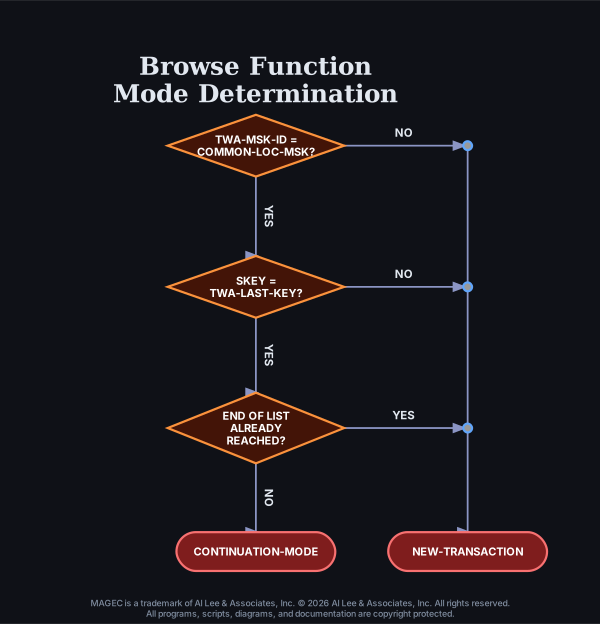

The editing and formatting of screen fields based upon their Edit types is mostly done in MAGEC's Control Program's "automatic edit" routine, prior to its passing control to the MMP. The exception to that is the pattern edits (Edit types "P" and "#"), which are handled within the MMP in the BB500-SCREEN-EDIT paragraph.
The Control Program must make a determination as to whether or not to execute the automatic edit routine based upon the function code and whether this will be a new transaction or a contunuation. Refer to "Appendix A" and "Appendix B" for a discussion of NEW-TRANSACTION-MODE and CONTINUATION-MODE.
Obviously, it would not be necessary to edit and validate screen data for a transaction which is merely an inquiry and will not be updating the files or database. The Control Program looks at the SFUNCT and TWA-LAST-FUNCT fields, and the SKEY and TWA-LAST-KEY fields before passing control to your MMP. If it determines that it is appropriate to edit the screen data, it executes the automatic edit routines which do several things:
It should also be noted that the contents of the type "W" fields will again be filled in after the MMP exits, just before the screen is sent to the operator. This is done so that the MMP can alter the contents of the type "T" field and the description will change accordingly.
Note: Since the determination of whether or not to execute the automatic editing routine is done prior to entering your MMP and is based on the function code (SFUNCT), changing the function code within your MMP's processing will not affect it. Thus, if your MMP was entered with a function code which did not indicate the need for automatic editing, but your program logic has altered it to another function code which does require editing, the editing will not have been done. This means that the numeric values (Sfield-N) will not have been filled in--likewise for all of the other processes described above. If you wish to alter the function code and have the editing done, you should do a FTH-FUNCT using the new function code so as to give the Control Program a chance to see the new function code and act upon it. Refer to "Appendix B" of the Customization section in your MAGEC Tutorials book. Remember too, the contents of TWA-LAST-FUNCT, SKEY, and TWA-LAST-KEY will affect the determination.
Normally only the ADD, CHG, and DUP functions require automatic editing. If you wish to indicate that editing is required for any other function you can do so on the FCD file definition for that function code. Refer to "Figure 3" in the Security section of this Programmer's Reference book.
Function codes ending in "ADD", "CHG", or "DUP" are considered to require automatic editing in their continuation modes regardless what is specified on the FCD definition for them. Any other function codes receive the editing only if you have specified "Y" for THIS FUNCTION WILL INVOKE AUTO EDITING (Y OR N): on their respective FCD definitions.
For purposes of determining whether or not to execute automatic editing for each transaction, the Control Program treats any function code having a "Y" specified (as described above) as if it were a "CHG" function. Refer to the prior appendices in this section for discussion of the determination logic.
Within your MMP updates to the files or database should only occur in CONTINUATION-MODE since no automatic editing will have been done for the NEW-TRANSACTION-MODE transaction. Normally NEW-TRANSACTION-MODE involves only the display of a screen containing data to be updated (or empty fields in which to type new data to be added). If you chose to add customization which does updates to files in NEW-TRANSACTION-MODE you will be responsible for all data validation. Data integrity should always be the paramount consideration!
If you wish to ignore some, or all, of the errors found by the automatic editing routine, you can. The automatic editing routine indicates in which fieds it found errors by setting the SfieldE field (in the Mask copybook) to "E", and by setting the master error flag and adding the appropriate error number to the list of TWA-ERR fields. You can, if you wish, interrogate any or all of these fields to determine if a certain error was found and then unset that error by removing (blanking) the error number from the list, resetting the SfieldE field to space, and/or resetting the master error flag to space. It would be best to do this early in the program logic, as in %PREINIT, if possible since having an error flagged might alter the path of the logic later on. An obvious illustration of this phenomenon is that any coding in the %EDIT2 insertion point will be entirely bypassed if the ERROR-FOUND condition is true. Also, the ERROR-FOUND condition triggers the Control Program to look up the error numbers indicated in the TWA-ERR's and display the associated error messages in SERRMSG before the screen is sent. Of course, the MMP will also bypass the file updates if ERROR-FOUND is true.